


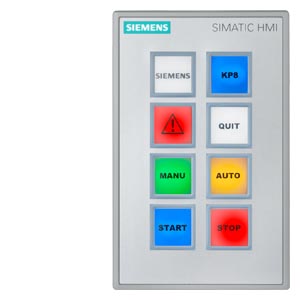
Siemens 6AV3688-3AF37-0AX0 SIMATIC PP17-I
Price range: € 246,00 through € 499,00
The Siemens 6AV3688-3AF37-0AX0 is a push-button panel (PP17-I) belonging to the SIMATIC HMI product family. It is a compact operator panel designed for direct machine-level control and monitoring, providing a rugged interface between the operator and the automation system. This unit is manufactured by Siemens and is intended for use in conjunction with SIMATIC PLCs and automation controllers.
The PP17-I panel features a set of illuminated push buttons and function keys that allow direct control commands to be issued to the connected controller. It communicates via PROFIBUS DP, enabling integration into existing SIMATIC automation networks. The panel is built to industrial standards with a robust housing suitable for panel mounting, and the illuminated keys provide clear visual feedback on the status of assigned functions. The device operates on 24 V DC supply voltage and is designed for reliable operation in industrial environments.
The SIMATIC PP17-I is commonly deployed on machine tools, conveyor systems, packaging machinery, and assembly lines where operators require a dedicated, tactile control interface at the machine front. Its PROFIBUS DP connectivity makes it well suited for integration into larger SIMATIC S7-based control architectures. The panel is particularly valued in applications where direct push-button control is preferred over touchscreen interaction, such as in environments with heavy gloves or high-vibration conditions.
Technical Specifications
| Input Voltage | 24 V DC |
|---|---|
| Communication Interface | PROFIBUS DP |
| Mounting | Panel mounting |
| Operating Temperature | 0 °C to +50 °C |
| Storage Temperature | -20 °C to +70 °C |
| Relative Humidity | 10% to 90% (non-condensing) |
| IP Protection Rating | IP65 (front) |
| Series/Product Family | SIMATIC HMI PP17-I |
| Certifications | CE, UL |
| Display Type | Illuminated push buttons / function keys |
| Bus System Compatibility | PROFIBUS DP |
Common Error Codes & System Events
- Event ID: 70000
- Communication error on PROFIBUS DP interface — loss of connection to the master controller.
Check PROFIBUS cable connections and termination resistors. Verify the DP master is active and the station address is correctly configured on the PP17-I. - Event ID: 70001
- Station address conflict detected on the PROFIBUS DP network.
Ensure each device on the PROFIBUS segment has a unique station address. Reconfigure the PP17-I address using the DIP switches and restart the network. - Event ID: 70010
- Supply voltage out of range — 24 V DC supply is below the minimum threshold.
Measure the supply voltage at the panel connector. Ensure the power supply unit is providing a stable 24 V DC within the specified tolerance range. - Event ID: 70020
- Internal hardware fault detected in the panel.
Cycle power to the panel. If the fault persists, the unit may require repair or replacement of internal components. - Event ID: 70030
- Configuration mismatch — the GSD file configuration does not match the connected PP17-I hardware.
Verify the GSD file used in the PROFIBUS master configuration matches the exact hardware variant of the PP17-I. Re-download the configuration to the master. - Event ID: 70040
- Watchdog timeout — the PROFIBUS master has not communicated with the PP17-I within the watchdog time.
Check the PROFIBUS network for cable faults or excessive bus load. Increase the watchdog timeout in the master configuration if necessary. - Event ID: 70050
- Button or key stuck fault — a push button has been detected as continuously active beyond the expected duration.
Inspect the affected push button for mechanical jamming or contamination. Clean or replace the faulty button element.
Frequently Asked Questions
What communication interface does the 6AV3688-3AF37-0AX0 use?
The 6AV3688-3AF37-0AX0 uses PROFIBUS DP for communication, allowing it to be integrated as a slave device into SIMATIC automation networks.
What is the supply voltage for this panel?
The panel operates on a 24 V DC supply voltage.
Is the 6AV3688-3AF37-0AX0 compatible with SIMATIC S7 PLCs?
Yes, the PP17-I is designed for use with SIMATIC S7 controllers via PROFIBUS DP. It is configured using a GSD file imported into the PROFIBUS master configuration in STEP 7 or TIA Portal.
What is the front-face protection rating of this panel?
The front face of the 6AV3688-3AF37-0AX0 is rated IP65, making it resistant to dust ingress and low-pressure water jets.
Can this panel be used as a standalone HMI without a PLC?
No, the PP17-I is a dependent operator panel that requires a PROFIBUS DP master controller such as a SIMATIC S7 PLC to function. It does not have standalone processing capability.
Troubleshooting
Panel does not power on after installation
Check the 24 V DC supply voltage at the panel power connector using a multimeter. Verify polarity and that the supply is within the specified voltage range.
Ensure the power supply is providing stable 24 V DC. Check and replace any blown fuses in the supply circuit. Verify wiring connections at the panel terminal.
PROFIBUS DP communication not established with the master PLC
Verify the PROFIBUS station address set on the PP17-I DIP switches matches the address configured in the master project. Check cable continuity and bus termination at both ends of the PROFIBUS segment.
Correct any address mismatch by adjusting the DIP switches on the panel. Replace damaged PROFIBUS cable or connectors. Ensure bus termination resistors are enabled only at the two physical ends of the bus.
Illuminated push buttons do not light up
Check the 24 V DC supply to the panel. Verify that the PROFIBUS communication is active and that the PLC program is sending the correct output signals to illuminate the keys.
Restore the supply voltage if absent. Debug the PLC program to confirm the correct output bits are being set. If individual LEDs remain dark with correct signals, the button module may require replacement.
Configuration mismatch error in STEP 7 or TIA Portal
Compare the GSD file version used in the hardware configuration with the actual hardware variant of the PP17-I. Check the order number on the panel label against the configured device.
Import the correct GSD file for the 6AV3688-3AF37-0AX0 variant from the Siemens support portal. Recompile and download the hardware configuration to the PLC.
Push button inputs not recognized by the PLC
Monitor the PROFIBUS input data in the PLC diagnostic buffer or online monitoring tool. Check whether the input bytes assigned to the PP17-I are updating when buttons are pressed.
Verify the I/O address assignment in the hardware configuration matches the addresses used in the PLC program. If addresses are correct but data is not updating, check the PROFIBUS connection and cable integrity.
| Condition | Repair, Used, Refurbished, New in box (sealed) |
|---|
Related products
-
Siemens 6AV6642-0BC01-1AX0 TP177B
Price range: € 630,00 through € 1.421,00 -
Siemens 6AV6640-0CA11-0AX0 OP 73micro
Price range: € 368,00 through € 1.055,00 -
Siemens 6AG1545-0CC10-4AX0 SIPLUS HMI TP900
€ 1.340,00


