


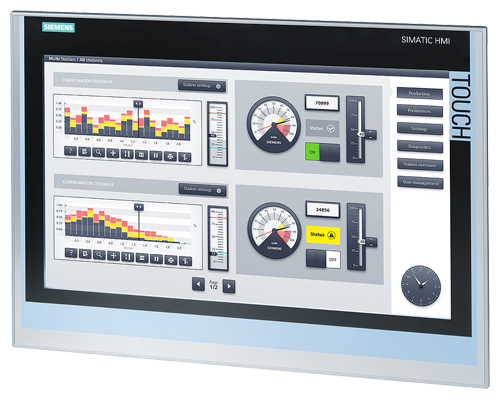
Siemens 6AV2124-0UC02-0AX0 SIMATIC HMI TP1200 Comfort
Price range: € 1.380,00 through € 6.200,00
The Siemens 6AV2124-0UC02-0AX0 is a 12-inch widescreen Touch Panel belonging to the SIMATIC HMI Comfort Panel series, designed for high-performance human-machine interface applications in industrial automation environments. This panel operates within the SIMATIC HMI Comfort family, which represents Siemens' premium tier of operator panels offering advanced visualization, scripting, and communication capabilities. The unit provides a high-resolution TFT display with multi-touch functionality, enabling intuitive operator interaction with complex process visualizations.
The TP1200 Comfort features a 12.1-inch widescreen TFT display with a resolution of 1280 x 800 pixels and 16 million colors, delivering clear and detailed process graphics. It supports a wide range of communication interfaces including PROFINET, PROFIBUS, Ethernet, USB, and serial interfaces, allowing integration into diverse automation architectures. The panel includes 12 MB user memory for project data, supports scripting in VBScript, and offers an SD card slot for extended storage. It operates on a 24 V DC supply and carries an IP65 protection rating on the front face, making it suitable for panel-mount installations in industrial enclosures.
The TP1200 Comfort is widely deployed in manufacturing automation, process industries, energy management, water and wastewater treatment, and machine tool applications. Its compatibility with SIMATIC S7 PLCs via PROFINET and PROFIBUS makes it a natural fit for Siemens-based control architectures, while its multi-protocol support allows use in mixed-vendor environments. The robust construction and wide operating temperature range make it suitable for demanding industrial settings including automotive assembly lines, packaging machinery, and chemical processing plants.
Technical Specifications
| Display Size | 12.1 inch widescreen |
|---|---|
| Display Resolution | 1280 x 800 pixels |
| Display Type | TFT LCD |
| Display Colors | 16,777,216 (16 million) |
| Touch Technology | Resistive multi-touch |
| Input/Operating Voltage | 24 V DC (19.2 V to 28.8 V) |
| Power Consumption | Approx. 25 W typical |
| Communication Interface | 2x PROFINET/Ethernet (RJ45), 1x PROFIBUS DP (RS 422/485), 2x USB 2.0, 1x SD card slot |
| User Memory | 12 MB |
| Operating Temperature | 0 °C to +50 °C |
| Storage Temperature | -20 °C to +60 °C |
| Relative Humidity | 10% to 90% (non-condensing) |
| IP/Protection Rating | IP65 (front), IP20 (rear) |
| Dimensions (W x H x D) | Approx. 340 x 240 x 46 mm |
| Panel Cutout | Approx. 318 x 218 mm |
| Mounting | Panel mounting (portrait and landscape) |
| Certifications | CE, UL, cULus, ATEX Zone 2 |
| Series/Product Family | SIMATIC HMI Comfort Panel |
Common Error Codes & System Events
- Event ID 10000
- Connection to the PLC or controller has been interrupted or cannot be established.
Check PROFINET or PROFIBUS cabling and connector integrity. Verify PLC is powered and running. Confirm IP address or PROFIBUS address settings match the project configuration. - Event ID 10001
- Communication timeout: the HMI panel did not receive a response from the configured controller within the expected time window.
Check network load and cable quality. Verify controller scan cycle time and HMI polling cycle settings. Reduce tag update rates if network is overloaded. - Event ID 20000
- Project download error: the project file could not be transferred to the panel or was rejected due to version incompatibility.
Ensure the WinCC (TIA Portal) project version matches the firmware version on the panel. Update panel firmware if necessary and retry the download. - Event ID 40000
- System memory low: available user memory on the panel is critically low, which may affect runtime performance.
Reduce project size by optimizing graphics, removing unused tags, or compressing images. Consider archiving historical data to an external SD card. - Event ID 50000
- Backup or restore operation failed during project or recipe data transfer.
Check the SD card for errors or replace it. Ensure the SD card is properly seated and formatted correctly. Retry the backup or restore operation. - Event ID 70000
- Firmware update failed or was interrupted, leaving the panel in an inconsistent state.
Re-initiate the firmware update using ProSave or TIA Portal. Ensure stable power supply during the update process. Do not disconnect power or USB during firmware flashing. - Event ID 30000
- Tag or variable access error: a configured tag could not be read or written, typically due to an address mismatch.
Verify tag addresses in the HMI project match the actual PLC data block or memory addresses. Recompile and download the project after correcting address assignments.
Frequently Asked Questions
What communication protocols does the 6AV2124-0UC02-0AX0 support?
The TP1200 Comfort supports PROFINET, PROFIBUS DP, Ethernet/IP, Modbus TCP, Modbus RTU, and several other protocols via its integrated interfaces. It has two RJ45 PROFINET ports and one PROFIBUS DP port as standard.
What TIA Portal version is required to program this panel?
The 6AV2124-0UC02-0AX0 requires Siemens TIA Portal with the WinCC Comfort/Advanced option package. TIA Portal V13 SP1 or later is generally required, with later versions recommended for full feature support.
What is the supply voltage for this HMI panel?
The panel operates on 24 V DC with an acceptable input range of 19.2 V to 28.8 V. A stable, regulated 24 V DC power supply is required for reliable operation.
Can this panel be used in a landscape and portrait orientation?
Yes, the TP1200 Comfort supports both landscape and portrait mounting orientations. The display orientation must be configured correctly in the TIA Portal project settings before downloading.
What is the front panel protection rating of the 6AV2124-0UC02-0AX0?
The front face of the panel is rated IP65, providing protection against dust ingress and low-pressure water jets. The rear of the unit is rated IP20 and must be housed within a suitable enclosure.
Troubleshooting
Display remains blank after power is applied
Measure 24 V DC at the power supply connector on the rear of the panel. Check for correct polarity. Observe whether the status LED on the panel illuminates.
If voltage is correct but display remains off, perform a hard reset by holding the reset button. If the panel still does not boot, the internal power board or backlight inverter may be faulty and require replacement.
Touch input is unresponsive or inaccurate
Test touch response across the full screen surface in the panel's built-in touch calibration mode, accessible via the Start Center. Check for physical damage or contamination on the touch surface.
Perform a touch screen recalibration via the panel's Start Center settings. If calibration does not resolve the issue, the touch overlay or digitizer assembly may need to be replaced.
Panel repeatedly loses connection to the PLC during operation
Check the PROFINET or PROFIBUS cable for damage, loose connectors, or excessive length. Use a network diagnostic tool to check for packet loss or high cycle times on the network.
Replace damaged cables and ensure connectors are properly crimped and seated. Verify that IP addresses are static and correctly assigned. Reduce HMI tag update cycles to lower network load if intermittent dropouts persist.
Panel boots to Start Center and will not load the runtime project
Check whether a valid project is stored on the panel by navigating to the Transfer settings in the Start Center. Verify that the project was successfully downloaded and that no download errors were reported.
Re-download the project from TIA Portal using a direct Ethernet or USB connection. Ensure the firmware version on the panel is compatible with the project version. Reset the panel to factory defaults if the project storage appears corrupted.
SD card is not recognized by the panel
Remove and reinsert the SD card to ensure proper seating. Check the SD card in a PC to verify it is not corrupted or write-protected.
Format the SD card to FAT32 using a PC and reinsert it. If the panel still does not recognize the card, test with a known-good SD card. Ensure the card capacity does not exceed the panel's supported maximum.
| Condition | Repair, Used, Refurbished, New in box (sealed) |
|---|
Related products
-
Siemens 6AG1642-0BA01-4AX1 TP177B
€ 1.040,00 -
Siemens 6AV3627-1QK00-0AX0 OP27
Price range: € 649,00 through € 869,00


