


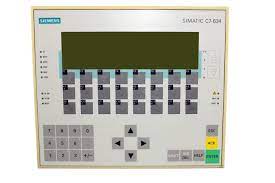
Siemens 6ES7634-1DF02-0AE3 SIMATIC C7-634
Price range: € 1.832,00 through € 2.999,00
The Siemens SIMATIC C7-634, part number 6ES7634-1DF02-0AE3, is a compact combined controller and operator panel unit belonging to the SIMATIC C7 product family. It integrates a programmable logic controller (PLC) based on the S7-300 CPU architecture with an operator panel (OP) into a single housing, eliminating the need for separate HMI and controller hardware. This integration reduces panel space requirements and simplifies wiring in machine-level automation applications.
The C7-634 features a built-in STN monochrome display with touch or key-based operation and supports PROFIBUS-DP for communication with distributed I/O and other automation components. It includes onboard digital and analog I/O, MPI (Multi-Point Interface) for programming and HMI connectivity, and supports STEP 7 for PLC programming alongside ProTool for HMI configuration. The unit operates on 24 V DC supply and is designed for panel mounting with a robust industrial-grade enclosure rated to IP65 on the front face.
The SIMATIC C7-634 is widely used in machine automation, packaging machinery, printing equipment, and small to medium-scale production lines where a compact all-in-one solution is preferred. Its combined PLC and HMI functionality makes it suitable for OEMs seeking to reduce hardware complexity and cabinet footprint. The unit is particularly common in applications requiring local operator control with integrated process logic execution.
Technical Specifications
| Series/Product Family | SIMATIC C7 |
|---|---|
| Display Type | STN monochrome LCD |
| Display Size | 5.7 inch |
| Input/Operating Voltage | 24 V DC |
| Communication Interface | MPI, PROFIBUS-DP |
| Onboard Digital Inputs | 16 |
| Onboard Digital Outputs | 16 |
| Onboard Analog Inputs | 4 |
| Onboard Analog Outputs | 2 |
| Programming Software | STEP 7 / ProTool |
| IP Rating (Front) | IP65 |
| IP Rating (Rear) | IP20 |
| Operating Temperature | 0 °C to +55 °C |
| Storage Temperature | -20 °C to +70 °C |
| Mounting | Panel mounting |
| Certifications | CE, UL |
Common Error Codes & System Events
- Event ID: 10000
- Loss of communication between the HMI and the PLC CPU internal interface
Check MPI configuration parameters, verify cable connections between HMI and CPU sections, and restart the device. Confirm matching MPI addresses. - Event ID: 40000
- Project download error — configuration data could not be transferred to the device
Verify the ProTool project is compiled without errors, check the MPI/PC adapter connection, and ensure the device is in transfer mode before initiating download. - Event ID: 70010
- Tag read error — the HMI cannot read a configured PLC variable
Verify the PLC address referenced in the HMI project exists and is correctly mapped. Check that the PLC program is running and the data block or memory area is accessible. - Event ID: 70011
- Tag write error — the HMI cannot write a value to a configured PLC variable
Check that the target PLC address is not write-protected and that the data type in the HMI project matches the PLC variable definition. - Event ID: 20000
- Operating system error or internal watchdog timeout detected
Perform a complete power cycle. If the fault persists, check for firmware compatibility issues and consider reloading the operating system via the appropriate Siemens service tool. - Event ID: 50000
- Recipe data error — recipe record could not be read from or written to memory
Check available memory on the device, verify recipe configuration in ProTool, and ensure the recipe data area in the PLC is correctly defined and accessible. - Event ID: 60000
- Printer communication error — configured printer is not responding
Verify printer interface settings, check cable connections, and confirm the printer is powered on and configured to match the C7 output settings.
Frequently Asked Questions
Is the SIMATIC C7-634 compatible with STEP 7 for PLC programming?
Yes, the C7-634 PLC section is programmed using Siemens STEP 7 software, while the HMI section is configured using ProTool. Both tools are required for full commissioning of the device.
What communication interfaces are available on the 6ES7634-1DF02-0AE3?
The unit provides MPI (Multi-Point Interface) for programming and inter-device communication, as well as PROFIBUS-DP for connecting distributed I/O modules and field devices.
Can the C7-634 be used as a standalone controller without an external HMI?
Yes, the integrated PLC can execute a STEP 7 program independently. The built-in operator panel provides local visualization and control without requiring an external HMI device.
What is the front panel protection rating of the C7-634?
The front panel of the C7-634 is rated IP65, making it suitable for panel-mount installations in environments where dust and water spray may be present.
What onboard I/O does the 6ES7634-1DF02-0AE3 provide?
The unit includes 16 digital inputs, 16 digital outputs, 4 analog inputs, and 2 analog outputs onboard, reducing the need for additional I/O expansion modules in smaller applications.
Troubleshooting
Display remains blank after power on
Measure the 24 V DC supply voltage at the power connector. Check that the supply is within the specified tolerance. Inspect the internal fuse if accessible.
Restore the 24 V DC supply to within specification. If the supply is correct and the display remains blank, the internal power supply or display backlight may have failed and the unit should be sent for repair or replacement.
HMI project cannot be downloaded to the device
Verify the device is set to transfer mode. Check the MPI or PC adapter cable connection and confirm the correct COM port and transfer rate are selected in ProTool.
Set the C7 to transfer mode via the start menu, use a compatible PC-MPI adapter, and ensure the baud rate in ProTool matches the device MPI settings. Re-attempt the download.
PLC program stops executing and CPU goes to STOP mode
Connect STEP 7 online to the CPU and read the diagnostic buffer. Identify the fault event that caused the transition to STOP mode, such as a programming error, I/O access fault, or watchdog timeout.
Resolve the identified fault in the STEP 7 program or hardware configuration. Clear the diagnostic buffer, correct the fault cause, and switch the CPU back to RUN mode via STEP 7 or the mode selector.
PROFIBUS-DP communication faults with connected I/O modules
Check the PROFIBUS cable termination resistors at both ends of the network segment. Verify station addresses and baud rate settings match across all devices on the bus.
Correct any termination or addressing issues. Replace damaged PROFIBUS cables or connectors. Confirm the hardware configuration in STEP 7 matches the physical network topology and re-download the configuration.
Touchscreen or keypad inputs are not responding correctly
Check for physical damage to the front panel. Verify the HMI project is correctly loaded and that the configured input elements correspond to the correct screen objects.
Recalibrate the touch panel if the option is available in the device menu. If keys are unresponsive due to mechanical wear, the front panel membrane or keypad assembly may require replacement.
| Condition | Repair, Used, Refurbished, New in box (sealed) |
|---|
Related products
-
Siemens 6AV6545-8CC10-0AA0 Mobile Panel 177
€ 1.247,00 -
Siemens 6AG1642-0BD01-4AX0 TP177B
€ 555,00 -
Siemens 6AG1643-0AA01-4AX0 MP 277
€ 1.278,00


