


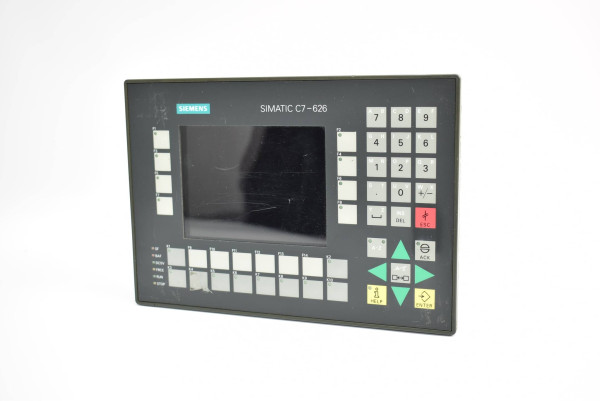
Siemens 6ES7626-2AG01-0AE3 SIMATIC C7-626
€ 1.770,00
The Siemens SIMATIC C7-626, part number 6ES7626-2AG01-0AE3, is a compact combined controller and operator panel unit belonging to the SIMATIC C7 product family. It integrates an S7-300 series PLC with an HMI operator panel into a single housing, eliminating the need for separate controller and display units. This all-in-one design is intended for machine-level automation where space and wiring complexity must be minimized.
The C7-626 features a built-in STN monochrome display with touch or membrane keypad operation, and incorporates an integrated S7-315 compatible CPU with onboard I/O. It supports MPI (Multi-Point Interface) communication for connection to SIMATIC networks, programming via STEP 7, and HMI configuration via ProTool. The unit includes integrated digital inputs and outputs, onboard RAM and load memory, and supports expansion via standard S7-300 I/O modules through a local bus interface.
The SIMATIC C7-626 is widely used in machine automation applications such as packaging machinery, printing equipment, textile machines, and general-purpose industrial machinery where a compact, integrated controller-display solution is required. Its ability to combine PLC logic and operator interface in one unit reduces panel space requirements and simplifies system architecture, making it well suited for OEM machine builders and system integrators working in space-constrained environments.
Technical Specifications
| Series/Product Family | SIMATIC C7 |
|---|---|
| Display Type | STN monochrome LCD |
| Display Size | 5.7 inch |
| Input/Operating Voltage | 24 V DC |
| Communication Interface | MPI (Multi-Point Interface) |
| Integrated CPU | S7-315 compatible |
| Onboard Digital Inputs | 16 |
| Onboard Digital Outputs | 16 |
| Programming Software | STEP 7 / ProTool |
| Operating Temperature | 0 °C to +55 °C |
| Storage Temperature | -20 °C to +70 °C |
| Relative Humidity | 10 % to 95 % (non-condensing) |
| IP/Protection Rating | IP65 (front panel) |
| Mounting | Panel mounting |
| Certifications | CE, UL |
Common Error Codes & System Events
- Event ID: 10000
- General system fault detected in the integrated CPU module
Perform a complete power cycle. Check STEP 7 diagnostics buffer for detailed fault information and verify program integrity. - Event ID: 10001
- MPI communication error — loss of connection to MPI network or programming device
Check MPI cable connections and terminating resistors. Verify MPI address settings and network configuration in STEP 7 hardware configuration. - Event ID: 10002
- I/O access error — the CPU cannot access configured I/O modules
Check physical connections to I/O modules on the local bus. Verify hardware configuration matches installed modules in STEP 7. - Event ID: 10003
- Battery/memory backup failure — onboard backup battery is low or missing
Replace the onboard lithium backup battery. After replacement, reload the user program and data blocks from a programming device. - Event ID: 10004
- STOP mode entered due to programming error or watchdog timeout
Connect STEP 7 programming device, read the diagnostics buffer, correct the identified program error, and restart the CPU. - Event ID: 10005
- HMI configuration mismatch — ProTool project does not match the connected hardware
Re-download the correct ProTool HMI project to the C7 unit and ensure the hardware configuration is consistent with the loaded project. - Event ID: 10006
- Overtemperature warning — internal temperature has exceeded the permissible operating range
Check ambient temperature and ensure adequate ventilation around the unit. Clean any blocked ventilation slots and verify installation clearances.
Frequently Asked Questions
What programming software is required for the SIMATIC C7-626?
The C7-626 requires Siemens STEP 7 for PLC programming and ProTool for HMI configuration. Both software packages must be installed on the programming device.
What communication interface does the C7-626 use for programming and networking?
The C7-626 uses MPI (Multi-Point Interface) as its primary communication interface for programming and connection to SIMATIC networks such as S7-300 and S7-400 systems.
Can the C7-626 be expanded with additional I/O modules?
Yes, the C7-626 supports expansion with standard SIMATIC S7-300 signal modules connected via the integrated local bus interface on the rear of the unit.
What is the supply voltage for the C7-626?
The C7-626 operates on a 24 V DC supply voltage, which must be provided externally via the power supply connector.
Is the front panel of the C7-626 rated for wash-down or dusty environments?
The front panel of the C7-626 carries an IP65 protection rating, making it suitable for environments with dust and water spray, though the rear of the unit is not sealed to the same degree.
Troubleshooting
Display remains blank after power on
Check that 24 V DC supply is present at the power connector. Measure voltage at the input terminals and verify the power supply unit is functioning correctly.
Restore correct 24 V DC supply. If voltage is present but display remains blank, inspect internal fuse and consider replacing the internal power supply board or the complete unit.
CPU remains in STOP mode and cannot be switched to RUN
Connect a STEP 7 programming device via MPI and read the diagnostics buffer to identify the specific fault causing the STOP condition.
Correct the identified program error or hardware configuration mismatch in STEP 7, perform a memory reset (MRES) if necessary, reload the user program, and restart the CPU.
MPI communication cannot be established with programming device
Verify MPI cable integrity and check that the MPI address of the C7-626 is correctly set and does not conflict with other devices on the network. Check bus termination at both ends.
Correct MPI address settings, replace faulty MPI cable, ensure proper bus termination resistors are installed at both ends of the MPI segment, and retry connection in STEP 7.
HMI screens display incorrectly or show configuration errors after power on
Check whether the ProTool project loaded on the device matches the current hardware configuration. A mismatch between project version and hardware is a common cause.
Re-download the correct and up-to-date ProTool HMI project to the C7-626 via the MPI interface using the ProTool transfer function, then restart the unit.
Onboard digital inputs or outputs not responding correctly
Verify 24 V DC supply to the I/O section. Check wiring at the I/O terminals and confirm the STEP 7 hardware configuration correctly maps the onboard I/O addresses.
Correct wiring faults at the I/O terminals, update the STEP 7 hardware configuration to correctly reflect the onboard I/O addressing, and reload the configuration to the CPU.
| Condition | Repair, Used, Refurbished, New in box (sealed) |
|---|
Related products
-
Siemens 6AV6545-0AA15-2AX0 TP 270
Price range: € 399,00 through € 1.149,00 -
Siemens 6AV3627-1NK00-2AX0 SIMATIC OP 27
Price range: € 749,00 through € 964,00


