


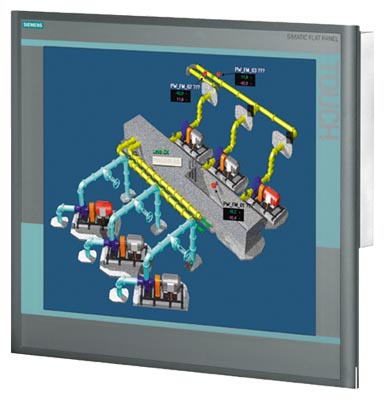
Siemens 6AV7861-3TB00-1AA0 SIMATIC IFP1900
Price range: € 599,00 through € 911,00
The Siemens 6AV7861-3TB00-1AA0 is a 19-inch Industrial Flat Panel (IFP) monitor belonging to the SIMATIC IFP1900 series, manufactured by Siemens AG. It is a high-performance industrial monitor designed for use in demanding production environments where reliable visualization is required. This unit functions as a standalone display device that can be connected to standard PC-based control systems or SIMATIC Panel PCs.
The 6AV7861-3TB00-1AA0 features a 19-inch TFT LCD display with a resolution of 1280 x 1024 pixels (SXGA) and a wide color depth supporting 16.7 million colors. The panel supports resistive touch input, enabling operator interaction directly on the screen surface. It connects to host systems via a standard DVI or VGA video interface and is powered by a 24 V DC supply. The enclosure provides IP65 protection on the front face, making it resistant to dust and water ingress, and the unit is built to withstand the vibration and temperature variations typical of industrial settings.
The SIMATIC IFP1900 is commonly deployed in machine tool control stations, automotive assembly lines, process control rooms, and packaging machinery where a robust, panel-mounted display is required. Its wide operating temperature range and IP65 front protection make it suitable for use in harsh factory floor environments. The monitor is frequently paired with SIMATIC Panel PCs or standard industrial computers running WinCC or other SCADA visualization software.
Technical Specifications
| Display Size | 19 inch |
|---|---|
| Display Resolution | 1280 x 1024 pixels (SXGA) |
| Display Colors | 16.7 million |
| Display Type | TFT LCD |
| Touch Technology | Resistive |
| Input/Operating Voltage | 24 V DC |
| IP/Protection Rating | IP65 (front), IP20 (rear) |
| Operating Temperature | 0 °C to +50 °C |
| Storage Temperature | -20 °C to +60 °C |
| Relative Humidity | 5% to 90% (non-condensing) |
| Communication Interface | DVI-D, USB |
| Mounting | Panel mounting |
| Certifications | CE, UL, cULus |
| Series/Product Family | SIMATIC IFP1900 |
Common Error Codes and Diagnostic Indicators
- No Signal
- The monitor is powered on but receives no video signal from the connected host system.
Check DVI or VGA cable connection between the monitor and the host PC. Verify the host system is powered on and outputting a video signal at the correct resolution. - Out of Range
- The incoming video signal resolution or refresh rate exceeds the monitor's supported specifications.
Adjust the host system display settings to 1280 x 1024 at 60 Hz. Ensure the graphics driver outputs a compatible signal. - Backlight Failure
- The display panel backlight has failed or degraded, resulting in a dark or very dim screen.
Check the 24 V DC supply voltage at the power connector. If supply is correct, the backlight inverter or backlight lamp may require replacement by a qualified technician. - Touch Not Responding
- The resistive touch screen does not register input or registers incorrect touch positions.
Recalibrate the touch screen using the calibration utility in the connected operating system. Check USB cable connection between panel and host. Clean the touch surface and check for physical damage. - Power LED Off
- The monitor shows no signs of power; the status LED remains off.
Verify 24 V DC supply is present and within tolerance at the power input connector. Check wiring and fuse in the supply circuit. - Image Distortion
- The displayed image shows geometric distortion, flickering, or color anomalies.
Check video cable integrity and replace if damaged. Verify the host graphics card output settings match the native resolution. Test with a known-good cable and host system. - USB Device Not Recognized
- The USB interface of the monitor is not recognized by the connected host system.
Check USB cable connection. Try a different USB port on the host. Verify that appropriate USB drivers are installed on the host operating system.
Frequently Asked Questions
What is the native resolution of the 6AV7861-3TB00-1AA0?
The native resolution is 1280 x 1024 pixels (SXGA) at a 19-inch screen size. Operating the monitor at its native resolution is recommended for optimal image clarity.
What supply voltage does this monitor require?
The 6AV7861-3TB00-1AA0 requires a 24 V DC power supply. Ensure the supply is within the specified tolerance range before connecting.
Is this monitor compatible with SIMATIC Panel PCs?
Yes, the SIMATIC IFP1900 is designed to integrate with SIMATIC Panel PCs and standard industrial computers. It connects via DVI-D interface and USB for touch functionality.
What is the front panel protection rating?
The front face of the monitor carries an IP65 protection rating, providing full dust protection and resistance to water jets. The rear of the unit is rated IP20.
Can this monitor be used with third-party PC systems running WinCC?
Yes, the monitor functions as a standard display device and is compatible with any host system capable of outputting a DVI signal at the supported resolution. WinCC and other SCADA software run on the connected host, not on the monitor itself.
Troubleshooting
Screen remains completely dark after power is applied
Check that 24 V DC is present at the power input connector using a multimeter. Verify the power LED status. Determine whether the backlight is off or whether there is no image at all.
If no supply voltage is present, check the external power supply and wiring. If supply is correct but screen remains dark, the internal power board or backlight may have failed and the unit should be sent for repair or the backlight assembly replaced.
Touch input is inaccurate or offset from the actual touch position
This typically indicates the touch screen calibration has drifted, which can occur after a system change or OS reinstallation. Verify the USB connection between the monitor and host is secure.
Run the touch screen calibration utility provided by the operating system or Siemens software. Ensure the USB cable is firmly connected. If the problem persists after calibration, inspect the touch overlay for physical damage.
Monitor displays 'Out of Range' or shows a distorted image
The host system is outputting a video signal with a resolution or refresh rate not supported by the monitor. Check the current display settings on the host PC.
Set the host system display output to 1280 x 1024 at 60 Hz via the operating system display settings. Update the graphics driver if necessary to ensure correct resolution options are available.
Intermittent loss of image or flickering display
Inspect the DVI cable for damage, loose connectors, or excessive cable length. Check that the 24 V DC supply voltage is stable and within tolerance under load.
Replace the DVI cable with a known-good, shielded cable of appropriate length. Verify supply voltage stability with a multimeter. Secure all connectors at both the monitor and host ends.
Monitor powers on but no touch response is detected by the host system
The USB connection used for touch data transmission may be disconnected or the driver may not be installed. Check Device Manager on the host for any unrecognized USB devices.
Reconnect the USB cable between the monitor and host. Install or reinstall the touch screen driver if required. Test with a different USB port on the host system to rule out a faulty port.
| Condition | Repair, Used, Refurbished, New in box (sealed) |
|---|
Related products
-
Siemens 6AV6642-8BA12-0AB0 TP177B
€ 879,00 -
Siemens 6AV6642-0BC01-1AX0 TP177B
Price range: € 630,00 through € 1.421,00 -
Siemens 6AV3607-1NH00-0AX0 OP7
€ 615,00


