


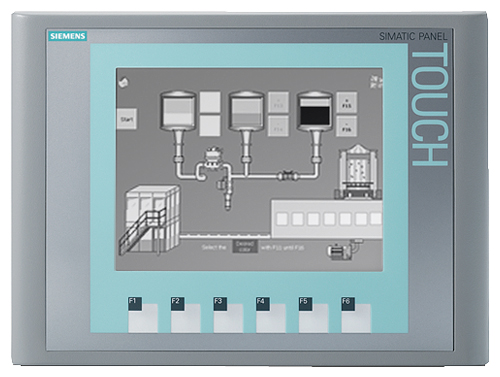
Siemens 6AV6647-0AB11-3AX0 KTP400 Basic
Price range: € 311,00 through € 1.169,00
The Siemens KTP400 Basic (part number 6AV6647-0AB11-3AX0) is a compact key and touch panel belonging to the SIMATIC HMI Basic Panel series. It features a 4-inch widescreen TFT display and is designed for straightforward machine-level visualization tasks. As part of the Basic Panel generation, it is engineered for integration with Siemens SIMATIC S7 controllers and is configured exclusively using WinCC Basic within the TIA Portal engineering framework.
The KTP400 Basic offers a 4-inch TFT display with a resolution of 480 x 272 pixels and 64,000 color depth, providing clear process visualization. It combines touch operation with four dedicated function keys, allowing flexible operator interaction. The panel communicates via a PROFINET interface and supports MPI/PROFIBUS DP through an RS-422/RS-485 port, enabling connectivity to a range of Siemens PLCs. It operates on a 24 V DC supply and includes 10 MB of user memory for project data storage.
The KTP400 Basic is widely deployed in small to medium-scale machine automation applications across industries such as packaging, material handling, food and beverage, and general manufacturing. Its compact form factor and panel-mount design make it suitable for integration into control cabinets and machine front panels where space is limited. The combination of touch and key operation provides reliable usability in environments where gloved operation or tactile feedback is required.
Technical Specifications
| Display Size | 4 inch |
|---|---|
| Display Resolution | 480 x 272 pixels |
| Display Colors | 64,000 (16-bit) |
| Display Type | TFT widescreen |
| Touch Technology | Resistive touch screen |
| Function Keys | 4 |
| Input/Operating Voltage | 24 V DC |
| Power Consumption | 4.5 W (typical) |
| Communication Interface | PROFINET (RJ45), RS-422/RS-485 (MPI/PROFIBUS DP) |
| User Memory | 10 MB |
| Operating Temperature | 0 °C to +50 °C |
| Storage Temperature | -20 °C to +60 °C |
| Relative Humidity | 10% to 90% (non-condensing) |
| IP Rating (Front) | IP65 |
| IP Rating (Rear) | IP20 |
| Mounting | Panel mount |
| Certifications | CE, UL, cULus |
| Engineering Software | WinCC Basic (TIA Portal) |
Common Error Codes and System Events
- Event ID: 10000
- Configuration error detected during startup; the loaded project is incompatible or corrupt.
Reload the project via TIA Portal and ensure the WinCC Basic version matches the panel firmware version. - Event ID: 20000
- Communication connection to the PLC has been lost or cannot be established.
Check PROFINET cable connections, verify IP address configuration on both the panel and PLC, and confirm the PLC is in RUN mode. - Event ID: 40000
- Tag address error; a configured tag references an address that does not exist in the connected controller.
Review tag definitions in WinCC Basic and verify that all PLC addresses referenced in the project are valid and accessible. - Event ID: 50000
- Operator panel memory overflow; available user memory has been exceeded.
Reduce the project size by removing unused screens, images, or data logs, then reload the project to the panel. - Event ID: 70000
- Firmware update error; firmware transfer to the panel was interrupted or failed.
Restart the firmware update procedure using the Siemens ProSave tool or TIA Portal, ensuring a stable connection throughout the transfer. - Event ID: 110000
- Recipe data error; recipe records cannot be read or written correctly.
Check recipe configuration in the project, verify available memory, and ensure the recipe data format matches the panel firmware version. - Event ID: 130000
- System time synchronization error; the panel cannot synchronize its clock with the configured time source.
Verify the time synchronization settings in the project configuration and ensure the PLC or network time source is reachable.
Frequently Asked Questions
Which engineering software is required to configure the KTP400 Basic 6AV6647-0AB11-3AX0?
The KTP400 Basic must be configured using WinCC Basic, which is included with the TIA Portal engineering framework. It is not compatible with WinCC flexible or older STEP 7 tools.
What communication interfaces are available on this panel?
The panel provides one PROFINET port (RJ45) for Ethernet-based communication and one RS-422/RS-485 port supporting MPI and PROFIBUS DP protocols for connection to Siemens S7 controllers.
Is the KTP400 Basic compatible with third-party PLCs?
The KTP400 Basic is primarily designed for use with Siemens SIMATIC S7 controllers. Limited connectivity to third-party controllers may be possible via the RS-485 interface, but driver support is restricted compared to higher-tier Siemens HMI panels.
What is the front panel protection rating of the KTP400 Basic?
The front panel carries an IP65 protection rating, making it resistant to dust ingress and low-pressure water jets, suitable for typical industrial machine front panel installations.
Can the KTP400 Basic operate both as a touch panel and with physical keys?
Yes, the KTP400 Basic supports both resistive touch screen input and four dedicated physical function keys, allowing flexible operator interaction including gloved-hand operation via the function keys.
Troubleshooting
Display remains blank after power is applied
Measure the 24 V DC supply voltage at the panel's power connector. Verify polarity and that the supply is within the specified tolerance range of 19.2 V DC to 28.8 V DC.
Correct any wiring errors or supply voltage issues. If the supply is confirmed good and the display remains blank, the internal power supply or backlight may be faulty and the unit should be sent for repair or replacement.
Panel displays 'No connection to PLC' or communication errors persist
Check the PROFINET cable and RJ45 connector for physical damage. Verify the IP address assigned to the panel matches the configuration in TIA Portal and that the PLC is powered and in RUN mode.
Replace damaged cables or connectors, correct IP address mismatches in the project configuration, and reload the project to the panel. Ensure no IP address conflicts exist on the network.
Touchscreen does not respond or responds inaccurately to touch input
Inspect the screen surface for contamination, damage, or excessive pressure points. Attempt a touchscreen calibration from the panel's Start Center menu if accessible.
Clean the screen surface with a soft, dry cloth. Perform a touchscreen recalibration via the operating system settings. If the issue persists after calibration, the touch foil may be damaged and the panel requires hardware repair.
Project transfer from TIA Portal fails or times out
Verify the Ethernet connection between the engineering PC and the panel. Confirm the panel is in transfer mode (accessible via the Start Center) and that no firewall or antivirus software is blocking the TIA Portal communication.
Switch the panel to transfer mode manually via the Start Center, disable interfering firewall rules on the PC, and retry the project download. Ensure the TIA Portal version is compatible with the panel firmware version.
Panel firmware update fails and panel does not restart correctly
Check whether the firmware update was interrupted due to a power loss or communication failure. The panel may enter a recovery or loader mode indicated by a specific startup screen.
Use the Siemens ProSave tool to perform a firmware restoration via the RS-485 or Ethernet interface. Follow the recovery procedure documented in the panel's operating instructions to restore normal operation.
| Condition | Repair, Used, Refurbished, New in box (sealed) |
|---|
Related products
-
Siemens 6AG1642-0BA01-4AX1 TP177B
€ 1.040,00 -
Siemens 6AG1545-0CC10-4AX0 SIPLUS HMI TP900
€ 1.340,00


