


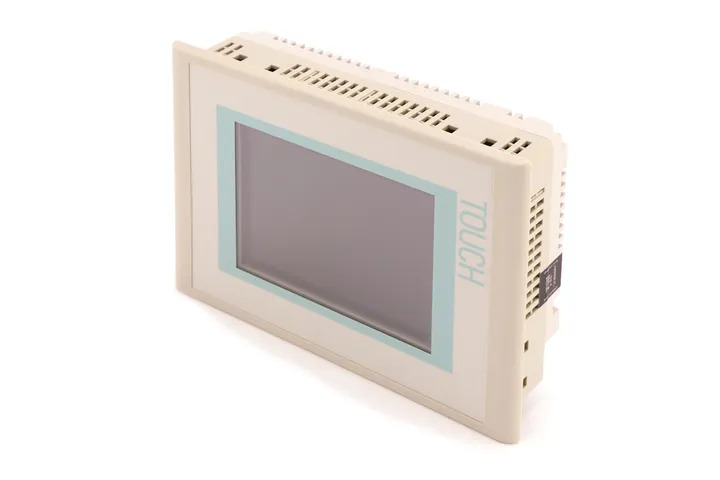
Siemens 6AV6642-0BA01-1AX0 TP177B
Price range: € 720,00 through € 950,00
The Siemens 6AV6642-0BA01-1AX0 is a TP177B 6" touch panel HMI belonging to the SIMATIC HMI 177 series, manufactured by Siemens. It is a compact operator panel designed for machine-level visualization and control tasks, featuring a 5.7-inch STN color display with touch operation. This unit is part of the WinCC flexible-based panel family and is widely deployed in mid-range automation applications.
The TP177B 6AV6642-0BA01-1AX0 features a 5.7-inch STN color display with a resolution of 320 x 240 pixels (QVGA) and supports up to 256 colors. It is equipped with a resistive touch screen for operator input and includes a MPI/PROFIBUS DP interface as well as a RS-422/RS-485 serial interface for PLC connectivity. The panel operates on 24 V DC supply voltage and provides 512 KB of user memory for project data. Configuration is performed using Siemens WinCC flexible 2008 or later software, and the unit supports recipe management, alarm logging, and trend display functions.
The TP177B is commonly used in machine building, packaging machinery, conveyor systems, and general factory automation where a compact yet capable HMI is required. Its compatibility with the SIMATIC S7-200, S7-300, and S7-400 PLC families makes it a versatile choice for a broad range of control architectures. The panel's compact form factor and panel-mount design make it suitable for integration into standard control cabinet doors and operator stations.
Technical Specifications
| Display Size | 5.7 inch |
|---|---|
| Display Type | STN color |
| Display Resolution | 320 x 240 pixels (QVGA) |
| Display Colors | 256 colors |
| Touch Technology | Resistive touchscreen |
| Input/Operating Voltage | 24 V DC |
| Communication Interface | MPI/PROFIBUS DP, RS-422/RS-485 |
| User Memory | 512 KB |
| Operating Temperature | 0 °C to +50 °C |
| Storage Temperature | -20 °C to +60 °C |
| Relative Humidity | 10% to 90% (non-condensing) |
| IP Rating (Front) | IP65 |
| IP Rating (Rear) | IP20 |
| Mounting | Panel mounting |
| Series/Product Family | SIMATIC HMI TP177B |
| Configuration Software | WinCC flexible 2008 |
Common Error Codes & System Events
- Event ID: 10000
- Communication error between HMI panel and PLC. The configured connection to the controller cannot be established or has been interrupted.
Check MPI/PROFIBUS DP cable connections and termination resistors. Verify PLC address settings match the HMI project configuration. Ensure the PLC is powered and in RUN mode. - Event ID: 10001
- Connection to PLC timed out. The HMI did not receive a response from the controller within the configured timeout period.
Check network cabling and connector integrity. Verify baud rate and station address settings on both HMI and PLC. Reduce network load if multiple devices share the bus. - Event ID: 40000
- Project download error. A project transfer from the engineering PC to the HMI panel failed.
Verify the transfer cable or network connection between PC and HMI. Ensure WinCC flexible is set to the correct transfer mode and the panel is in transfer mode. Check that the project is compiled without errors before transfer. - Event ID: 20000
- Tag read error. The HMI was unable to read a configured tag value from the PLC.
Confirm the tag address exists in the PLC program and is accessible. Check for PLC program changes that may have altered memory addresses. Re-download the HMI project if tag addresses have been updated. - Event ID: 20001
- Tag write error. The HMI was unable to write a value to a configured PLC tag.
Verify the PLC is in a state that allows write access (not in STOP mode with write protection). Check that the tag address is correctly configured and writable in the PLC program. - Event ID: 50000
- System memory low. Available memory on the HMI panel is insufficient for the current operation.
Delete unused project data, log files, and recipe data from the panel. Transfer a leaner project with reduced graphics or logging intervals. Perform a panel reset if memory fragmentation is suspected. - Event ID: 70010
- Internal device error or hardware fault detected on the HMI panel.
Perform a power cycle of the HMI panel. If the error persists, back up the project and perform a factory reset. Contact Siemens technical support or arrange for hardware inspection if the fault recurs.
Frequently Asked Questions
Which PLC families are compatible with the TP177B 6AV6642-0BA01-1AX0?
The TP177B is compatible with Siemens SIMATIC S7-200, S7-300, and S7-400 PLCs via MPI or PROFIBUS DP. It can also communicate with S7-200 via the RS-422/RS-485 PPI interface.
What software is required to configure this HMI panel?
The TP177B is configured using Siemens WinCC flexible 2008 or a later compatible version. The project is then transferred to the panel via MPI, PROFIBUS DP, or a USB/serial connection from the engineering PC.
What is the supply voltage for the 6AV6642-0BA01-1AX0?
The panel requires a 24 V DC supply voltage. Ensure the power supply can deliver sufficient current, typically at least 0.35 A, to power the panel reliably.
What is the IP protection rating of the TP177B front panel?
The front face of the TP177B achieves IP65 protection, making it resistant to dust ingress and low-pressure water jets. The rear of the unit is rated IP20.
Can the TP177B display be used as a replacement for the 6AV6642-0BA01-1AX1?
The 6AV6642-0BA01-1AX0 and 6AV6642-0BA01-1AX1 are successive versions of the TP177B and are functionally very similar, but minor hardware revisions may exist. Verify compatibility with your existing project and WinCC flexible version before substituting one for the other.
Troubleshooting
Display remains blank after power on
Measure the 24 V DC supply voltage at the power connector on the rear of the panel. Check for correct polarity. Inspect the internal fuse if accessible.
Ensure the 24 V DC supply is stable and within tolerance. If supply voltage is correct but the display remains off, the internal power supply board or backlight inverter may be faulty and the unit should be sent for repair or the backlight replaced.
Touch input is unresponsive or inaccurate
Attempt to recalibrate the touchscreen via the panel's Start Center or Control Panel menu. Check for physical damage, scratches, or contamination on the touch surface.
Perform a touchscreen recalibration through the SIMATIC HMI Start Center. Clean the screen surface with a soft, dry cloth. If calibration does not resolve the issue, the resistive touch overlay may need replacement.
HMI cannot establish communication with the PLC
Verify MPI or PROFIBUS DP cable connections at both the HMI and PLC ends. Check that the bus termination resistors are correctly placed at both ends of the network segment. Confirm station addresses and baud rate settings.
Correct any wiring faults and ensure proper bus termination. Match the MPI/PROFIBUS address and baud rate in the HMI project to the PLC configuration. Re-download the project to the HMI after making configuration changes.
Project transfer from PC to HMI fails
Check that the HMI is in Transfer mode (accessible via the Start Center). Verify the communication cable between the PC and HMI is functional. Confirm the WinCC flexible project compiles without errors.
Place the HMI in Transfer mode manually via the Start Center. Use a known-good MPI or PC/PPI cable. Recompile the project in WinCC flexible and retry the transfer. Temporarily disable PC firewall software if using Ethernet-based transfer.
Panel repeatedly restarts or crashes during operation
Check the 24 V DC supply for voltage dips or ripple using a multimeter or oscilloscope. Inspect the environment for excessive temperature or vibration. Review the HMI alarm and event logs for recurring system events.
Stabilize the power supply and ensure it is adequately rated. Verify the ambient temperature is within the 0 to 50 °C operating range. If the issue persists, perform a factory reset and re-download the project. Hardware failure of the main board may require unit repair or replacement.
| Condition | Repair, Used, Refurbished, New in box (sealed) |
|---|
Related products
-
Siemens 6AG1643-0AA01-4AX0 MP 277
€ 1.278,00 -
Siemens 6AG1642-0BD01-4AX0 TP177B
€ 555,00 -
Siemens 6AG1642-0BD01-2AX0 TP177B
€ 714,00


