


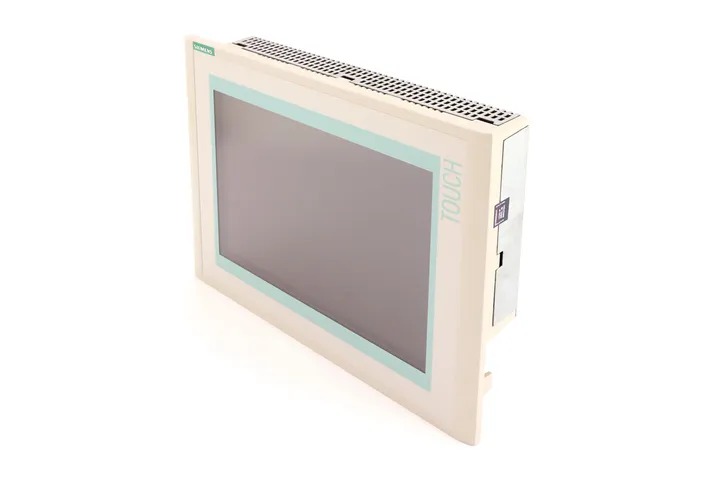
Siemens 6AV6545-0DA10-0AX0 TP270
Price range: € 1.422,00 through € 2.025,00
The Siemens 6AV6545-0DA10-0AX0 is a Touch Panel 270 (TP270) HMI device belonging to the SIMATIC Panel family. This unit features a 10.4-inch TFT color display and is designed for operator control and monitoring tasks in industrial automation environments. It is a standalone operator panel that runs the WinCC flexible runtime environment and communicates directly with Siemens PLCs and third-party controllers.
The TP270 (6AV6545-0DA10-0AX0) is equipped with a resistive touchscreen interface and a 10.4-inch TFT display capable of rendering 256 colors at a resolution of 640 x 480 pixels (VGA). It features a MPI/PROFIBUS DP interface for direct connection to SIMATIC S7 controllers, as well as a serial RS-232/RS-422/RS-485 interface for third-party PLC connectivity. The panel includes 8 MB of user memory for project data and is powered by a 24 V DC supply. An Ethernet interface is not standard on this variant, and configuration is performed using WinCC flexible software on a PC.
The TP270 is widely used in machine building, process automation, and factory automation applications where a robust, mid-size operator interface is required. It is commonly found on packaging machinery, conveyor systems, injection molding machines, and general-purpose industrial equipment. Its compatibility with the SIMATIC S7-300 and S7-400 controller families makes it a practical choice for installations already using Siemens automation infrastructure.
Technical Specifications
| Display Size | 10.4 inch |
|---|---|
| Display Resolution | 640 x 480 pixels (VGA) |
| Display Type | TFT color LCD |
| Display Colors | 256 |
| Touch Technology | Resistive touchscreen |
| Input Voltage | 24 V DC |
| Power Consumption | Approx. 25 W |
| User Memory | 8 MB |
| Communication Interface | MPI/PROFIBUS DP, RS-232/RS-422/RS-485 |
| Operating Temperature | 0 °C to +50 °C |
| Storage Temperature | -20 °C to +60 °C |
| Relative Humidity | 10% to 90% (non-condensing) |
| IP Rating (Front) | IP65 |
| IP Rating (Rear) | IP20 |
| Mounting | Panel mounting |
| Series/Product Family | SIMATIC TP270 |
Common Error Codes & System Events
- Event ID: 10000
- Communication error between the HMI panel and the connected PLC. The configured connection cannot be established.
Check MPI/PROFIBUS DP cable connections and termination resistors. Verify the PLC address and baud rate settings match the HMI project configuration. Ensure the PLC is powered and in RUN mode. - Event ID: 10001
- Connection to the PLC was interrupted during runtime after a previously successful connection.
Inspect cable integrity and connector seating. Check for electromagnetic interference sources near the communication cable. Verify PLC is still operational and has not faulted. - Event ID: 40000
- Project download failed or project data in memory is corrupted or incompatible with the current firmware version.
Re-download the project from WinCC flexible to the panel. Ensure the WinCC flexible version used for the project matches the firmware on the panel. Perform a memory reset if necessary before re-downloading. - Event ID: 20000
- Tag read/write error. The HMI is unable to read from or write to a configured PLC tag or data block.
Verify the PLC data block and address referenced in the HMI project exist and are accessible. Check that the PLC program has not changed the DB structure. Confirm communication is active. - Event ID: 70010
- System memory low. Available runtime memory on the panel is insufficient for the current project.
Reduce the number of active screens or objects in the project. Check for memory leaks caused by excessive alarm logging or recipe data. Consider archiving or reducing log data stored on the panel. - Event ID: 50001
- Firmware update error. The firmware transfer to the panel was interrupted or the firmware file is incompatible.
Restart the firmware update procedure using the correct firmware version for the TP270. Ensure a stable power supply during the update process. Use the correct ProSave or WinCC flexible tool for the transfer. - Event ID: 60000
- Panel hardware fault detected. An internal hardware component has reported an error during self-test at startup.
Perform a power cycle. If the fault persists, back up the project and perform a factory reset. If the error continues after reset, the panel may require hardware repair or replacement.
Frequently Asked Questions
Which PLC families are compatible with the TP270 (6AV6545-0DA10-0AX0)?
The TP270 is primarily designed for use with Siemens SIMATIC S7-300 and S7-400 PLCs via MPI or PROFIBUS DP. It can also communicate with S7-200 PLCs and select third-party controllers via the RS-232/RS-422/RS-485 serial interface using appropriate drivers in WinCC flexible.
What software is required to configure and program this HMI panel?
The TP270 is configured using Siemens WinCC flexible software on a Windows PC. The project is then transferred to the panel via an MPI cable, a PC adapter, or a USB-to-MPI adapter.
Does the 6AV6545-0DA10-0AX0 support Ethernet communication?
No, this specific variant of the TP270 does not include an Ethernet interface. Communication is limited to MPI/PROFIBUS DP and serial RS-232/RS-422/RS-485 interfaces.
What is the front panel protection rating of the TP270?
The front panel of the TP270 is rated IP65, making it suitable for panel mounting in environments where dust and water spray protection is required.
Can the TP270 be integrated into TIA Portal projects?
No, the TP270 is not supported by TIA Portal. It must be configured exclusively using WinCC flexible, which is the legacy Siemens HMI configuration software for this product generation.
Troubleshooting
Display remains blank after power on
Measure the 24 V DC supply voltage at the power connector on the rear of the panel. Check that the voltage is within the acceptable range (typically 19.2 V to 28.8 V DC). Inspect the internal fuse if accessible.
Correct any power supply issues. If the supply voltage is correct but the display remains blank, the backlight inverter or the display itself may have failed and the unit will require hardware repair or component replacement.
Touchscreen does not respond or responds inaccurately
Determine whether the issue is a complete lack of response or positional inaccuracy. A complete lack of response may indicate a failed touch controller, while inaccuracy suggests the touchscreen requires calibration.
Perform a touchscreen calibration via the panel's startup menu (accessible by pressing the touch area during boot). If calibration does not resolve the issue, the resistive touch overlay may be damaged and require replacement.
HMI cannot establish communication with the S7 PLC
Verify the MPI or PROFIBUS DP cable is correctly connected and terminated at both ends. Check that the node address configured in the HMI project matches the actual PLC MPI address. Use a PROFIBUS diagnostic tool to check bus integrity if available.
Correct address mismatches in the WinCC flexible project and re-download. Replace damaged cables or connectors. Ensure termination resistors are only active at the two physical ends of the bus.
Project fails to download from PC to the panel
Check the PC adapter or MPI cable connection between the PC and the panel. Verify that the correct communication port and transfer settings are selected in WinCC flexible or ProSave. Confirm the panel is in transfer mode.
Place the panel in transfer mode via the startup menu. Use a known-good MPI/PC adapter. If transfer still fails, perform a memory reset on the panel before attempting the download again.
Panel displays 'No project' or loads an incorrect project after power cycle
This may indicate that the project stored in flash memory has been corrupted or that the panel memory was reset unintentionally. Check if the correct project file was previously downloaded to the panel.
Re-download the correct project from WinCC flexible to the panel. Ensure the power supply is stable during the download process to prevent corruption. Verify the project is saved to internal flash and not only to a memory card if one is present.
| Condition | Repair, Used, Refurbished, New in box (sealed) |
|---|
Related products
-
Siemens 6AG1642-0BD01-4AX0 TP177B
€ 555,00 -
Siemens 6AV6642-8BA10-0AA0 TP177B
Price range: € 964,00 through € 1.611,00 -
Siemens 6AV3627-1QK00-2AX0 OP27
Price range: € 749,00 through € 1.658,00


