

Siemens 6AV3688-3ED13-0AX0 SIMATIC PP17-I
Price range: € 465,00 through € 1.350,00
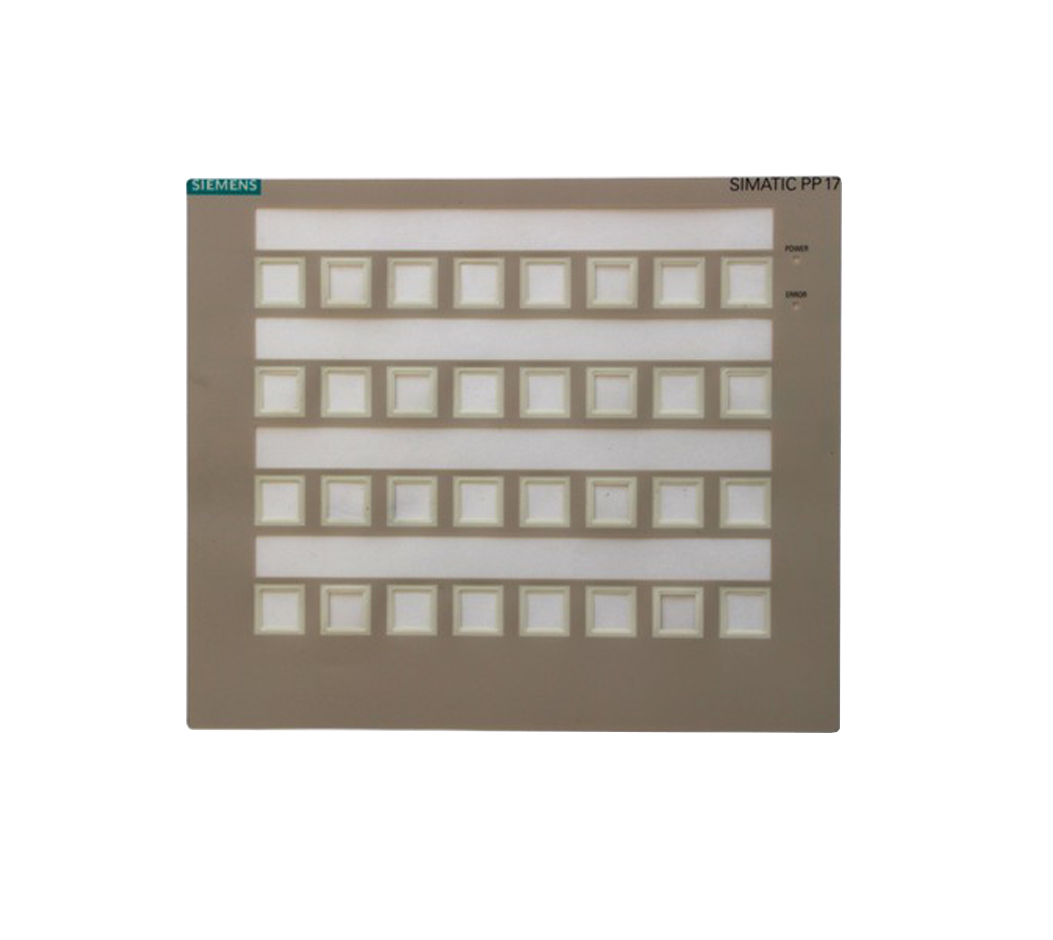
The Siemens 6AV3688-3ED13-0AX0 is a SIMATIC PP17-I push-button panel belonging to the SIMATIC HMI family. It is a compact operator panel designed for direct machine-level operation, providing a rugged interface for controlling and monitoring industrial processes without a traditional graphical display. This unit is manufactured by Siemens and is part of the PP17 series of operator panels.
The PP17-I panel features a membrane keyboard with illuminated push buttons and function keys, allowing operators to trigger discrete control actions directly. It communicates via PROFIBUS DP, enabling seamless integration into Siemens SIMATIC automation environments. The panel operates on 24 V DC supply voltage and is built to withstand harsh industrial environments, carrying a front-face protection rating of IP65. Configuration is performed using STEP 7 or compatible Siemens engineering tools.
The SIMATIC PP17-I is widely used in manufacturing, automotive, and process industries where simple, reliable operator control stations are required at the machine level. It is particularly suited for applications such as conveyor systems, assembly lines, and packaging machinery where discrete push-button control is preferred over touchscreen interfaces. Its PROFIBUS DP connectivity makes it a natural fit for existing Siemens S7 PLC-based automation architectures.
Technical Specifications
| Input Voltage | 24 V DC |
|---|---|
| Communication Interface | PROFIBUS DP |
| Protection Rating (Front) | IP65 |
| Protection Rating (Rear) | IP20 |
| Operating Temperature | 0 °C to +50 °C |
| Storage Temperature | -20 °C to +70 °C |
| Relative Humidity | 10% to 90%, non-condensing |
| Mounting | Panel mounting |
| Series/Product Family | SIMATIC PP17 |
| Certifications | CE, UL |
| Display | No graphical display; illuminated push buttons |
| Bus System Compatibility | SIMATIC S7, PROFIBUS DP |
Common Error Codes & System Events
- Event ID: 40000
- Communication error on PROFIBUS DP interface. The panel has lost connection to the PLC or master device.
Check PROFIBUS cable connections and termination resistors. Verify the PROFIBUS address configured on the panel matches the PLC configuration in STEP 7. - Event ID: 40010
- PROFIBUS DP address conflict detected. Two devices share the same bus address.
Verify all PROFIBUS node addresses on the network are unique. Reconfigure the panel address using the DIP switches or engineering tool. - Event ID: 40020
- Supply voltage out of range. The 24 V DC supply has dropped below the minimum threshold.
Measure the supply voltage at the panel connector. Ensure the power supply unit is providing a stable 24 V DC within the specified tolerance. - Event ID: 40030
- Configuration mismatch. The downloaded configuration does not match the connected hardware.
Re-download the correct configuration from STEP 7 or the engineering tool. Verify the hardware version of the panel matches the project settings. - Event ID: 40040
- Internal hardware fault detected on the push-button panel.
Perform a power cycle. If the fault persists, check for physical damage to the membrane keyboard or internal PCB. The unit may require repair or replacement. - Event ID: 40050
- LED illumination fault. One or more illuminated push buttons are not functioning correctly.
Check the LED driver circuitry and connections to the membrane keyboard. Replace the membrane keyboard assembly if individual LEDs have failed. - Event ID: 40060
- Watchdog timeout. The panel has not received a valid communication frame from the master within the expected time window.
Check PROFIBUS DP network load and cable integrity. Increase the watchdog timeout setting in the PLC configuration if the network is heavily loaded.
Frequently Asked Questions
What communication protocol does the 6AV3688-3ED13-0AX0 use?
The SIMATIC PP17-I uses PROFIBUS DP for communication with the PLC or automation system. It is designed for integration into Siemens S7-based PROFIBUS networks.
Does this panel have a graphical display?
No, the PP17-I does not feature a graphical display. It is a push-button operator panel with illuminated membrane keys for discrete control operations.
What is the supply voltage for this panel?
The panel operates on a 24 V DC supply voltage. Ensure the power source is within the specified tolerance range for reliable operation.
Which Siemens PLCs are compatible with this operator panel?
The PP17-I is compatible with Siemens SIMATIC S7-300 and S7-400 PLCs via PROFIBUS DP. It is configured and integrated using STEP 7 engineering software.
What is the front protection rating of this panel?
The front face of the 6AV3688-3ED13-0AX0 carries an IP65 protection rating, making it suitable for installation in environments where dust and water jets may be present.
Troubleshooting
Panel push buttons are unresponsive after power on
Check the PROFIBUS DP connection status and verify the 24 V DC supply voltage at the panel terminals. Confirm the panel address matches the STEP 7 hardware configuration.
Re-seat the PROFIBUS connector and verify cable termination. Re-download the configuration from STEP 7. If the supply voltage is correct and communication is established but buttons remain unresponsive, inspect the membrane keyboard for physical damage and replace if necessary.
Illuminated push buttons do not light up
Verify that the 24 V DC supply is present and within tolerance. Check whether the PLC program is correctly sending the output signals to control the LED states via PROFIBUS DP.
Confirm the PLC output mapping in STEP 7 corresponds to the correct button LEDs. If the supply and program are correct, the membrane keyboard LED assembly may have failed and should be replaced.
PROFIBUS DP communication fault indicated by PLC
Check the PROFIBUS cable for continuity and correct termination at both ends of the bus segment. Verify the panel PROFIBUS address using the DIP switch settings on the device.
Replace damaged PROFIBUS cables or connectors. Ensure bus termination resistors are active only at the two physical ends of the network. Correct any address conflicts by reassigning unique addresses to all devices.
Panel does not respond after configuration download
Confirm that the hardware version of the PP17-I matches the GSD file and hardware configuration used in STEP 7. Check for any configuration mismatch errors reported in the diagnostic buffer.
Update the GSD file to the correct version for this hardware revision and re-download the configuration. Perform a complete power cycle of the panel after downloading to ensure the new configuration is applied.
Panel powers on but immediately loses communication with PLC
Measure the PROFIBUS bus voltage and check for excessive cable length or missing termination. Inspect the PROFIBUS connector at the panel for bent or damaged pins.
Correct cable length to within PROFIBUS DP specifications for the selected baud rate. Ensure proper bus termination is applied. Replace the PROFIBUS connector if pins are damaged.
| Condition | Repair, Used, Refurbished, New in box (sealed) |
|---|
Related products
-
Siemens 6AV6642-0BC01-1AX1 TP177B
Price range: € 657,00 through € 1.249,00 -
Siemens 6AG1642-0BD01-4AX0 TP177B
€ 555,00 -
Siemens 6AV6642-0BC01-1AX0 TP177B
Price range: € 630,00 through € 1.421,00