


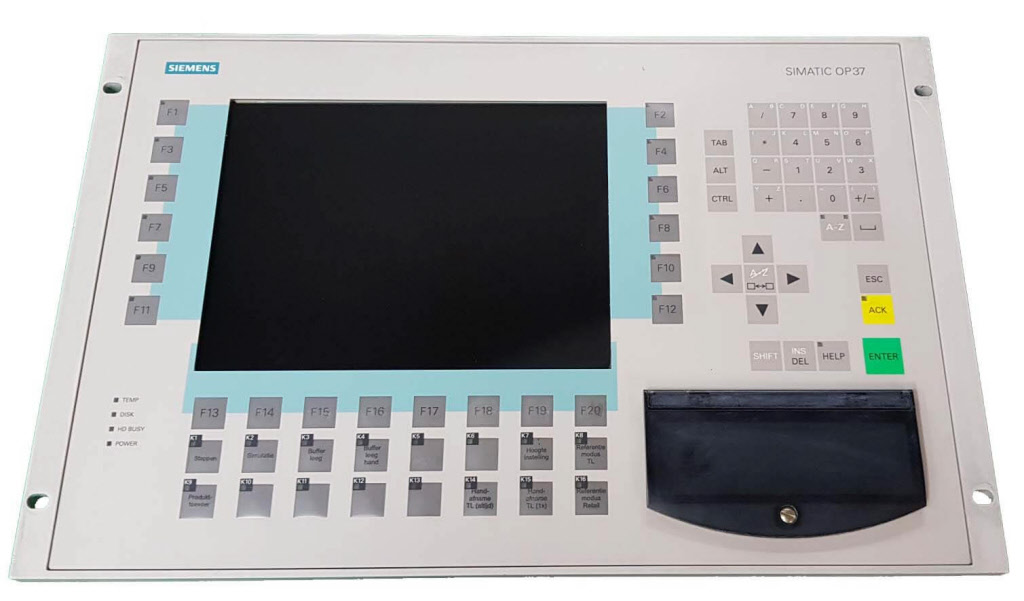
Siemens 6AV3637-1LL00-0AX1 SIMATIC OP 37
Price range: € 1.296,00 through € 1.473,92
The Siemens SIMATIC OP 37 (part number 6AV3637-1LL00-0AX1) is a high-performance operator panel belonging to the SIMATIC OP series of human-machine interface devices. It is designed for demanding industrial visualization and control tasks, providing a robust and reliable interface between operators and automated systems. The OP 37 features a large monochrome LCD display and is engineered to integrate seamlessly with Siemens SIMATIC S5 and S7 PLC families.
The 6AV3637-1LL00-0AX1 variant is equipped with a 7.5-inch STN monochrome LCD display with a resolution of 640 x 480 pixels (VGA), offering clear readability in industrial environments. It supports multiple communication interfaces including MPI, PROFIBUS-DP, and serial interfaces (RS-232/RS-422/RS-485), enabling flexible connectivity to a wide range of controllers. The panel includes an integrated keyboard with function keys and a numeric/alphanumeric keypad for direct operator input, and operates on a 24 V DC supply. Onboard memory supports project data storage, and the unit is rated to IP65 at the front panel for protection against dust and water ingress.
The SIMATIC OP 37 is widely deployed in manufacturing automation, machine tool control, process engineering, and packaging machinery applications. Its large display and comprehensive keypad make it suitable for complex operator interfaces requiring detailed process visualization, alarm management, and recipe handling. The panel is particularly common in industries such as automotive, food and beverage, chemical processing, and general factory automation where robust and proven HMI solutions are required.
Technical Specifications
| Display Size | 7.5 inch |
|---|---|
| Display Type | STN monochrome LCD |
| Display Resolution | 640 x 480 pixels (VGA) |
| Input/Operating Voltage | 24 V DC |
| Communication Interface | MPI, PROFIBUS-DP, RS-232, RS-422, RS-485 |
| IP/Protection Rating | IP65 (front panel) |
| Operating Temperature | 0 °C to 50 °C |
| Storage Temperature | -20 °C to 60 °C |
| Relative Humidity | 10 % to 90 % (non-condensing) |
| Mounting | Panel mounting |
| Series/Product Family | SIMATIC OP |
| Certifications | CE, UL |
| Input Type | Membrane keyboard with function keys and numeric/alphanumeric keypad |
Common Error Codes & System Events
- Event ID: 10000
- Communication error between the OP 37 and the connected PLC. The panel cannot establish or maintain a connection to the controller.
Check MPI or PROFIBUS-DP cable connections and termination resistors. Verify the PLC address settings match the OP 37 configuration. Restart both the panel and the PLC. - Event ID: 10001
- PLC not responding or connection to PLC has been lost during operation.
Verify the PLC is powered and in RUN mode. Check the communication cable integrity and connector pins. Confirm the configured station address and baud rate match the PLC settings. - Event ID: 20000
- Project download error. The project data could not be successfully transferred to the OP 37.
Check the PC-to-panel connection cable and interface settings in ProTool. Ensure the panel is in transfer mode before initiating the download. Verify sufficient memory is available on the panel. - Event ID: 40000
- Internal memory error detected. The panel has identified a fault in its internal project or configuration memory.
Perform a full panel reset and re-download the project from ProTool. If the error persists, the internal memory or hardware may require replacement. - Event ID: 50000
- Operating system error or system software fault detected on the OP 37.
Perform a panel reset by cycling power. If the fault recurs, reload the operating system firmware using the appropriate Siemens service tool and re-download the project. - Event ID: 60000
- Configuration error. The loaded project configuration is incompatible with the current panel firmware version.
Verify the ProTool project version matches the firmware version on the OP 37. Update the firmware or recompile and re-download the project using the correct ProTool version. - Event ID: 70000
- Alarm buffer overflow. The number of pending alarms has exceeded the panel's alarm buffer capacity.
Acknowledge and clear existing alarms on the panel. Review the PLC program to identify the root cause of excessive alarm generation and reduce alarm frequency where possible.
Frequently Asked Questions
Which PLC families are compatible with the SIMATIC OP 37 (6AV3637-1LL00-0AX1)?
The OP 37 is compatible with Siemens SIMATIC S7-300, S7-400, and S5 PLC families via MPI or PROFIBUS-DP interfaces. It can also communicate with third-party controllers via the serial RS-232/RS-422/RS-485 interface using appropriate drivers.
What software is used to configure and program the OP 37?
The OP 37 is configured using Siemens ProTool software. Projects created in ProTool are compiled and downloaded to the panel via a serial or MPI connection.
What is the supply voltage for the 6AV3637-1LL00-0AX1?
The OP 37 operates on a 24 V DC supply voltage. Ensure the power supply is stable and within the specified tolerance range to prevent operational faults.
What is the front panel protection rating of the OP 37?
The front panel of the OP 37 is rated to IP65, providing protection against dust ingress and low-pressure water jets, making it suitable for installation in industrial control cabinet doors.
Can the OP 37 display color graphics?
No, the 6AV3637-1LL00-0AX1 variant uses a monochrome STN LCD display. It does not support color graphics, but provides high-contrast monochrome visualization at VGA resolution (640 x 480 pixels).
Troubleshooting
Display remains blank after power is applied
Check the 24 V DC supply voltage at the panel power connector using a multimeter. Inspect the internal fuse and verify the backlight is not simply dimmed or disabled via contrast settings.
Restore the 24 V DC supply if absent or out of tolerance. Replace the internal fuse if blown. If the backlight has failed, the LCD backlight assembly or the panel itself may require replacement or refurbishment.
Panel displays 'No connection to PLC' or communication errors repeatedly
Verify the MPI or PROFIBUS-DP cable is correctly connected and terminated at both ends. Check that the PLC station address configured in ProTool matches the actual PLC address. Measure cable continuity.
Replace or reseat the communication cable. Correct the station address and baud rate settings in the ProTool project and re-download. Ensure termination resistors are installed only at the physical ends of the bus segment.
Project download fails or panel does not enter transfer mode
Confirm the panel is set to transfer mode via the panel's startup menu. Check the serial or MPI cable connection between the programming PC and the panel. Verify the correct COM port and transfer settings in ProTool.
Restart the panel and select transfer mode from the boot menu. Replace the PC-to-panel cable if faulty. Ensure the ProTool transfer settings (baud rate, interface) match the physical connection being used.
Keypad buttons are unresponsive or intermittently fail
Inspect the membrane keypad for physical damage, contamination, or worn key contacts. Check the internal ribbon cable connection between the keypad membrane and the main PCB.
Clean the keypad surface with a suitable non-abrasive cleaner. If the ribbon cable is loose or damaged, reseat or replace it. In cases of severe membrane wear, replace the keypad membrane assembly.
Panel restarts unexpectedly or freezes during operation
Check the 24 V DC supply for voltage dips or ripple using an oscilloscope or quality multimeter. Inspect the panel for signs of overheating. Verify the project does not contain configuration errors that could cause software exceptions.
Stabilize the power supply and ensure it has sufficient current capacity for the panel load. Improve panel ventilation if overheating is suspected. Re-download a verified project from ProTool and update the panel firmware if an older version is installed.
| Condition | Repair, Used, Refurbished, New in box (sealed) |
|---|
Related products
-
Siemens 6AV6642-8BA10-0AA0 TP177B
Price range: € 964,00 through € 1.611,00 -
Siemens 6AG1642-0BA01-4AX1 TP177B
€ 1.040,00 -
Siemens 6AV6642-0BC01-1AX0 TP177B
Price range: € 630,00 through € 1.421,00


