


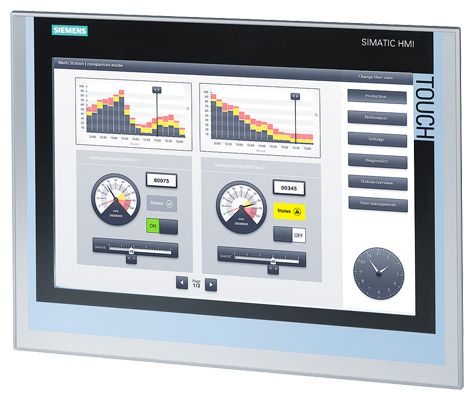
Siemens 6AV2124-0QC02-0AX0 SIMATIC HMI TP700 Comfort
Price range: € 1.488,00 through € 5.299,00
The Siemens 6AV2124-0QC02-0AX0 is a 7-inch widescreen touch panel belonging to the SIMATIC HMI Comfort Panel series. It is designed for high-performance human-machine interface applications and serves as an operator panel for monitoring and controlling industrial automation systems. This unit is part of Siemens' premium HMI line, offering advanced visualization capabilities within the SIMATIC ecosystem.
The TP700 Comfort features a 7-inch TFT widescreen display with a resolution of 800 x 480 pixels and 16-million-color depth, providing clear and detailed process visualization. It supports a resistive touch interface and includes both PROFINET and MPI/PROFIBUS communication interfaces, enabling seamless integration with S7-300, S7-400, S7-1200, and S7-1500 PLCs. The panel is equipped with 12 MB user memory for project data, a USB host and device interface, and an SD card slot for data logging and project transfer. It operates on 24 V DC supply and carries an IP65 protection rating on the front face.
The SIMATIC TP700 Comfort is widely deployed in manufacturing, process automation, water treatment, food and beverage, and packaging industries. Its widescreen format and multi-protocol communication support make it suitable for machine-level operator stations where clear visualization and reliable connectivity are required. The panel's robust construction and IP65 front protection allow installation in demanding industrial environments with exposure to dust and moisture.
Technical Specifications
| Display Size | 7 inch (widescreen) |
|---|---|
| Display Resolution | 800 x 480 pixels |
| Display Colors | 16,777,216 (24-bit) |
| Display Type | TFT LCD |
| Touch Technology | Resistive |
| Input/Operating Voltage | 24 V DC |
| Power Consumption | Approx. 9 W |
| Communication Interface | PROFINET (RJ45), MPI/PROFIBUS DP (RS-422/485), USB 2.0 (host and device) |
| Memory | 12 MB user memory |
| Storage Expansion | SD card slot |
| Operating Temperature | 0 °C to +50 °C |
| Storage Temperature | -20 °C to +60 °C |
| Relative Humidity | 10 % to 90 % (non-condensing) |
| IP/Protection Rating | IP65 (front), IP20 (rear) |
| Mounting | Panel mounting |
| Certifications | CE, UL, cULus |
| Series/Product Family | SIMATIC HMI Comfort Panel |
Common Error Codes & System Events
- Event ID: 10000
- Configuration error detected during startup; project data may be corrupted or incompatible with the panel firmware version.
Re-transfer the project from TIA Portal ensuring the firmware version matches. Clear the panel memory and reload the project if necessary. - Event ID: 20000
- Communication connection to the PLC has been lost or cannot be established.
Check PROFINET or PROFIBUS cable connections and verify IP address or MPI/DP address settings. Confirm the PLC is in RUN mode and the communication parameters in the project match the hardware configuration. - Event ID: 40000
- Tag read/write error; the HMI cannot access a configured PLC tag or data block.
Verify the tag address exists in the PLC program and the data block is not write-protected. Check for address mismatches between the HMI project and the PLC data structure. - Event ID: 70000
- Overflow in the alarm or event buffer; the number of pending alarms exceeds the configured buffer size.
Acknowledge and clear active alarms. Increase the alarm buffer size in the TIA Portal project configuration if overflow recurs frequently. - Event ID: 50000
- Recipe data error; a recipe record could not be read from or written to the configured storage location.
Check that the SD card is properly inserted and not write-protected. Verify recipe configuration in TIA Portal and ensure sufficient storage space is available. - Event ID: 30000
- Script or function error during runtime; a configured VB script or system function returned an error.
Review the script logic in TIA Portal for syntax or runtime errors. Check that all referenced tags and functions are correctly configured and accessible. - Event ID: 80000
- System memory low warning; available runtime memory is insufficient for current project demands.
Reduce the number of simultaneously active screens, alarms, or data logs. Optimize the project in TIA Portal by reducing image sizes and script complexity.
Frequently Asked Questions
Which PLCs are compatible with the SIMATIC TP700 Comfort 6AV2124-0QC02-0AX0?
The TP700 Comfort is compatible with Siemens S7-1200, S7-1500, S7-300, and S7-400 PLCs via PROFINET or MPI/PROFIBUS DP. It also supports communication with third-party controllers using OPC UA or Modbus TCP depending on firmware version.
What software is required to program and configure this HMI panel?
The panel is configured using Siemens TIA Portal with the WinCC (TIA Portal) engineering software. A license for WinCC Comfort or higher is required to access all features of the Comfort Panel series.
What is the supply voltage for the 6AV2124-0QC02-0AX0?
The panel operates on a 24 V DC supply voltage. An external regulated 24 V DC power supply must be provided as the panel does not include an integrated power supply unit.
Does this panel support data logging and trend displays?
Yes, the SIMATIC Comfort Panel series supports data logging to internal memory or an SD card, and TIA Portal allows configuration of trend views for process value visualization over time.
What is the front panel protection rating of this unit?
The front face of the TP700 Comfort carries an IP65 protection rating, making it suitable for installation in environments with dust and water spray. The rear of the panel is rated IP20.
Troubleshooting
Display remains blank after power is applied
Measure the 24 V DC supply voltage at the power connector on the rear of the panel. Check that polarity is correct and voltage is within the specified range of 19.2 V to 28.8 V DC.
Correct the supply voltage or replace the power supply if it is out of range. If voltage is correct, the internal backlight or power supply board may be faulty and the panel may require repair or replacement.
HMI cannot establish communication with the PLC
Verify the PROFINET IP address settings on both the HMI and PLC. Check the Ethernet cable and switch connections. For PROFIBUS, verify the bus address and termination resistors at both ends of the cable.
Correct any IP address or bus address mismatches in TIA Portal and re-transfer the project. Replace faulty cables or connectors. Ensure the PLC is powered and in RUN mode.
Touchscreen does not respond accurately or registers incorrect touch positions
The resistive touchscreen may require recalibration, particularly after prolonged use or if the panel has been replaced. Access the Control Panel on the HMI operating system to check calibration status.
Perform a touchscreen recalibration via the Start Center or Control Panel on the HMI. If calibration does not resolve the issue, the touch overlay may be damaged and require physical replacement.
Project transfer from TIA Portal fails or times out
Check the USB or PROFINET connection between the engineering PC and the HMI panel. Verify that the panel is in Transfer mode and that no firewall or antivirus software is blocking the TIA Portal communication.
Switch the panel to Transfer mode manually via the Start Center. Use a direct Ethernet connection rather than a network switch if possible. Disable firewall exceptions for TIA Portal and retry the transfer.
Panel repeatedly restarts or shows a runtime error on startup
The installed project may be incompatible with the current panel firmware version, or the project data may be corrupted. Check the firmware version in the panel's system information screen.
Update the panel firmware to match the TIA Portal version used to create the project, or re-transfer a freshly compiled project. If the issue persists, perform a factory reset via the Service menu and reload the project.
| Condition | Repair, Used, Refurbished, New in box (sealed) |
|---|
Related products
-
Siemens 6AV6642-8BA12-0AB0 TP177B
€ 879,00 -
Siemens 6AG1642-0BA01-4AX0 TP177B
€ 675,00 -
Siemens 6AV3627-1NK00-2AX0 SIMATIC OP 27
Price range: € 749,00 through € 964,00


