


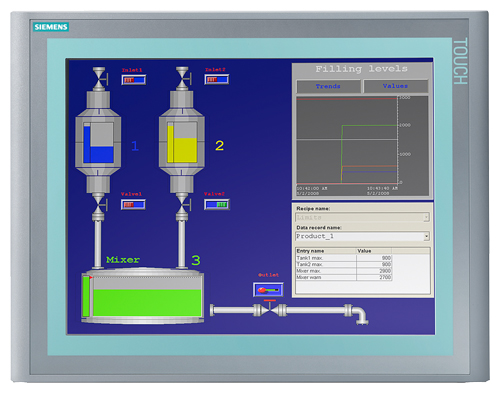
Siemens 6AG1647-0AG11-4AX0 SIPLUS HMI TP177B
€ 2.517,00
The Siemens 6AG1647-0AG11-4AX0 is a SIPLUS variant of the SIMATIC HMI TP177B touch panel, belonging to the SIPLUS extreme product family designed for use in harsh and demanding environments. This unit is part of the Siemens SIMATIC HMI 170 series and provides a compact, panel-mounted human-machine interface solution with a resistive touchscreen. The SIPLUS designation indicates that this device has been conditioned and qualified for extended environmental stress beyond standard SIMATIC specifications.
The TP177B features a 5.7-inch STN color display with a resolution of 320 x 240 pixels (QVGA) and supports up to 256 colors. It is equipped with a MPI/PROFIBUS DP interface as well as a RS-422/RS-485 serial interface for PLC connectivity, and includes a USB port for project transfer and data backup. The panel operates on 24 V DC supply voltage and offers 6 MB of user memory for project data. The SIPLUS variant is rated for extended operating temperature ranges and enhanced resistance to condensation and corrosive atmospheres compared to the standard SIMATIC TP177B.
The SIPLUS HMI TP177B 6AG1647-0AG11-4AX0 is typically deployed in industrial environments where standard HMI panels would be exposed to temperature extremes, humidity, or chemically aggressive conditions. Typical applications include process automation in chemical and petrochemical plants, outdoor machinery, food and beverage processing, and water treatment facilities. Its robust design and extended environmental ratings make it suitable for installation in control cabinets subject to harsh ambient conditions.
Technical Specifications
| Display Size | 5.7 inch |
|---|---|
| Display Resolution | 320 x 240 pixels (QVGA) |
| Display Type | STN color LCD |
| Display Colors | 256 colors |
| Touch Technology | Resistive touchscreen |
| Input Voltage | 24 V DC |
| Power Consumption | Max. 6 W |
| Communication Interface | MPI/PROFIBUS DP, RS-422/RS-485, USB |
| User Memory | 6 MB |
| Operating Temperature | -20 °C to +60 °C (SIPLUS extended range) |
| Storage Temperature | -20 °C to +70 °C |
| Relative Humidity | 5% to 95% (with condensation, SIPLUS rated) |
| IP Rating (Front) | IP65 |
| Mounting | Panel mounting |
| Series/Product Family | SIPLUS extreme / SIMATIC HMI 170 series |
| Certifications | CE, UL, cULus |
Common Error Codes & System Events
- Event ID: 10000
- Configuration error detected during startup; the loaded project is incompatible with the panel firmware version.
Reload a compatible project using SIMATIC WinCC flexible. Verify that the project was compiled for the TP177B target device. - Event ID: 10001
- Communication connection to the PLC has been lost or cannot be established.
Check MPI/PROFIBUS DP cable connections and termination resistors. Verify PLC address settings and baud rate configuration in the project. - Event ID: 20000
- System memory is insufficient to load the current project.
Reduce project size by optimizing graphics and scripts. Ensure project does not exceed the 6 MB user memory limit. - Event ID: 40000
- Transfer mode is active; the panel is waiting for a project download.
Transfer the project from the engineering PC using SIMATIC WinCC flexible, or cancel transfer mode by restarting the panel. - Event ID: 70010
- Tag read/write error; a configured PLC tag cannot be accessed.
Verify PLC tag addresses in the project configuration. Check that the PLC program contains the expected data blocks and addresses. - Event ID: 110000
- Backup/restore operation failed on the USB device.
Check that the USB storage device is properly formatted (FAT32) and has sufficient free space. Retry the backup or restore operation. - Event ID: 140000
- Recipe data error; recipe records could not be read or written correctly.
Check recipe configuration in WinCC flexible. Verify that the recipe memory area is correctly defined and that PLC addresses are accessible.
Frequently Asked Questions
What is the supply voltage for the 6AG1647-0AG11-4AX0?
The panel operates on a 24 V DC supply voltage. Ensure the power supply is within the permitted tolerance range as specified in the SIMATIC HMI TP177B operating instructions.
What is the difference between the SIPLUS 6AG1647-0AG11-4AX0 and the standard SIMATIC TP177B?
The SIPLUS variant is conditioned for extended environmental stress, including wider operating temperature ranges, resistance to condensation, and enhanced tolerance to corrosive atmospheres. It is based on the standard SIMATIC TP177B hardware but qualified for harsher installation conditions.
Which communication interfaces are available on this panel?
The panel provides an MPI/PROFIBUS DP interface for PLC communication, an RS-422/RS-485 serial interface, and a USB port for project transfer and data storage.
Which engineering software is required to program this HMI panel?
The TP177B is configured using Siemens SIMATIC WinCC flexible 2008 or later. It is not compatible with TIA Portal WinCC; the legacy WinCC flexible software must be used.
Is this panel compatible with SIMATIC S7-300 and S7-400 PLCs?
Yes, the TP177B communicates with SIMATIC S7-300 and S7-400 PLCs via the MPI or PROFIBUS DP interface. It also supports communication with S7-200 PLCs via the RS-422/RS-485 port using the PPI protocol.
Troubleshooting
Display remains blank after power is applied
Measure the 24 V DC supply voltage at the panel's power connector. Check for correct polarity. Inspect the internal fuse if accessible.
Correct any wiring or polarity errors. If the supply voltage is correct and the display remains blank, the internal power supply or backlight may be faulty and the unit should be sent for repair or replacement.
Touchscreen does not respond or registers incorrect touch positions
Check whether the touchscreen surface is clean and free of moisture or debris. Attempt to recalibrate the touchscreen via the panel's Start Center menu.
Clean the touchscreen surface with a dry cloth. Perform a touchscreen calibration from the Start Center. If calibration fails repeatedly, the resistive touch layer may be damaged and require hardware repair.
Cannot establish communication with the PLC
Verify the MPI or PROFIBUS DP address configured in the HMI project matches the physical PLC address. Check cable connections, bus termination, and baud rate settings.
Correct address and baud rate settings in WinCC flexible and retransfer the project. Ensure bus termination resistors are correctly placed at both ends of the MPI/PROFIBUS segment. Replace the communication cable if damaged.
Project transfer from PC to panel fails
Check that the USB cable or MPI adapter is correctly connected. Verify that the panel is in Transfer mode (accessible via Start Center). Confirm that the WinCC flexible project is compiled for the TP177B target.
Restart the panel and manually activate Transfer mode from the Start Center. Ensure the correct communication channel is selected in WinCC flexible Transfer settings. Try a different USB cable or MPI/PC adapter if the issue persists.
Panel displays 'No project' message after startup
The internal flash memory may not contain a valid project, or the project may have been lost due to a firmware update or memory error.
Retransfer the project from the engineering PC using WinCC flexible. If the panel repeatedly loses its project, check for power supply instability during operation, which can corrupt flash memory.
| Condition | Repair, Used, Refurbished, New in box (sealed) |
|---|
Related products
-
Siemens 6AV6640-0CA11-0AX0 OP 73micro
Price range: € 368,00 through € 1.055,00 -
Siemens 6AV6642-0BA01-1AX1 TP177B
Price range: € 723,00 through € 2.499,00 -
Siemens 6AG1642-0BA01-4AX1 TP177B
€ 1.040,00


