


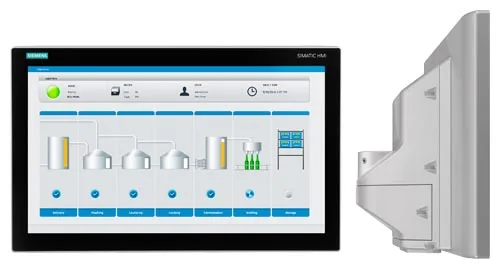
Siemens 6AV2124-0MC24-0BX0 SIMATIC HMI TP1200 Comfort
€ 1.251,00
The Siemens 6AV2124-0MC24-0BX0 is a 12-inch widescreen Touch Panel from the SIMATIC HMI Comfort Panel series, manufactured by Siemens. It belongs to the second generation of Comfort Panels (Comfort V2) and is designed for high-performance human-machine interface applications in industrial automation environments. The panel provides a high-resolution TFT display with multi-touch capability, enabling intuitive operator interaction with complex machine processes.
The 6AV2124-0MC24-0BX0 features a 12.1-inch widescreen TFT display with a resolution of 1280 x 800 pixels and 16 million colors, delivering clear visualization of process data and graphics. It is equipped with PROFINET and MPI/PROFIBUS interfaces for seamless integration into Siemens automation networks, and includes USB host and device ports as well as an SD card slot for data logging and project transfer. The panel runs on the WinCC Runtime Advanced platform, supports scripts, alarms, trends, and recipes, and offers 12 MB of user memory for project data. It operates on a 24 V DC supply and carries CE, UL, and cUL certifications.
The TP1200 Comfort is widely deployed in machine building, automotive manufacturing, food and beverage processing, water treatment, and chemical industries. Its robust design with IP65 front protection makes it suitable for installation in control cabinet doors in environments where dust and water ingress are a concern. The multi-touch functionality and high-resolution display make it particularly effective for applications requiring detailed process visualization and complex operator input.
Technical Specifications
| Display Size | 12.1 inch widescreen |
|---|---|
| Display Resolution | 1280 x 800 px (WXGA) |
| Display Colors | 16,777,216 (16 million) |
| Display Type | TFT LCD |
| Touch Technology | Multi-touch (resistive/capacitive), 5-finger touch |
| Input/Operating Voltage | 24 V DC (19.2 V – 28.8 V) |
| Power Consumption | Approx. 25 W |
| Communication Interface | PROFINET (2x RJ45), MPI/PROFIBUS DP (RS 422/485), 4x USB, 1x SD card slot |
| User Memory | 12 MB |
| Operating Temperature | 0 °C to +50 °C |
| Storage Temperature | -20 °C to +60 °C |
| Relative Humidity | 10% to 90% (non-condensing) |
| IP/Protection Rating | IP65 (front), IP20 (rear) |
| Dimensions (W x H x D) | 365 x 254 x 52 mm |
| Panel Cutout | 339 x 228 mm |
| Weight | Approx. 2.9 kg |
| Certifications | CE, UL, cUL |
| Mounting | Panel mounting (portrait and landscape) |
| Series/Product Family | SIMATIC HMI Comfort Panel V2 |
Common Error Codes & System Events
- Event ID: 70010
- Connection to PLC interrupted or communication timeout on configured connection.
Check PROFINET or PROFIBUS cable connections and network settings. Verify PLC is in RUN mode and IP address/station address matches HMI project configuration. - Event ID: 140000
- Project download failed or project data is corrupt.
Re-transfer the project from TIA Portal using a valid USB or PROFINET connection. Ensure TIA Portal version matches the panel firmware version. - Event ID: 110000
- Tag read/write error — the HMI cannot access a configured PLC tag.
Verify the tag address exists in the PLC program and that the data type matches the HMI configuration. Check communication connection status. - Event ID: 40000
- Operating system or firmware error detected on the panel.
Perform a panel reset. If the error persists, update the panel firmware using the ProSave tool or TIA Portal device update function. - Event ID: 20000
- Insufficient memory for runtime operation — project memory limit approached or exceeded.
Reduce project size by optimizing graphics, removing unused tags, or archiving historical data. Consider upgrading to a panel with larger memory. - Event ID: 130000
- Recipe data error — recipe record cannot be read or written.
Check recipe configuration in TIA Portal. Verify the SD card is properly inserted and not write-protected if recipes are stored externally. - Event ID: 80010
- Alarm logging error — alarm buffer overflow or data logging failure.
Clear the alarm buffer and check data log configuration. Ensure sufficient storage space is available on the internal memory or SD card.
Frequently Asked Questions
Which Siemens TIA Portal version is required to program the 6AV2124-0MC24-0BX0?
The TP1200 Comfort V2 (6AV2124-0MC24-0BX0) requires TIA Portal V14 or higher with the WinCC Advanced or WinCC Comfort/Advanced software package. Using the correct version ensures full compatibility with the panel firmware.
What communication protocols does the 6AV2124-0MC24-0BX0 support?
The panel supports PROFINET via two RJ45 ports and MPI/PROFIBUS DP via an RS 422/485 interface. It can communicate with Siemens S7-300, S7-400, S7-1200, and S7-1500 PLCs as well as third-party controllers via OPC UA or Modbus TCP (with appropriate configuration).
Is the 6AV2124-0MC24-0BX0 compatible with S7-1500 PLCs?
Yes, the TP1200 Comfort is fully compatible with the Siemens S7-1500 PLC series via PROFINET. The connection is configured in TIA Portal using the integrated HMI-PLC communication setup.
What is the front panel protection rating of this HMI?
The front of the 6AV2124-0MC24-0BX0 is rated IP65, providing protection against dust ingress and low-pressure water jets. The rear of the panel is rated IP20.
Can the panel firmware be updated in the field?
Yes, the firmware can be updated using the Siemens ProSave tool or via TIA Portal's device update function, either through a USB connection or over PROFINET. Always back up the existing project before performing a firmware update.
Troubleshooting
Display remains blank after power on
Measure the 24 V DC supply voltage at the panel power connector. Check that the voltage is within the 19.2–28.8 V DC range. Inspect internal fuses if accessible.
Correct the supply voltage if out of range. If voltage is correct and display remains blank, the internal power supply or backlight inverter may be faulty and the panel should be sent for repair or replacement.
Touch input not responding or inaccurate
Check whether the touch screen responds at all by observing any visual feedback. Determine if the issue is across the full screen or localized to specific areas. Check for physical damage or contamination on the screen surface.
Clean the screen surface with a soft, dry cloth. Perform a touch screen calibration via the panel's Start Center settings. If the problem persists, the touch digitizer may be damaged and require replacement.
HMI cannot establish communication with PLC
Verify the PROFINET or PROFIBUS cable is properly connected and undamaged. Check the IP address or PROFIBUS station address configured in the HMI project matches the PLC settings. Use TIA Portal online diagnostics to check network status.
Correct any IP address or station address mismatches in TIA Portal and re-download the project. Replace faulty cables or connectors. Ensure the PLC is in RUN mode and the network switch or hub is functioning correctly.
Panel continuously reboots or freezes during operation
Check for unstable 24 V DC supply voltage, particularly voltage dips under load. Review the system event log in the panel's Start Center for recurring event IDs. Check ambient temperature around the panel installation.
Stabilize the power supply and ensure adequate current capacity (minimum 2 A at 24 V DC). Ensure the panel is not operating above the 50 °C ambient temperature limit. If the issue persists after power stabilization, a firmware re-flash or hardware repair may be required.
Project transfer from TIA Portal fails
Verify the communication path between the engineering PC and the panel (USB or PROFINET). Check that the TIA Portal version and panel firmware version are compatible. Ensure the panel is in Transfer mode via the Start Center.
Switch the panel to Transfer mode manually via Start Center > Transfer. Use a known-good USB cable or verify PROFINET connectivity with a ping test. If version mismatch is detected, update the panel firmware using ProSave before re-attempting the project transfer.
| Condition | Repair, Used, Refurbished, New in box (sealed) |
|---|
Related products
-
Siemens 6AV6643-0AA01-1AX1 TP277
€ 249,00 -
Siemens 6AV6545-8CC10-0AA0 Mobile Panel 177
€ 1.247,00 -
Siemens 6AV6545-0AA15-2AX0 TP 270
Price range: € 399,00 through € 1.149,00


