


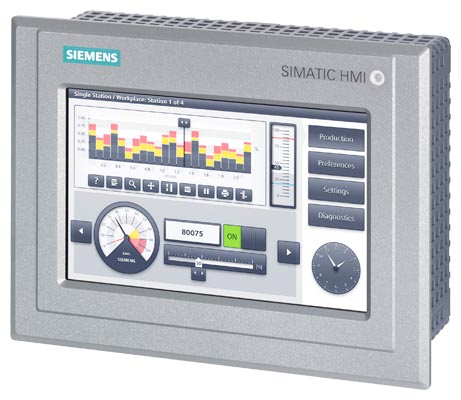
Siemens 6AG2124-0GC13-1AX0 SIMATIC IPC277E
€ 1.486,00
The Siemens 6AG2124-0GC13-1AX0 is a SIPLUS HMI variant of the SIMATIC IPC277E (formerly known as the MP277 series), designed for use in harsh and demanding industrial environments. It belongs to the SIPLUS extreme product family, which is engineered to operate reliably under extended temperature ranges, increased condensation, and exposure to corrosive atmospheres. This panel PC combines the functionality of a high-performance HMI with the robustness required for critical industrial installations.
The unit features a 10.4-inch TFT display with a resolution of 640 x 480 pixels (VGA) and supports touch operation as well as key-based input. It is equipped with a Windows CE or Windows Embedded Compact operating system and runs on an x86-compatible processor platform. Communication interfaces include PROFINET, MPI/PROFIBUS DP, USB ports, and an Ethernet interface, enabling integration into a wide range of automation architectures. The device supports Siemens WinCC flexible and TIA Portal WinCC Runtime software environments, and includes onboard flash memory for project and runtime data storage.
The SIPLUS IPC277E is deployed in industries such as chemical processing, oil and gas, water treatment, and food and beverage manufacturing, where environmental conditions exceed standard HMI specifications. Its conformal coating and extended operating temperature range make it suitable for outdoor enclosures, marine environments, and facilities with aggressive airborne contaminants. The panel is typically mounted in control cabinets or operator stations where continuous, reliable human-machine interaction is essential.
Technical Specifications
| Display Size | 10.4 inch |
|---|---|
| Display Resolution | 640 x 480 pixels (VGA) |
| Display Colors | 256 colors (TFT) |
| Touch Technology | Resistive touch screen |
| Input/Operating Voltage | 24 V DC |
| Power Consumption | Approx. 30 W |
| Operating Temperature | -20 °C to +60 °C (SIPLUS extended range) |
| Storage Temperature | -40 °C to +70 °C |
| Relative Humidity | 5% to 95% (non-condensing, with conformal coating for condensation resistance) |
| IP/Protection Rating | IP65 (front panel) |
| Communication Interface | PROFINET, MPI/PROFIBUS DP, USB 2.0, Ethernet (RJ45) |
| Mounting | Panel mounting (portrait or landscape) |
| Certifications | CE, UL, cULus |
| Series/Product Family | SIPLUS extreme / SIMATIC IPC277E |
Common Error Codes & System Events
- Event ID: 100001
- Runtime startup error — WinCC Runtime failed to start correctly on boot.
Check project integrity and re-download the runtime project via TIA Portal or WinCC flexible. Verify available flash memory and restart the panel. - Event ID: 110001
- Communication connection to PLC lost — PROFINET or MPI/PROFIBUS connection interrupted.
Check physical cable connections, verify network configuration and IP address settings, and confirm the PLC is in RUN mode. - Event ID: 120001
- Tag read/write error — A configured tag cannot be read from or written to the connected controller.
Verify the tag address in the HMI project matches the PLC data block or memory area. Check communication link status. - Event ID: 130001
- Flash memory write error — The panel was unable to write data to internal flash storage.
Check available storage space on the internal flash. Delete unnecessary files or archived logs. Consider replacing the storage medium if errors persist. - Event ID: 140001
- Screen saver or backlight fault — Backlight has failed or screen saver is not deactivating.
Check backlight lifetime settings in the panel configuration. If the backlight has failed, the display assembly may require replacement. - Event ID: 150001
- System time synchronization error — Panel clock could not synchronize with the configured time server or PLC.
Verify time synchronization settings in the HMI project. Check network connectivity to the time server or PLC time master. - Event ID: 160001
- Touchscreen calibration error — Touch input is misaligned or unresponsive.
Perform a touchscreen recalibration via the panel's Start Center or Control Panel. If the issue persists, inspect the touch overlay for damage.
Frequently Asked Questions
What software is required to program the 6AG2124-0GC13-1AX0?
This panel is compatible with Siemens WinCC flexible 2008 SP4 or later, as well as TIA Portal with WinCC Runtime Advanced. The appropriate software version depends on the firmware version installed on the panel.
What makes the SIPLUS variant different from the standard SIMATIC IPC277E?
The SIPLUS extreme variant (6AG2 prefix) includes conformal coating on the PCBs and is rated for extended temperature ranges and increased resistance to condensation and corrosive environments, making it suitable for harsher industrial conditions than the standard version.
What communication protocols does this HMI support?
The panel supports PROFINET, MPI, PROFIBUS DP, and standard Ethernet TCP/IP, allowing it to connect to a wide range of Siemens and third-party PLCs using appropriate drivers.
What is the supply voltage for this panel?
The panel operates on 24 V DC, which is the standard supply voltage for Siemens SIMATIC HMI panels in this series.
Is this panel compatible with TIA Portal?
Yes, the IPC277E can be configured using TIA Portal with WinCC Runtime Advanced, provided the panel firmware is updated to a compatible version. Older firmware versions may require WinCC flexible.
Troubleshooting
Display remains blank after power is applied
Measure 24 V DC at the power supply connector. Check if the power LED or status indicator is active. Determine whether the backlight has failed or the panel is not booting.
Verify the 24 V DC supply is within tolerance. If the panel boots but the screen is dark, the backlight assembly may need replacement. If there is no boot activity, inspect internal fuses and the power supply board.
Touchscreen does not respond or responds inaccurately
Attempt to interact with the Start Center using a stylus. Check if the touch controller is recognized in the Windows CE Control Panel under hardware devices.
Perform a touchscreen recalibration from the Start Center or Control Panel. If calibration does not resolve the issue, inspect the touch overlay for physical damage and replace if necessary.
Panel fails to establish communication with the PLC
Check the physical connection on the PROFINET or MPI/PROFIBUS port. Verify the IP address or MPI address configuration on both the HMI and PLC. Use diagnostic tools in TIA Portal to check connection status.
Correct any IP address conflicts or MPI address mismatches. Replace the communication cable if damaged. Ensure the PLC is in RUN mode and the correct communication driver is configured in the HMI project.
HMI project does not load after download
Check the transfer log in WinCC flexible or TIA Portal for error messages. Verify that the panel has sufficient free flash memory for the project.
Delete old or unused projects from the panel's flash memory via the Start Center file manager. Re-download the project and ensure the runtime software version on the panel matches the project version.
Panel reboots unexpectedly or freezes during operation
Check the operating temperature around the panel and verify adequate ventilation. Review the Windows CE event log for system errors or application crashes.
Ensure the ambient temperature is within the specified operating range. Clean any blocked ventilation paths. If software-related, update the panel firmware and runtime to the latest compatible version and re-download the project.
| Condition | Repair, Used, Refurbished, New in box (sealed) |
|---|
Related products
-
Siemens 6AV6642-0BC01-1AX0 TP177B
Price range: € 630,00 through € 1.421,00 -
Siemens 6AG1642-0BA01-4AX0 TP177B
€ 675,00 -
Siemens 6AG1642-0BD01-2AX0 TP177B
€ 714,00


