


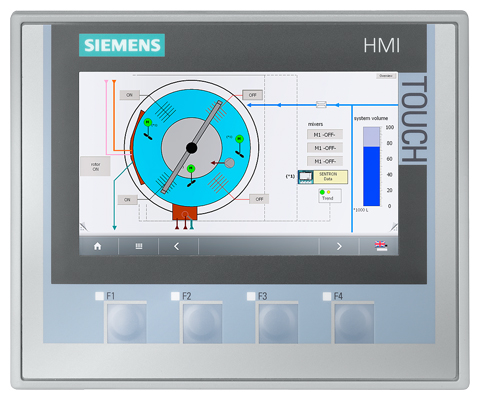
Siemens 6AG1124-2DC01-4AX0 SIPLUS HMI TP700 Comfort
€ 586,00
The Siemens 6AG1124-2DC01-4AX0 is a member of the SIPLUS HMI Comfort series, specifically a ruggedized variant of the SIMATIC HMI TP700 Comfort touch panel. It belongs to the SIPLUS extreme product line, which is designed for operation under harsh environmental conditions beyond the standard operating range. This 7-inch widescreen touch panel provides a high-performance human-machine interface solution for demanding industrial environments.
The TP700 Comfort SIPLUS variant features a 7-inch widescreen TFT display with a resolution of 800 x 480 pixels and 16 million colors, paired with a resistive touch screen. It supports a wide range of communication interfaces including PROFINET, MPI/PROFIBUS DP, Ethernet, and USB ports for both host and device connections. The panel includes 12 MB of user memory for project data, supports Sm@rtAccess for remote monitoring, and is compatible with WinCC (TIA Portal) engineering software. The SIPLUS design incorporates conformal coating on the PCBs and extended temperature tolerance to withstand condensation, corrosive atmospheres, and temperature extremes.
This panel is typically deployed in industries such as chemical processing, oil and gas, water treatment, food and beverage, and marine applications where standard HMI panels would be susceptible to environmental degradation. Its resistance to condensation and corrosive gases makes it suitable for outdoor enclosures, coastal installations, and process environments with aggressive media. The extended environmental ratings allow integration into machinery and control cabinets exposed to fluctuating temperatures and high humidity levels.
Technical Specifications
| Display Size | 7 inch widescreen |
|---|---|
| Display Resolution | 800 x 480 pixels |
| Display Colors | 16,777,216 (16 million) |
| Display Type | TFT LCD |
| Touch Technology | Resistive |
| Input/Operating Voltage | 24 V DC |
| Power Consumption | Approx. 9 W |
| Communication Interface | PROFINET (RJ45), MPI/PROFIBUS DP (RS 422/485), 2x USB (Type A host), 1x USB (Type B device), Ethernet |
| User Memory | 12 MB |
| Operating Temperature | -20 °C to +60 °C |
| Storage Temperature | -40 °C to +70 °C |
| Relative Humidity | 5% to 95% (with condensation, SIPLUS rated) |
| IP/Protection Rating | IP65 (front), IP20 (rear) |
| Mounting | Panel mounting |
| Series/Product Family | SIPLUS HMI Comfort / SIMATIC HMI TP700 Comfort |
| Certifications | CE, UL, cULus |
Common Error Codes & System Events
- Event ID: 10000
- Communication error between HMI panel and PLC. The configured connection to the controller cannot be established or has been lost.
Check PROFINET or MPI/PROFIBUS DP cable connections and termination resistors. Verify PLC is in RUN mode and the IP address or station address configuration matches the HMI project settings. - Event ID: 10001
- Tag read error. The HMI panel cannot read a configured tag from the connected controller.
Verify the tag address exists in the PLC program and the data block or memory area is accessible. Check for address mismatches between the HMI project and the PLC configuration. - Event ID: 10002
- Tag write error. The HMI panel cannot write a value to a configured tag in the connected controller.
Confirm the PLC is not in a write-protected state and the tag address is correctly configured. Check user permissions and PLC operating mode. - Event ID: 20000
- Project download error. A project transfer from the engineering PC to the HMI panel has failed.
Ensure the correct transfer channel (Ethernet or USB) is selected and the panel is in Transfer mode. Verify the WinCC TIA Portal project is compiled without errors before initiating the transfer. - Event ID: 40000
- Internal device error or system fault detected on the HMI panel.
Perform a controlled restart of the HMI panel. If the fault persists, reload the HMI project. Check for firmware compatibility between the panel and the WinCC TIA Portal version used. - Event ID: 70000
- Sm@rtServer or remote access error. Remote monitoring or control via Sm@rtAccess has failed.
Verify network connectivity and that the Sm@rtServer function is enabled in the HMI project settings. Check firewall rules and ensure the correct IP address is used by the remote client. - Event ID: 50000
- Backup or restore operation failed on the HMI panel.
Check that the USB storage device is properly formatted (FAT32) and has sufficient free space. Retry the backup or restore operation and ensure the panel is not in active transfer mode during the process.
Frequently Asked Questions
What is the supply voltage for the 6AG1124-2DC01-4AX0?
The panel operates on 24 V DC. Ensure the power supply is within the permissible tolerance range, typically 19.2 V DC to 28.8 V DC.
What makes the SIPLUS TP700 Comfort different from the standard SIMATIC TP700 Comfort?
The SIPLUS variant (6AG1124-2DC01-4AX0) features conformal coating on the printed circuit boards and is rated for extended environmental conditions including condensation, corrosive atmospheres, and a wider operating temperature range down to -20 °C. The standard SIMATIC TP700 Comfort is not designed for these conditions.
Which engineering software is required to program this HMI panel?
The panel is configured using Siemens WinCC (TIA Portal). The project must be compiled and downloaded via Ethernet or USB connection.
What communication protocols does the 6AG1124-2DC01-4AX0 support?
The panel supports PROFINET, MPI, PROFIBUS DP, and standard Ethernet (TCP/IP). It also includes USB host and device ports for data transfer and peripheral connection.
Is the front of the panel sealed against dust and water ingress?
Yes, the front of the panel meets IP65 protection rating, making it resistant to dust and low-pressure water jets. The rear of the panel is rated IP20.
Troubleshooting
Display remains blank after power is applied
Measure the 24 V DC supply voltage at the power connector on the rear of the panel. Check that the voltage is within the 19.2 V to 28.8 V DC range. Inspect the internal fuse if accessible.
Correct the supply voltage if out of range. If the supply is correct and the display remains blank, the internal power supply board or backlight inverter may be faulty and the unit should be sent for repair or the backlight replaced.
HMI panel fails to communicate with the PLC over PROFINET
Verify the Ethernet cable is connected to the correct PROFINET port and check the link LED indicator. Confirm the IP address assigned to the panel in the TIA Portal project matches the actual panel IP address, accessible via the panel's Start Center settings.
Correct any IP address mismatch in the TIA Portal project and re-download. Replace the Ethernet cable if the link LED does not illuminate. Ensure the PLC and HMI are on the same subnet.
Touch screen does not respond or registers incorrect touch positions
Check whether the touch screen responds at all by observing any visual feedback on the display. If the panel is accessible, attempt a touch screen recalibration from the Start Center or Control Panel menu.
Perform a touch screen calibration via the panel's Start Center. If calibration does not resolve the issue, the resistive touch overlay may be damaged or the touch controller board may require replacement.
Project transfer from TIA Portal to the panel fails repeatedly
Confirm the panel is set to Transfer mode via the Start Center. Check the network connection between the engineering PC and the panel. Verify the TIA Portal project is fully compiled without errors and the correct device IP address is entered in the transfer settings.
Switch the panel to Transfer mode manually if it does not switch automatically. Ensure no firewall on the engineering PC is blocking the transfer port. If using USB, try a different USB cable or port. Re-compile the project and retry the transfer.
Panel displays condensation or moisture inside the screen
Inspect the panel enclosure sealing and the front gasket for damage or improper installation. Verify the installation environment humidity levels and check whether the panel cutout dimensions and mounting torque meet the specifications in the operating manual.
Replace the front panel gasket if damaged and ensure the panel is mounted with the correct torque to achieve the IP65 seal. Install a desiccant or improve enclosure ventilation to reduce internal humidity. If moisture has entered the electronics, the panel must be dried and inspected for corrosion damage before returning to service.
| Condition | Repair, Used, Refurbished, New in box (sealed) |
|---|
Related products
-
Siemens 6AV3607-1NH00-0AX0 OP7
€ 615,00 -
Siemens 6AV6642-0BC01-1AX0 TP177B
Price range: € 630,00 through € 1.421,00 -
Siemens 6AV3627-1QK00-2AX0 OP27
Price range: € 749,00 through € 1.658,00


