


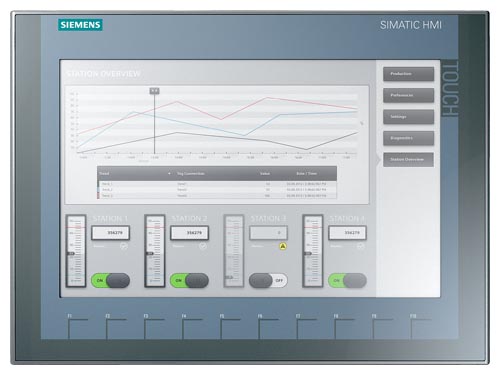
Siemens 6AG1123-2MA03-2AX0 SIPLUS HMI TP 1200 Comfort
€ 1.313,00
The Siemens 6AG1123-2MA03-2AX0 is a member of the SIPLUS HMI series, specifically a ruggedized variant of the SIMATIC HMI TP 1200 Comfort touch panel. It belongs to the Comfort Panel family within the SIMATIC HMI product line and is designed for demanding industrial environments where standard panels may not meet extended temperature or environmental requirements. This part number designates a 12-inch widescreen touch panel engineered for reliable human-machine interface operation under harsh conditions.
The TP 1200 Comfort panel features a 12.1-inch widescreen TFT display with a resolution of 1280 x 800 pixels and 16 million colors, providing clear visualization of process data. It supports a capacitive or resistive touch screen interface and includes a wide range of communication interfaces such as PROFINET, MPI/PROFIBUS DP, USB, and Ethernet. The panel is equipped with 12 MB user memory for project data and supports the SIMATIC WinCC (TIA Portal) engineering environment. The SIPLUS variant extends the operating temperature range and offers enhanced resistance to condensation and harmful substances per IEC 60721-3-3.
The SIPLUS TP 1200 Comfort is widely deployed in process industries, automotive manufacturing, chemical plants, and energy facilities where ambient conditions exceed standard panel specifications. Its extended temperature tolerance and conformal coating make it suitable for outdoor enclosures, foundry environments, and applications near cooling or heating sources. The panel is commonly integrated with Siemens S7-300, S7-400, and S7-1500 PLC families for comprehensive automation solutions.
Technical Specifications
| Display Size | 12.1 inch |
|---|---|
| Display Resolution | 1280 x 800 pixels |
| Display Colors | 16,777,216 (16 million) |
| Display Type | TFT widescreen |
| Touch Technology | Resistive touch screen |
| Input/Operating Voltage | 24 V DC |
| Power Consumption | Approx. 30 W |
| User Memory | 12 MB |
| Communication Interface | PROFINET, MPI/PROFIBUS DP, USB (2x Type A, 1x Type B), Ethernet RJ45 |
| Operating Temperature | -25 °C to +60 °C (SIPLUS extended range) |
| Storage Temperature | -40 °C to +70 °C |
| Relative Humidity | 5 % to 95 % (no condensation, standard); condensation permissible per SIPLUS spec |
| IP/Protection Rating | IP65 (front), IP20 (rear) |
| Mounting | Panel mounting |
| Certifications | CE, UL, cULus, IEC 61131-2 |
| Series/Product Family | SIPLUS HMI Comfort Panel |
Common Error Codes & System Events
- Event ID: 70000
- Configuration error – the project loaded on the panel contains configuration faults or is incompatible with the panel firmware version.
Reload the project using TIA Portal ensuring the panel firmware and project version match. Perform a firmware update if necessary. - Event ID: 40000
- Communication error – loss of connection to the configured PLC or controller.
Check PROFINET or MPI/PROFIBUS DP cabling and connector integrity. Verify PLC is powered and running. Check IP address or MPI address configuration on both panel and PLC. - Event ID: 20000
- System error – internal panel software or runtime fault detected.
Perform a warm restart of the panel. If the fault persists, reload the project or perform a factory reset and re-download the project from TIA Portal. - Event ID: 50000
- Tag communication error – one or more configured tags cannot be read from or written to the PLC.
Verify tag addresses in TIA Portal match the PLC data block structure. Check communication link status and ensure the PLC program is running. - Event ID: 10000
- Power supply undervoltage – the 24 V DC supply voltage has dropped below the permissible threshold.
Measure the supply voltage at the panel power connector. Ensure the power supply unit delivers a stable 24 V DC within tolerance. Check wiring for voltage drop. - Event ID: 80000
- Backup/restore error – an error occurred during project backup or restore operation via USB or network.
Verify the USB storage device is formatted correctly (FAT32) and has sufficient free space. Retry the backup or restore operation. Check file integrity of the project archive. - Event ID: 30000
- Screen saver or display fault – display backlight or screen saver function has encountered an error.
Check display settings in the panel's Control Panel. If the backlight has failed, the display unit or backlight inverter may require replacement.
Frequently Asked Questions
What is the supply voltage for the 6AG1123-2MA03-2AX0?
The panel operates on 24 V DC. Ensure the power supply is stable and within the specified tolerance range to prevent undervoltage faults.
What is the difference between the SIPLUS variant and the standard SIMATIC TP 1200 Comfort?
The SIPLUS variant (6AG1123-2MA03-2AX0) is designed for extended environmental conditions, including a wider operating temperature range of -25 °C to +60 °C and enhanced resistance to condensation and corrosive atmospheres. The standard SIMATIC TP 1200 Comfort is rated for 0 °C to +50 °C.
Which engineering software is used to program this panel?
The panel is configured and programmed using Siemens TIA Portal with the WinCC (TIA Portal) HMI engineering software. The project must be compiled and downloaded to the panel via Ethernet or USB.
What communication protocols does the 6AG1123-2MA03-2AX0 support?
The panel supports PROFINET, MPI, PROFIBUS DP, and standard Ethernet TCP/IP communication, allowing integration with a wide range of Siemens and third-party controllers.
Is the 6AG1123-2MA03-2AX0 compatible with S7-1500 PLCs?
Yes, the TP 1200 Comfort panel is fully compatible with SIMATIC S7-1500, S7-400, and S7-300 PLCs when configured via TIA Portal using the appropriate communication interface.
Troubleshooting
Display remains blank after power on
Measure the 24 V DC supply voltage at the panel power connector. Check whether the panel emits any startup sounds or LED indicators are active, which would suggest a display hardware fault rather than a power issue.
Confirm the supply voltage is within 24 V DC tolerance. If voltage is correct and the panel shows no signs of life, inspect the internal fuse and power supply board. A failed backlight or display unit may require panel repair or replacement.
Panel fails to establish communication with the PLC
Check the PROFINET or PROFIBUS DP cable connections and verify the IP address or MPI/DP address settings on both the panel and the PLC. Use the panel's diagnostic screen to view communication status.
Correct any IP address conflicts or MPI address mismatches. Replace damaged cables or connectors. Ensure the PLC is in RUN mode and the network switch or hub is functioning correctly.
Touch screen does not respond or responds inaccurately
Determine whether the issue is limited to specific screen areas or is global. Check for physical damage, contamination, or moisture on the touch surface. Attempt a touch screen recalibration from the panel's Control Panel.
Clean the touch surface with a soft, dry cloth. Perform touch screen calibration via the SIMATIC panel Control Panel. If calibration fails or the issue persists, the touch screen overlay may require replacement.
Project download from TIA Portal fails
Verify the Ethernet or USB connection between the engineering PC and the panel. Check that the TIA Portal project firmware version matches the panel's installed firmware version. Review TIA Portal error messages for specific fault details.
Update the panel firmware to match the TIA Portal project version using the ProSave tool or TIA Portal firmware update function. Ensure no firewall or network settings are blocking the connection on the engineering PC.
Panel repeatedly restarts or shows runtime errors after project load
Check the project for configuration errors such as unsupported functions, incorrect tag types, or memory overload. Review the panel's event log for specific Event IDs that indicate the source of the fault.
Open the project in TIA Portal, resolve all compilation warnings and errors, and re-download the project. If memory usage is near the 12 MB limit, optimize the project by reducing image sizes or removing unused screens and tags.
| Condition | Repair, Used, Refurbished, New in box (sealed) |
|---|
Related products
-
Siemens 6AV3607-1NH00-0AX0 OP7
€ 615,00 -
Siemens 6AG1643-0AA01-4AX0 MP 277
€ 1.278,00 -
Siemens 6AV3627-1QK00-0AX0 OP27
Price range: € 649,00 through € 869,00


