

Siemens 6ES7613-1CA02-0AE3 SIMATIC C7-613
€ 1.278,00
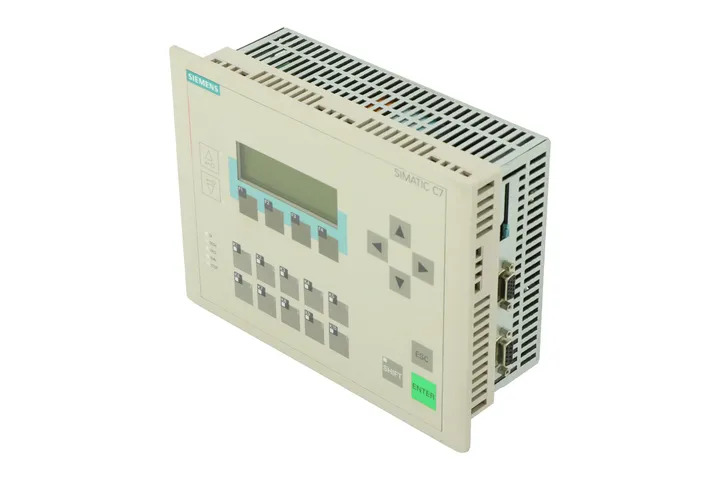
The Siemens SIMATIC C7-613, part number 6ES7613-1CA02-0AE3, is a compact combined controller and operator panel unit belonging to the SIMATIC C7 product family. It integrates a programmable logic controller (PLC) based on the S7-300 CPU architecture with an operator panel (OP) into a single housing, eliminating the need for separate HMI and controller hardware. This integration reduces panel space requirements and simplifies system wiring and commissioning.
The C7-613 features a built-in monochrome display with touch or membrane keypad input, onboard digital I/O, and MPI (Multi-Point Interface) communication for integration into SIMATIC networks. It supports STEP 7 programming software for PLC logic and ProTool or WinCC flexible for HMI configuration, allowing both controller and visualization to be engineered within the Siemens TIA-compatible toolchain. The unit includes retentive memory for data and program storage, and supports expansion via standard S7-300 I/O modules.
The SIMATIC C7-613 is well suited for compact machine-level automation tasks in industries such as packaging, material handling, and general manufacturing. Its all-in-one design makes it particularly appropriate for standalone machines or small production cells where minimizing control cabinet footprint is a priority. The integrated I/O and display make it a practical solution for applications requiring local operator interaction combined with direct process control.
Technical Specifications
| Series/Product Family | SIMATIC C7 |
|---|---|
| Display Type | Monochrome LCD |
| Operator Input | Membrane keypad |
| Communication Interface | MPI (Multi-Point Interface) |
| PLC Base | S7-300 CPU architecture |
| Onboard Digital Inputs | 16 |
| Onboard Digital Outputs | 16 |
| Input/Operating Voltage | 24 V DC |
| Operating Temperature | 0 °C to +55 °C |
| Storage Temperature | -20 °C to +70 °C |
| Relative Humidity | 10 % to 95 % (non-condensing) |
| IP/Protection Rating | IP65 (front panel) |
| Mounting | Panel mounting |
| Certifications | CE, UL |
Common Error Codes & System Events
- Event ID: 10000
- MPI communication error detected between C7 unit and connected SIMATIC network nodes.
Check MPI cable connections and termination resistors. Verify MPI address settings and baud rate configuration in STEP 7. - Event ID: 10001
- Configuration mismatch between downloaded HMI project and connected PLC program.
Re-download both the PLC program via STEP 7 and the HMI project via ProTool/WinCC flexible to ensure consistency. - Event ID: 10002
- Tag read/write error — HMI unable to access a configured PLC data address.
Verify that the PLC data block or memory address referenced in the HMI tag configuration exists and is correctly defined in the STEP 7 project. - Event ID: 10003
- Retentive memory error — data in retentive memory area could not be restored after power cycle.
Check battery or capacitor backup status. Perform a memory reset and reload the PLC program. Reconfigure retentive data areas if necessary. - Event ID: 10004
- I/O access error — onboard digital I/O module not responding correctly.
Check wiring to onboard I/O terminals. Verify I/O configuration in STEP 7 hardware configuration matches the physical unit. Replace unit if hardware fault is confirmed. - Event ID: 10005
- Watchdog timeout — CPU detected a program cycle time overrun.
Review PLC program for loops or instructions causing excessive scan time. Increase the watchdog time in CPU properties if justified, or optimize the program logic. - Event ID: 10006
- Power supply undervoltage — 24 V DC supply voltage dropped below operational threshold.
Measure the 24 V DC supply at the C7 power terminals. Check the power supply unit output and cable connections. Replace the power supply if voltage is out of specification.
Frequently Asked Questions
What programming software is required for the SIMATIC C7-613?
The PLC portion is programmed using Siemens STEP 7 (version 5.x), while the HMI visualization is configured using ProTool or WinCC flexible. Both tools are required for a complete project.
Can the C7-613 be expanded with additional I/O modules?
Yes, the C7-613 supports expansion with standard SIMATIC S7-300 signal modules (SM) connected via the integrated backplane bus, allowing additional digital and analog I/O to be added as required.
What communication interface does the C7-613 use?
The C7-613 uses MPI (Multi-Point Interface) as its primary communication interface, allowing it to connect to other SIMATIC PLCs, programming devices, and HMI panels within a SIMATIC network.
What is the supply voltage for the C7-613?
The C7-613 operates on a 24 V DC supply voltage, which must be provided externally and connected to the designated power terminals on the unit.
Is the C7-613 compatible with WinCC flexible for HMI configuration?
Yes, the C7-613 HMI component can be configured using WinCC flexible as well as the older ProTool software, depending on the version of the engineering toolchain being used.
Troubleshooting
Display remains blank after power is applied
Measure 24 V DC at the power supply terminals of the C7 unit. Check internal fuse if accessible. Observe whether the CPU RUN/STOP LED illuminates, indicating the controller is powered but the display circuit may have failed.
Confirm the 24 V DC supply is within specification (typically 20.4–28.8 V DC). If the CPU LEDs are active but the display is blank, the display backlight or display module may have failed and the unit should be sent for repair or replacement.
MPI communication cannot be established with a programming device
Check the MPI cable and connector integrity. Verify the MPI address of the C7-613 in STEP 7 hardware configuration and confirm it does not conflict with other nodes on the network. Check bus termination at both ends of the MPI segment.
Set the correct MPI address using STEP 7 or the C7 front panel menu. Ensure bus termination resistors are active only at the two physical ends of the MPI cable. Replace the MPI cable if continuity tests indicate a fault.
PLC enters STOP mode unexpectedly
Read the diagnostic buffer in STEP 7 (CPU Diagnostic Buffer) to identify the event that caused the STOP. Common causes include program errors, I/O access faults, or watchdog timeouts.
Address the specific fault identified in the diagnostic buffer. For program errors, correct the STEP 7 logic and reload. For I/O faults, inspect wiring and module configuration. Perform a CPU memory reset and reload if the cause cannot be isolated.
HMI tags show incorrect or no values on the operator panel
Verify that the HMI project tag addresses match the actual PLC data addresses in the STEP 7 program. Check that the MPI connection between the HMI and PLC components is active and error-free.
Re-download the HMI project using ProTool or WinCC flexible and ensure tag addresses are correctly mapped to the PLC memory. If communication errors are present, resolve MPI connectivity issues first.
Onboard digital outputs do not switch as expected
Check the PLC program in STEP 7 to confirm the output coils are being driven correctly. Measure the output terminal voltage with a multimeter when the output should be active. Inspect wiring for loose connections or short circuits.
Correct any program logic errors in STEP 7 and reload the project. If the program logic is correct but outputs remain inactive, inspect the output wiring and load. If outputs are confirmed faulty in hardware, the unit requires repair or replacement.
| Condition | Repair, Used, Refurbished, New in box (sealed) |
|---|
Related products
-
Siemens 6AV6640-0CA11-0AX0 OP 73micro
Price range: € 368,00 through € 1.055,00 -
Siemens 6AV6545-8CC10-0AA0 Mobile Panel 177
€ 1.247,00 -
Siemens 6AV3627-1QK00-2AX0 OP27
Price range: € 749,00 through € 1.658,00