


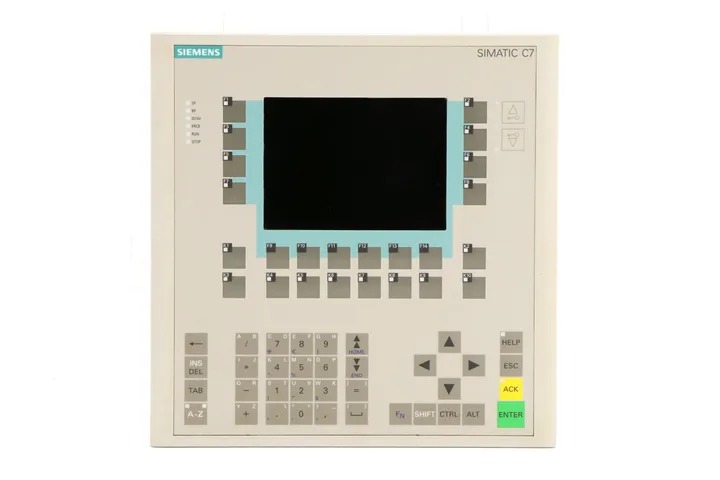
Siemens 6ES7636-2EC00-0AE3 SIMATIC C7-636
Price range: € 2.231,00 through € 4.499,00
The Siemens SIMATIC C7-636, part number 6ES7636-2EC00-0AE3, is a compact combined controller and operator panel unit belonging to the SIMATIC C7 product family. It integrates a programmable logic controller (PLC) based on the S7-300 CPU architecture with an operator panel (OP) into a single housing, eliminating the need for separate HMI and controller hardware. This integration reduces panel space requirements and simplifies wiring in machine-level automation tasks.
The C7-636 features a built-in STN LCD display with touch or membrane keypad operation and supports MPI (Multi-Point Interface) communication for integration into SIMATIC networks. It includes onboard digital I/O, integrated CPU functionality compatible with STEP 7 programming software, and supports ProTool for HMI configuration. The unit operates on 24 V DC supply voltage and is designed for panel mounting with a robust industrial-grade enclosure offering IP65 protection on the front face.
The SIMATIC C7-636 is primarily used in machine-level automation applications where a compact, self-contained control and visualization solution is required. Typical industries include packaging machinery, textile machinery, printing equipment, and general-purpose industrial machines. Its integrated design makes it well suited for OEM machine builders seeking to reduce component count and cabinet footprint without sacrificing control or visualization capability.
Technical Specifications
| Series/Product Family | SIMATIC C7 |
|---|---|
| Display Type | STN LCD |
| Display Size | 5.7 inch |
| Input/Operating Voltage | 24 V DC |
| Communication Interface | MPI (Multi-Point Interface) |
| Onboard Digital Inputs | 16 |
| Onboard Digital Outputs | 16 |
| IP Protection Rating (Front) | IP65 |
| Mounting | Panel mounting |
| Programming Software | STEP 7 / ProTool |
| CPU Compatibility | S7-300 compatible CPU |
| Operating Temperature | 0 °C to +55 °C |
| Storage Temperature | -20 °C to +70 °C |
| Certifications | CE, UL |
Common Error Codes & System Events
- Event ID: 10000
- Loss of communication on MPI interface
Check MPI cable connections and termination resistors. Verify MPI address settings in both the C7 unit and connected devices. Restart communication. - Event ID: 10001
- Project data transfer error during download
Verify ProTool project compatibility with the C7-636 firmware version. Re-attempt download via MPI. Check cable integrity. - Event ID: 40000
- PLC CPU in STOP mode
Check the CPU diagnostic buffer in STEP 7 for the cause of the STOP. Correct the program error or I/O fault and perform a CPU restart. - Event ID: 40001
- I/O access error on onboard digital I/O
Check wiring on the affected I/O channel. Verify load voltage is present. Inspect for short circuit or open circuit conditions. - Event ID: 70010
- Internal battery voltage low or battery missing
Replace the internal backup battery to retain retentive data and real-time clock settings. Use the correct battery type as specified in the manual. - Event ID: 70020
- Retentive memory data lost after power failure
Battery was depleted or absent during power loss. Replace battery and reload retentive data or reinitialize the application as required. - Event ID: 20000
- HMI configuration file missing or corrupted
Re-download the ProTool project to the C7 unit. Ensure the correct project file is compiled and transferred completely.
Frequently Asked Questions
Is the SIMATIC C7-636 compatible with STEP 7 programming software?
Yes, the C7-636 integrates an S7-300 compatible CPU that is programmed using Siemens STEP 7. The HMI portion is configured separately using ProTool software.
What communication interfaces does the C7-636 support?
The C7-636 supports MPI (Multi-Point Interface) for both PLC programming and HMI communication. This allows integration into existing SIMATIC S7 networks.
What is the supply voltage for the 6ES7636-2EC00-0AE3?
The unit operates on a 24 V DC supply voltage. Ensure the power supply is adequately rated for the unit's current consumption.
Can the C7-636 be used as a standalone controller without an external PLC?
Yes, the C7-636 integrates both the PLC and HMI functions in a single unit, allowing it to operate as a standalone machine controller without an external S7-300 CPU.
What is the front panel protection rating of the C7-636?
The front panel of the C7-636 carries an IP65 protection rating, making it suitable for installation in environments where dust and water spray may be present.
Troubleshooting
Display remains blank after power on
Measure 24 V DC at the power supply terminals of the C7 unit. Check internal fuse if accessible. Observe whether the CPU RUN/STOP LED is active, indicating the controller is powered but the display has failed.
Verify and restore correct 24 V DC supply. If supply is confirmed and display remains blank, the internal display or backlight may have failed and the unit should be sent for repair or the display module replaced.
CPU remains in STOP mode after startup
Connect STEP 7 via MPI and read the CPU diagnostic buffer to identify the cause of the STOP state. Check for program errors, I/O configuration mismatches, or missing modules.
Correct the identified fault in the STEP 7 program or hardware configuration. Perform a memory reset (MRES) if necessary and reload the program, then restart the CPU.
MPI communication cannot be established with a programming device
Check MPI cable connections and verify the MPI address of the C7 unit matches the configuration in STEP 7. Confirm bus termination is correctly applied at both ends of the MPI segment.
Correct the MPI address if misconfigured, replace faulty MPI cable, and ensure proper bus termination. Retry connection from the programming device.
HMI screens display incorrect or no data from the PLC
Verify that the ProTool project variable addresses match the actual data block or memory addresses in the STEP 7 program. Check that the CPU is in RUN mode and communication is active.
Correct any address mismatches in the ProTool project and re-download to the C7 unit. Ensure the PLC program is running and the relevant data areas are being written correctly.
Retentive data lost after power cycle
Check the internal backup battery voltage. If the battery is depleted or missing, retentive memory contents will be lost on every power cycle.
Replace the internal backup battery with the correct type as specified in the Siemens C7-636 manual. After replacement, reload or reinitialize retentive data as required by the application.
| Condition | Repair, Used, Refurbished, New in box (sealed) |
|---|
Related products
-
Siemens 6AV3627-1NK00-2AX0 SIMATIC OP 27
Price range: € 749,00 through € 964,00 -
Siemens 6AV6643-0AA01-1AX1 TP277
€ 249,00 -
Siemens 6AV6642-0BC01-1AX1 TP177B
Price range: € 657,00 through € 1.249,00


