

Siemens 6ES7634-2BF02-0AE3 SIMATIC C7-634
Price range: € 1.197,00 through € 1.485,00
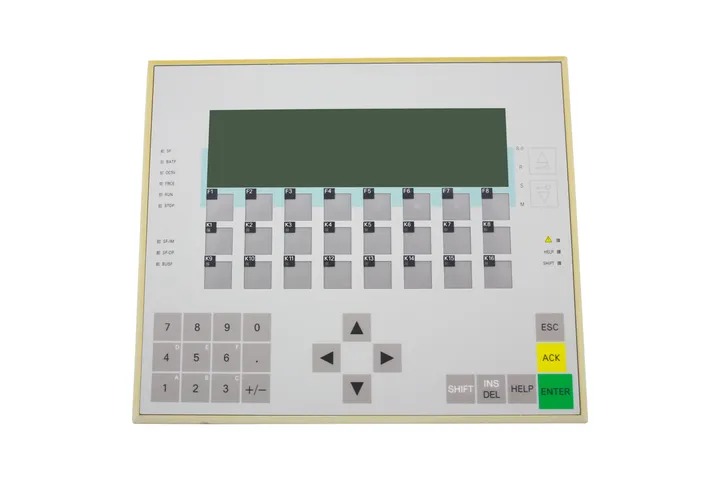
The Siemens SIMATIC C7-634, part number 6ES7634-2BF02-0AE3, is a compact combined controller and operator panel unit belonging to the SIMATIC C7 product family. It integrates a PLC (based on the SIMATIC S7-300 CPU) with an HMI operator panel into a single housing, eliminating the need for separate controller and display units. This all-in-one design is part of Siemens' strategy to reduce panel space and simplify machine-level automation architectures.
The C7-634 features a built-in STN monochrome display with touch functionality and function keys for operator interaction. It incorporates an MPI (Multi-Point Interface) communication port for integration into SIMATIC networks, and supports PROFIBUS-DP for field-level communication with distributed I/O and drives. The unit includes onboard digital and analog I/O, integrated CPU functionality compatible with STEP 7 programming, and can be configured using ProTool or WinCC flexible for the HMI portion alongside STEP 7 for the PLC logic.
The SIMATIC C7-634 is well suited for machine-level control applications where panel space is limited and a combined HMI and control solution is preferred. Typical industries include packaging machinery, conveyor systems, small to mid-scale manufacturing equipment, and process automation cells. Its integrated design reduces wiring complexity and commissioning time, making it a practical choice for OEMs building compact machine control panels.
Technical Specifications
| Series/Product Family | SIMATIC C7 |
|---|---|
| Display Type | STN monochrome LCD |
| Display Size | 5.7 inch |
| Touch Technology | Touch screen with function keys |
| Input/Operating Voltage | 24 V DC |
| Communication Interface | MPI, PROFIBUS-DP |
| Onboard Digital Inputs | 16 |
| Onboard Digital Outputs | 16 |
| Onboard Analog Inputs | 4 |
| Onboard Analog Outputs | 2 |
| Programming Software | STEP 7, ProTool / WinCC flexible |
| Operating Temperature | 0 °C to +55 °C |
| Storage Temperature | -20 °C to +70 °C |
| IP/Protection Rating | IP65 (front panel) |
| Mounting | Panel mounting |
| Certifications | CE, UL |
Common Error Codes & System Events
- Event ID: 10000
- Loss of communication on MPI interface. The C7 unit has lost contact with a connected device on the MPI network.
Check MPI cable connections and termination resistors. Verify MPI address settings and network configuration in STEP 7. Ensure no address conflicts exist on the bus. - Event ID: 40000
- PLC CPU has transitioned to STOP mode due to a programming error or hardware fault.
Connect STEP 7 programmer via MPI, read the diagnostic buffer, identify the cause of the STOP, correct the program or hardware fault, and perform a CPU restart. - Event ID: 10001
- PROFIBUS-DP communication error. A slave device on the PROFIBUS network is not responding or has failed.
Check PROFIBUS cable wiring and termination. Verify slave device power and address settings. Review the DP master configuration in STEP 7 hardware configuration. - BATTF
- Battery fault or battery voltage low. The backup battery for retaining RAM data and the real-time clock is depleted.
Replace the backup battery with the correct Siemens replacement type. After replacement, perform a memory reset and reload the user program if necessary. - EXTF
- External fault detected. A hardware fault has been detected in the I/O or peripheral modules connected to the C7 unit.
Check the diagnostic buffer in STEP 7 for detailed fault information. Inspect connected I/O wiring and modules for short circuits, overloads, or missing signals. - Event ID: 20000
- HMI configuration or project download error. The HMI runtime has detected a mismatch or missing project data.
Re-download the HMI project using ProTool or WinCC flexible. Ensure the project version is compatible with the firmware version of the C7-634 unit. - FRCE
- Force mode is active. One or more I/O variables are currently being forced via STEP 7, which may cause unexpected machine behavior.
Connect STEP 7 and navigate to the force table. Remove all active force values and disable force mode before returning the machine to normal operation.
Frequently Asked Questions
What PLC CPU is integrated into the SIMATIC C7-634?
The C7-634 integrates a CPU based on the SIMATIC S7-300 architecture, programmed using Siemens STEP 7 software. It supports standard S7-300 instruction sets and function blocks.
What software is required to program and configure the C7-634?
The PLC portion is programmed using Siemens STEP 7, while the HMI portion is configured using ProTool or WinCC flexible. Both software packages must be used together for a complete project.
What communication interfaces are available on the C7-634?
The C7-634 provides an MPI interface for programming and S7 network communication, and a PROFIBUS-DP interface for connecting distributed field devices and I/O modules.
Is the C7-634 compatible with SIMATIC S7-300 expansion modules?
Yes, the C7-634 can be expanded using standard SIMATIC S7-300 signal modules (SM), function modules (FM), and communication modules (CP) via the S7-300 backplane bus.
What is the front panel protection rating of the C7-634?
The front panel of the C7-634 carries an IP65 protection rating, making it suitable for installation in control panels where dust and water spray resistance is required.
Troubleshooting
Display remains blank after power is applied
Measure the 24 V DC supply voltage at the power connector. Check that the supply is within the specified tolerance. Inspect the internal fuse if accessible.
Correct the supply voltage to within the 24 V DC nominal range. If voltage is correct and display remains blank, the internal power supply or display backlight may have failed and the unit should be sent for repair or replacement.
CPU remains in STOP mode and will not transition to RUN
Connect STEP 7 via MPI and read the CPU diagnostic buffer to identify the specific fault causing the STOP condition. Check for program errors, missing I/O modules, or configuration mismatches.
Resolve the identified fault — correct program errors, ensure all configured hardware modules are present and correctly addressed, then perform a CPU restart from STEP 7 or via the mode selector switch.
PROFIBUS-DP slave devices are not communicating
Check the PROFIBUS cable for correct wiring, shielding, and termination at both ends of the bus segment. Verify slave device addresses match the hardware configuration in STEP 7.
Correct any wiring faults, ensure termination resistors are active only at the physical ends of the bus, and re-download the hardware configuration from STEP 7 if address or module changes were made.
HMI screen shows incorrect or outdated project data after restart
The HMI project stored in the unit may be corrupted or may not have been successfully downloaded. Check the project version in ProTool or WinCC flexible against the version loaded on the device.
Perform a fresh project download using ProTool or WinCC flexible via the MPI interface. Ensure the correct communication settings are configured in the transfer dialog before initiating the download.
Backup battery warning is displayed or BATTF LED is active
The internal backup battery voltage has dropped below the minimum threshold. This battery maintains retentive data memory and the real-time clock during power-off periods.
Replace the backup battery with the Siemens-specified replacement. After replacement, verify that retentive data and the real-time clock are intact; if data was lost, reload the user program and reconfigure the clock.
| Condition | Repair, Used, Refurbished, New in box (sealed) |
|---|
Related products
-
Siemens 6AG1642-0BD01-2AX0 TP177B
€ 714,00 -
Siemens 6AV6643-0AA01-1AX1 TP277
€ 249,00 -
Siemens 6AG1642-0BD01-4AX0 TP177B
€ 555,00