


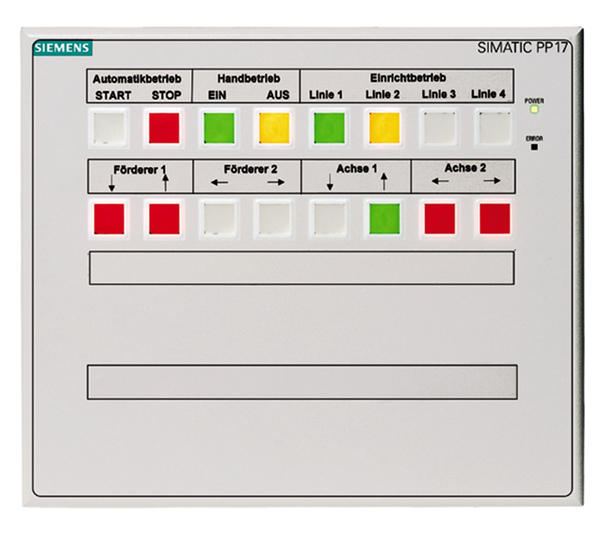
Siemens 6AV3688-3CD13-0AX0 TD 17
Price range: € 563,00 through € 1.239,00
The Siemens 6AV3688-3CD13-0AX0 is a Text Display (TD 17) belonging to the SIMATIC HMI product family. It is a compact operator panel designed for straightforward text-based visualization and operator control tasks in industrial automation environments. This unit interfaces directly with Siemens SIMATIC S7-200 PLCs, functioning as a dedicated display and input device for machine-level operation.
The TD 17 features a built-in LCD text display capable of showing multiple lines of alphanumeric characters, along with configurable function keys that allow operators to trigger predefined actions or navigate menus. It communicates with the S7-200 CPU via the PPI (Point-to-Point Interface) protocol over an RS-485 serial connection, requiring no additional communication modules. The panel is designed for panel-mount installation and operates on a 24 V DC supply, with a compact form factor suited for integration into control cabinet doors.
The TD 17 is widely used in small-scale machine automation, conveyor systems, packaging equipment, and process control applications where a full graphical HMI is not required. Its direct compatibility with the S7-200 PLC family makes it a cost-effective solution for OEMs and machine builders requiring basic operator interaction. The unit is particularly suited for applications demanding robust, reliable text-based status display and simple parameter entry without the complexity of a full SCADA or graphical panel system.
Technical Specifications
| Display Type | LCD Text Display |
|---|---|
| Display Lines | 4 lines of text |
| Characters per Line | 20 characters |
| Input/Operating Voltage | 24 V DC |
| Communication Interface | RS-485 (PPI protocol) |
| Compatible PLC | SIMATIC S7-200 |
| Mounting | Panel mount |
| Operating Temperature | 0 °C to +50 °C |
| Storage Temperature | -20 °C to +70 °C |
| IP Rating (Front) | IP65 |
| Certifications | CE, UL |
| Series/Product Family | SIMATIC TD 17 |
Frequently Asked Questions
Which PLC is the TD 17 6AV3688-3CD13-0AX0 compatible with?
The TD 17 is designed exclusively for use with Siemens SIMATIC S7-200 PLCs. It communicates via the PPI protocol over an RS-485 connection.
What configuration software is required for the TD 17?
The TD 17 is configured using the TD 17 Wizard integrated within STEP 7-Micro/WIN, the programming software for the S7-200 PLC family. No separate HMI configuration software such as WinCC Flexible is required.
What is the supply voltage for the TD 17?
The TD 17 operates on a 24 V DC supply voltage, typically sourced from the same power supply used for the S7-200 CPU.
Can the TD 17 display graphics or only text?
The TD 17 is a text-only display and does not support graphical visualization. It is limited to alphanumeric character display across its 4-line LCD screen.
What is the front panel protection rating of the TD 17?
The front panel of the TD 17 carries an IP65 protection rating, making it suitable for installation in environments where dust and water spray may be present.
Troubleshooting
Display remains blank after power on
Check that 24 V DC is present at the power supply terminals of the TD 17. Verify the cable connection between the TD 17 and the S7-200 CPU.
Ensure the 24 V DC supply is correctly wired and within tolerance. Replace the connecting cable if damaged. If the display remains blank with confirmed power, the internal LCD or power circuitry may require repair or unit replacement.
TD 17 shows 'No Connection' or communication error with S7-200
Verify the PPI cable is correctly seated at both the TD 17 port and the S7-200 CPU port 0. Check the baud rate and PPI address settings configured in STEP 7-Micro/WIN match the TD 17 configuration.
Re-seat the RS-485 cable connections. Confirm the TD 17 node address and baud rate match the settings in the TD 17 Wizard configuration. Replace the PPI cable if continuity testing reveals a fault.
Function keys on the TD 17 do not respond
Check the TD 17 configuration in STEP 7-Micro/WIN to confirm function keys have been assigned to the correct memory bits in the S7-200. Verify the PLC program is reading and acting on the TD 17 key bits.
Re-configure the function key assignments using the TD 17 Wizard and re-download the project to the S7-200 CPU. If keys are physically unresponsive, the keypad membrane may be worn and the unit may require hardware repair.
Displayed text is garbled or shows incorrect characters
This typically indicates a communication issue or a mismatch between the character set configured in the TD 17 Wizard and the data being sent from the S7-200 PLC program.
Review the string data and character encoding in the S7-200 program. Re-run the TD 17 Wizard to ensure the display configuration is consistent with the PLC data format, then re-download the configuration.
TD 17 does not retain configuration after power cycle
The TD 17 stores its configuration in the S7-200 CPU memory rather than internal non-volatile memory. If the CPU loses its program, the TD 17 will also lose its display configuration.
Ensure the S7-200 CPU has a valid memory cartridge or that the program is stored in permanent memory. Re-download the STEP 7-Micro/WIN project including the TD 17 configuration to the CPU.
| Condition | Repair, Used, Refurbished, New in box (sealed) |
|---|
Related products
-
Siemens 6AG1642-0BD01-2AX0 TP177B
€ 714,00 -
Siemens 6AV6642-0BA01-1AX1 TP177B
Price range: € 723,00 through € 2.499,00 -
Siemens 6AV3627-1QK00-2AX0 OP27
Price range: € 749,00 through € 1.658,00


