


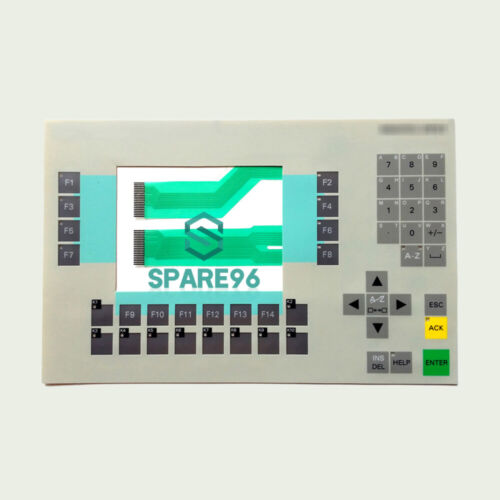
Siemens 6AV3627-5BB00-0AE0 OP27
€ 769,00
The Siemens 6AV3627-5BB00-0AE0 is the OP27 operator panel, part of the SIMATIC HMI family from Siemens. This unit is a monochrome graphical operator panel designed for machine-level human-machine interface applications. It provides a robust front-panel-mounted interface for process visualization, parameter input, and status monitoring in industrial environments.
The OP27 features a 5.7-inch STN monochrome LCD display with a resolution of 320 x 240 pixels (QVGA). It is equipped with a membrane keypad for operator input, including function keys and system keys. The panel communicates via MPI (Multi-Point Interface) and PROFIBUS-DP, enabling direct integration with Siemens S7-300 and S7-400 PLCs. It supports configuration via SIMATIC ProTool software and provides onboard memory for project storage. The unit operates on a 24 V DC supply and is rated IP65 at the front panel for protection against dust and water ingress.
The OP27 is widely deployed in manufacturing, process automation, and machine tool industries where a reliable and compact operator interface is required. It is commonly found on packaging machinery, conveyor systems, injection molding machines, and general-purpose industrial control panels. Its compatibility with the SIMATIC S7 controller family and PROFIBUS-DP makes it a standard choice for Siemens-based automation architectures from the late 1990s through the 2000s.
Technical Specifications
| Display Size | 5.7 inch |
|---|---|
| Display Type | STN monochrome LCD |
| Display Resolution | 320 x 240 pixels (QVGA) |
| Input Method | Membrane keypad |
| Input/Operating Voltage | 24 V DC |
| Communication Interface | MPI, PROFIBUS-DP |
| IP/Protection Rating | IP65 (front panel) |
| Operating Temperature | 0 °C to +50 °C |
| Storage Temperature | -20 °C to +60 °C |
| Relative Humidity | 10% to 90% (non-condensing) |
| Mounting | Panel mounting |
| Series/Product Family | SIMATIC HMI OP27 |
| Configuration Software | SIMATIC ProTool |
| Certifications | CE, UL |
Common Error Codes & System Events
- Event ID: 10000
- No connection to PLC. The operator panel cannot establish communication with the configured controller.
Check MPI or PROFIBUS-DP cable connections and termination resistors. Verify PLC address settings match the OP27 configuration. Ensure the PLC is powered and in RUN mode. - Event ID: 10001
- Connection to PLC interrupted. An established communication link to the controller has been lost.
Inspect cable integrity and connector seating. Check for bus termination issues on the PROFIBUS or MPI network. Restart the OP27 and PLC if the connection does not recover. - Event ID: 20000
- Project download error. The configuration project could not be transferred to the panel successfully.
Verify the ProTool project is compiled without errors. Check the transfer cable and COM port settings. Ensure the panel is in transfer mode before initiating download. - Event ID: 40000
- System memory low. Available memory for runtime operation is insufficient.
Reduce the size of the loaded project by removing unused screens or tags. Perform a full project download to clear fragmented memory. - Event ID: 50000
- Illegal operation. An operator action or script has attempted an invalid operation.
Review the project configuration for invalid tag references or script errors. Recompile and re-download the project using ProTool. - Event ID: 60000
- Hardware fault detected. An internal hardware error has been identified on the panel.
Perform a power cycle. If the fault persists, the panel may require repair or replacement of internal components. Contact Siemens technical support or a qualified repair facility. - Event ID: 70000
- Configuration error. The loaded project contains configuration data incompatible with the panel firmware version.
Verify the ProTool project version matches the firmware version of the OP27. Update firmware or recompile the project with the correct panel type selected.
Frequently Asked Questions
Which PLCs are compatible with the OP27 (6AV3627-5BB00-0AE0)?
The OP27 is compatible with Siemens SIMATIC S7-300 and S7-400 PLCs via MPI or PROFIBUS-DP. It also supports connection to S5 controllers via appropriate adapters and configuration in ProTool.
What software is used to configure the OP27?
The OP27 is configured using Siemens SIMATIC ProTool software. WinCC flexible is not natively supported for this panel generation; ProTool is the required engineering tool.
What is the supply voltage for the 6AV3627-5BB00-0AE0?
The OP27 operates on a 24 V DC supply voltage. Ensure the power supply is within the specified tolerance range to avoid panel faults.
What is the front panel protection rating of the OP27?
The OP27 carries an IP65 protection rating at the front panel, making it suitable for installation in environments with dust and water spray exposure.
Can the OP27 display color graphics?
No, the OP27 uses a monochrome STN LCD display. It does not support color graphics; all visualization is rendered in monochrome at a resolution of 320 x 240 pixels.
Troubleshooting
Display remains blank after power on
Measure 24 V DC at the power supply connector on the rear of the panel. Check for blown internal fuse. Observe whether the backlight is on but the display content is absent, or whether there is no illumination at all.
If no voltage is present, check the external power supply and wiring. If voltage is correct but the display is blank, the backlight or internal power board may have failed and the unit will require repair or component replacement.
OP27 cannot connect to S7 PLC via MPI
Verify the MPI address configured in the ProTool project matches the address set on the OP27 and that the PLC MPI address is correct. Check cable connections and ensure bus termination is applied at both ends of the MPI network.
Correct any address mismatches in the ProTool project and re-download. Replace the MPI cable if damaged. Ensure only the two physical end nodes on the MPI bus have termination resistors enabled.
Project download fails or transfer does not start
Confirm the OP27 is in transfer mode (accessible via the Start Center or by holding the appropriate key combination during boot). Check the serial transfer cable and PC COM port assignment in ProTool.
Restart the panel and re-enter transfer mode. Use a known-good PC-to-OP transfer cable. Verify COM port settings in ProTool match the physical port in use. Disable any conflicting software on the PC that may occupy the COM port.
Membrane keypad keys are unresponsive or intermittent
Test each key systematically in a diagnostic screen if available. Inspect the keypad membrane for visible damage, contamination, or delamination at the connector ribbon.
Clean the keypad surface with a dry cloth. If the ribbon connector is loose, reseat it carefully. If individual keys have failed, the membrane keypad assembly will need to be replaced as a unit.
Panel displays 'No project loaded' after power cycle
This indicates the internal flash memory did not retain the project, possibly due to a failed download, memory corruption, or a hardware fault on the memory module.
Re-download the ProTool project to the panel. If the problem recurs after multiple download attempts, the internal memory may be faulty and the panel should be sent for repair or replacement.
| Condition | Repair, Used, Refurbished, New in box (sealed) |
|---|
Related products
-
Siemens 6AV3607-1NH00-0AX0 OP7
€ 615,00 -
Siemens 6AV6643-0AA01-1AX1 TP277
€ 249,00 -
Siemens 6AG1643-0AA01-4AX0 MP 277
€ 1.278,00


