


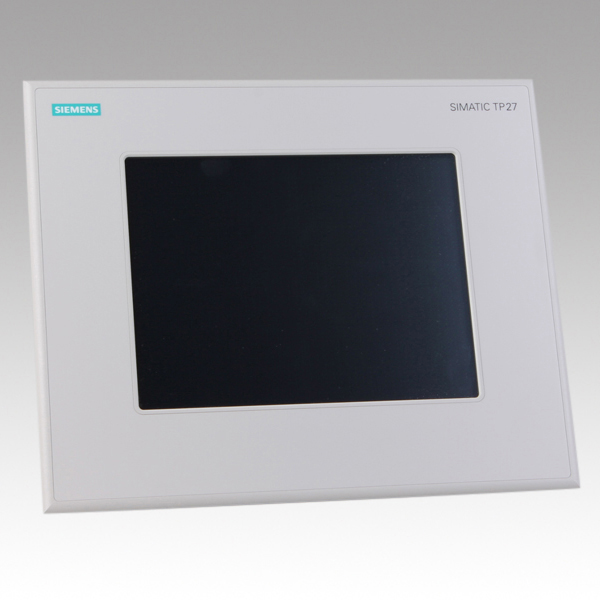
Siemens 6AV3627-1QL00-0AX0 OP27
Price range: € 502,00 through € 555,00
The Siemens OP27 (part number 6AV3627-1QL00-0AX0) is a monochrome operator panel belonging to the SIMATIC HMI OP series, designed for human-machine interface applications in industrial automation environments. It provides a graphical display with keypad-based operation, enabling operators to monitor and control machine processes without the need for a touchscreen. The OP27 is part of Siemens' established SIMATIC HMI product line and is compatible with a wide range of Siemens PLCs and third-party controllers.
The 6AV3627-1QL00-0AX0 features a 5.7-inch STN monochrome LCD display with a resolution of 320 x 240 pixels (QVGA), capable of rendering graphics, text, and trend curves. It is equipped with a membrane keypad including function keys, system keys, and cursor keys for navigation. Communication is supported via MPI, PROFIBUS DP, and serial interfaces (RS-422/RS-485), allowing integration into existing Siemens S7 and S5 PLC networks. The panel operates on a 24 V DC supply and includes an internal battery for retaining data and the real-time clock during power loss.
The OP27 is widely deployed in manufacturing, process automation, and machine tool industries where reliable operator interaction is required. Its robust construction and compatibility with SIMATIC S7-300, S7-400, and S5 controllers make it suitable for retrofitting legacy systems as well as new installations. The panel is commonly found in packaging machinery, conveyor systems, and general-purpose industrial control cabinets.
Technical Specifications
| Display Size | 5.7 inch |
|---|---|
| Display Type | STN monochrome LCD |
| Display Resolution | 320 x 240 pixels (QVGA) |
| Display Colors | Monochrome (blue/white) |
| Input/Operating Voltage | 24 V DC |
| Power Consumption | Max. 15 W |
| Communication Interface | MPI, PROFIBUS DP, RS-422/RS-485 |
| Operating Temperature | 0 °C to +50 °C |
| Storage Temperature | -20 °C to +60 °C |
| Relative Humidity | 10% to 90% (non-condensing) |
| IP/Protection Rating | IP65 (front panel) |
| Mounting | Panel mounting |
| Certifications | CE, UL, cUL |
| Series/Product Family | SIMATIC HMI OP Series |
| Battery | Internal lithium battery for data retention and RTC |
Common Error Codes & System Events
- Event ID: 40000
- Connection to PLC interrupted or PLC not reachable.
Check MPI/PROFIBUS cable connections and termination resistors. Verify PLC is powered and in RUN mode. Check communication parameters (baud rate, station address). - Event ID: 40001
- Timeout during communication with the configured PLC.
Verify network cabling integrity and connector seating. Check for address conflicts on the MPI or PROFIBUS network. Reduce network load if necessary. - Event ID: 10000
- Project download failed or project data corrupted.
Re-download the project from ProTool or WinCC flexible. Ensure the correct communication interface and transfer settings are selected. - Event ID: 10001
- No project loaded on the panel.
Transfer a valid project to the OP27 using ProTool or WinCC flexible via the appropriate interface. - Event ID: 20000
- Internal battery voltage low; data retention and real-time clock may be affected.
Replace the internal lithium battery. Refer to the OP27 operating instructions for the correct battery type and replacement procedure. - Event ID: 50000
- Printer communication error or printer not responding.
Check printer cable connections and printer power. Verify printer type and port settings in the project configuration. - Event ID: 60000
- Recipe data error or recipe memory full.
Check available recipe memory. Delete unused recipes or increase allocated recipe memory in the project configuration.
Frequently Asked Questions
Which PLCs are compatible with the Siemens OP27 (6AV3627-1QL00-0AX0)?
The OP27 is compatible with Siemens SIMATIC S7-300, S7-400, S5 series PLCs, and selected third-party controllers via serial interfaces. Communication is established through MPI, PROFIBUS DP, or RS-422/RS-485 connections.
What software is used to configure and program the OP27?
The OP27 is configured using Siemens ProTool or WinCC flexible (Standard or Compact edition). Projects are transferred to the panel via MPI, PROFIBUS DP, or a serial PC/PPI cable.
What is the display type and resolution of the OP27?
The OP27 features a 5.7-inch STN monochrome LCD with a resolution of 320 x 240 pixels (QVGA). It supports graphical display of process values, alarms, and trend curves.
Does the OP27 support touchscreen operation?
No, the OP27 does not have a touchscreen. Operator input is performed exclusively via the integrated membrane keypad, which includes function keys, system keys, and cursor navigation keys.
What is the supply voltage required for the OP27?
The OP27 requires a 24 V DC supply voltage. Maximum power consumption is approximately 15 W under normal operating conditions.
Troubleshooting
Display remains blank after power on
Check that 24 V DC is present at the power supply terminals. Inspect the internal fuse if accessible. Verify the display contrast setting has not been set to minimum.
Restore correct 24 V DC supply. Adjust display contrast using the contrast control keys during startup. If the display remains blank, the internal power supply or display unit may require replacement.
OP27 cannot establish communication with the PLC
Verify MPI or PROFIBUS DP cable connections and that terminating resistors are correctly placed at both ends of the network. Check that the station address and baud rate configured on the OP27 match the PLC network settings.
Correct any wiring faults or address conflicts. Ensure baud rate settings are consistent across all network nodes. Replace damaged cables or connectors as needed.
Project cannot be downloaded to the panel
Confirm the correct transfer cable is connected and the panel is in transfer mode. Check that the ProTool or WinCC flexible project is compiled without errors and that the correct communication port is selected in the software.
Set the OP27 to transfer mode via the Start Center menu. Re-compile the project and retry the download. If using a serial connection, verify COM port settings and cable integrity.
Real-time clock loses time after power off
The internal lithium battery is likely discharged or missing. Check battery status via the panel's system menu if available.
Replace the internal lithium battery with the correct type as specified in the OP27 operating manual. Reset the date and time after battery replacement.
Operator keys are unresponsive or intermittently fail
Inspect the membrane keypad for physical damage, contamination, or wear. Check the internal ribbon cable connection between the keypad and the main board.
Clean the keypad surface with a dry cloth. If keys remain unresponsive, the membrane keypad assembly may need replacement. Reseat or replace the internal ribbon cable connector if accessible.
| Condition | Repair, Used, Refurbished, New in box (sealed) |
|---|
Related products
-
Siemens 6AV6642-0BA01-1AX1 TP177B
Price range: € 723,00 through € 2.499,00 -
Siemens 6AG1642-0BD01-4AX0 TP177B
€ 555,00 -
Siemens 6AG1642-0BA01-4AX1 TP177B
€ 1.040,00


