


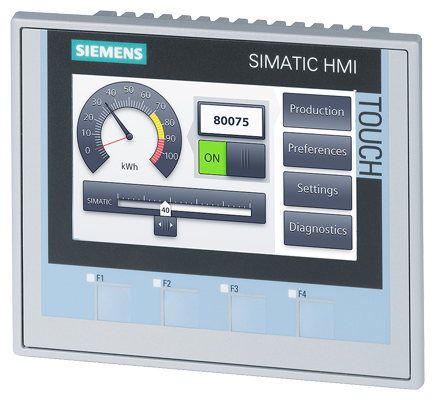
Siemens 6AV2124-2DC01-0AX0 SIMATIC HMI TP700 Comfort
Price range: € 366,00 through € 617,00
The Siemens SIMATIC HMI TP700 Comfort (part number 6AV2124-2DC01-0AX0) is a 7-inch widescreen touch panel from the SIMATIC Comfort Panel series. It belongs to Siemens' high-performance HMI product line designed for demanding machine-level visualization tasks. The panel provides a high-resolution color display with capacitive touch input, making it suitable for complex operator interface applications.
The TP700 Comfort features a 7-inch widescreen TFT display with a resolution of 800 x 480 pixels and 16-million-color depth. It is equipped with 12 MB of user memory and supports a wide range of communication interfaces including PROFINET, MPI, PROFIBUS DP, and USB. The panel runs on the Windows CE operating system and supports integration with Siemens WinCC (TIA Portal) engineering software. It carries an IP65 protection rating on the front face and meets CE, UL, and cULus certification standards.
The TP700 Comfort panel is widely used in manufacturing automation, machine tool control, packaging machinery, and process plant visualization. Its compatibility with SIMATIC S7-300, S7-400, S7-1200, and S7-1500 PLCs makes it a versatile choice for new installations and system upgrades. The panel's robust construction and wide operating temperature range make it suitable for industrial environments with demanding conditions.
Technical Specifications
| Display Size | 7 inch (widescreen) |
|---|---|
| Display Resolution | 800 x 480 pixels |
| Display Colors | 16,777,216 (16M colors) |
| Display Type | TFT LCD |
| Touch Technology | Resistive touch screen |
| Input/Operating Voltage | 24 V DC |
| Power Consumption | Approx. 9 W |
| User Memory | 12 MB |
| Communication Interface | PROFINET (RJ45 x2), MPI/PROFIBUS DP (RS 422/485), USB 2.0 |
| Operating Temperature | 0 °C to +50 °C |
| Storage Temperature | -20 °C to +60 °C |
| Relative Humidity | 10% to 90% (non-condensing) |
| IP/Protection Rating | IP65 (front), IP20 (rear) |
| Panel Cutout | 192 x 138 mm |
| Dimensions (W x H x D) | 214 x 158 x 46 mm |
| Certifications | CE, UL, cULus |
| Series/Product Family | SIMATIC Comfort Panel |
| Mounting | Panel mounting |
Common Error Codes & System Events
- Event ID: 10000
- Connection to the configured PLC could not be established or was interrupted.
Check PROFINET or PROFIBUS cable connections, verify PLC IP address or MPI/DP address settings in the project configuration, and confirm the PLC is in RUN mode. - Event ID: 10001
- Communication timeout between the HMI panel and the PLC controller.
Verify network cabling and switch/hub integrity. Check for IP address conflicts on the PROFINET network. Reduce polling cycle times if network load is high. - Event ID: 20000
- Project download failed or project data is corrupted on the panel.
Perform a full project download from TIA Portal. If the error persists, reset the panel to factory defaults via the Start Center and re-download the project. - Event ID: 40000
- Internal panel memory is full; logging or recipe data cannot be written.
Archive or delete existing data logs and recipe records. Check data log configuration in TIA Portal to ensure storage limits are appropriate. - Event ID: 50000
- System time synchronization error; panel clock could not be synchronized with the PLC or time server.
Check time synchronization settings in the HMI project. Verify NTP server address if network time sync is used, or configure time sync via PLC. - Event ID: 70000
- Screen saver or backlight timeout has been triggered; display has dimmed or switched off.
Touch the screen or press any key to reactivate the display. Adjust backlight timeout settings in the panel's Start Center if required. - Event ID: 110000
- Recipe data transfer error between HMI and PLC.
Verify recipe configuration in TIA Portal. Check that PLC data block addresses match the recipe variable mapping. Re-download the project if misconfiguration is found.
Frequently Asked Questions
Which PLCs are compatible with the TP700 Comfort (6AV2124-2DC01-0AX0)?
The TP700 Comfort is compatible with Siemens SIMATIC S7-1200, S7-1500, S7-300, and S7-400 PLCs via PROFINET or MPI/PROFIBUS DP. It can also communicate with third-party controllers using standard protocols such as Modbus TCP or OPC UA when configured appropriately.
What engineering software is required to program this HMI panel?
The TP700 Comfort is programmed using Siemens TIA Portal with the WinCC (Comfort) software package. A minimum of TIA Portal V13 is required, with later versions recommended for full feature support.
What is the operating voltage of the TP700 Comfort panel?
The panel operates on 24 V DC. It is important to use a regulated 24 V DC power supply with sufficient current capacity, typically at least 1 A.
Does the TP700 Comfort support data logging and recipe management?
Yes, the TP700 Comfort supports data logging, trend displays, and recipe management natively within the WinCC Comfort runtime environment. Data can be stored in internal memory or on an external USB storage device.
What is the IP protection rating of the TP700 Comfort?
The front face of the panel is rated IP65, providing protection against dust and water jets. The rear of the panel is rated IP20 and should be installed in a suitable enclosure.
Troubleshooting
Display remains blank after power is applied
Measure the 24 V DC supply voltage at the panel's power connector. Check that polarity is correct and supply voltage is within the 19.2–28.8 V DC tolerance range. Inspect the internal fuse if accessible.
Correct any wiring or polarity errors. Replace the power supply if output voltage is out of range. If the supply is confirmed good and the display remains blank, the panel's internal power board or backlight may require replacement.
Touch input is unresponsive or inaccurate
Check whether the touch screen responds at all or only in certain areas. Determine if the issue appeared after a project download or physical impact. Inspect the screen surface for damage or contamination.
Clean the screen surface with a soft, dry cloth. Perform a touch screen calibration via the panel's Start Center under Settings. If calibration does not resolve the issue, the touch screen overlay may need to be replaced.
Panel cannot establish communication with the PLC
Verify the PROFINET IP address assigned to the panel matches the configuration in TIA Portal. Check Ethernet cable integrity and confirm the connected switch or port is active. Use the panel's diagnostic tools in the Start Center to ping the PLC.
Correct IP address settings in TIA Portal and re-download the project. Replace the Ethernet cable if faulty. Ensure no IP address conflicts exist on the network segment.
Project download from TIA Portal fails or times out
Check the USB or PROFINET connection between the engineering PC and the panel. Verify the panel is in Transfer mode (accessible via Start Center). Confirm TIA Portal version is compatible with the panel firmware version.
Switch the panel to Transfer mode manually via the Start Center. Update the panel firmware if a version mismatch is detected. Use a direct Ethernet connection rather than a network switch for more reliable transfers.
Panel repeatedly reboots or displays a runtime error on startup
Check whether the issue occurs with a specific project or also with no project loaded. Inspect the 24 V DC supply for voltage drops or ripple. Check available user memory and ensure the project file is not corrupted.
Reload a known-good project backup from TIA Portal. If the panel reboots without any project loaded, perform a factory reset via the Start Center. Ensure the power supply is stable and adequately rated for the panel's power consumption.
| Condition | Repair, Used, Refurbished, New in box (sealed) |
|---|
Related products
-
Siemens 6AV6642-0BA01-1AX1 TP177B
Price range: € 723,00 through € 2.499,00 -
Siemens 6AG1642-0BD01-4AX0 TP177B
€ 555,00


