


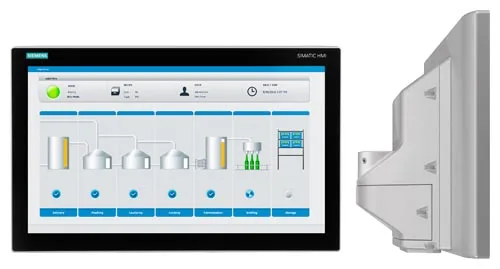
Siemens 6AV2124-0XC24-0BX0 SIMATIC HMI TP700 Comfort
€ 2.159,00
The Siemens SIMATIC HMI TP700 Comfort (part number 6AV2124-0XC24-0BX0) is a 7-inch widescreen touch panel belonging to the SIMATIC Comfort Panel series. It is designed for high-performance human-machine interface applications and serves as the primary operator interface between machine operators and automation systems. The panel runs on the Windows CE 6.0 operating system and is configured using Siemens TIA Portal with WinCC Comfort software.
The TP700 Comfort features a 7-inch TFT widescreen display with a resolution of 800 x 480 pixels and 16 million colors, providing clear and detailed visualization. It is equipped with a resistive touch screen and supports a wide range of communication interfaces including PROFINET, MPI/PROFIBUS DP, USB (host and device), and an SD card slot for data storage. The panel offers 12 MB of user memory for project data and supports high-speed data logging, alarm management, recipe management, and trend displays. It is rated IP65 on the front face, making it suitable for installation in industrial enclosure doors.
The TP700 Comfort is widely used in manufacturing, process automation, packaging machinery, food and beverage production, and automotive assembly lines. Its compatibility with the full range of Siemens SIMATIC S7 PLCs, including S7-300, S7-400, S7-1200, and S7-1500, makes it a versatile choice for both new installations and upgrades to existing automation systems. The widescreen format and high color depth allow for detailed process visualization and intuitive operator interaction.
Technical Specifications
| Display Size | 7 inch (widescreen) |
|---|---|
| Display Resolution | 800 x 480 pixels |
| Display Colors | 16,777,216 (16 million) |
| Display Type | TFT LCD |
| Touch Technology | Resistive |
| Input/Operating Voltage | 24 V DC |
| Power Consumption | Typical 8 W |
| User Memory | 12 MB |
| Communication Interface | 1x PROFINET (RJ45), 1x MPI/PROFIBUS DP (RS-422/485), 2x USB, 1x SD card slot |
| Operating Temperature | 0 °C to +50 °C |
| Storage Temperature | -20 °C to +60 °C |
| Relative Humidity | 10% to 90% (non-condensing) |
| IP Rating (Front) | IP65 |
| IP Rating (Rear) | IP20 |
| Mounting | Panel mounting |
| Operating System | Windows CE 6.0 |
| Certifications | CE, UL, cULus |
Common Error Codes & System Events
- Event ID: 1000
- Project transfer error — the HMI panel could not receive a project download from the engineering station.
Check the network or MPI/PROFIBUS connection between the PC and the panel. Verify the correct transfer channel is selected in the panel's Start Center and that the TIA Portal project is configured for the correct interface. - Event ID: 10000
- Connection to PLC lost — the configured communication connection to the controller has been interrupted.
Check PROFINET or PROFIBUS cabling and connectors. Verify PLC is powered and running. Check IP address configuration or MPI/DP address settings on both the panel and PLC. - Event ID: 20000
- Tag read error — the panel cannot read a configured tag from the PLC.
Verify the tag address exists in the PLC program and that the data type matches the HMI configuration. Check for PLC program changes that may have altered the data block structure. - Event ID: 40000
- Alarm buffer overflow — the number of active alarms has exceeded the panel's alarm buffer capacity.
Acknowledge and clear existing alarms. Review the alarm configuration in WinCC Comfort to increase buffer size or reduce the number of simultaneously active alarms. - Event ID: 70010
- SD card not found or removed — the panel cannot access the configured SD card storage.
Insert a compatible SD card into the slot. Ensure the card is properly seated and formatted. Check that the project is configured to use the correct storage path. - Event ID: 50000
- Recipe data error — a recipe record could not be read or written correctly.
Check recipe configuration in WinCC Comfort. Verify that the recipe data storage medium (internal memory or SD card) is accessible and has sufficient free space. - Event ID: 110000
- System time synchronization error — the panel failed to synchronize its internal clock with the configured time server or PLC.
Check the time synchronization settings in the HMI project. Verify network connectivity to the time server or ensure the PLC time synchronization tag is correctly configured.
Frequently Asked Questions
What PLC families are compatible with the TP700 Comfort 6AV2124-0XC24-0BX0?
The TP700 Comfort is compatible with Siemens SIMATIC S7-300, S7-400, S7-1200, and S7-1500 PLCs via PROFINET or MPI/PROFIBUS DP. It can also communicate with third-party controllers using standard protocols such as Modbus TCP or OPC UA when configured appropriately.
What software is required to program and configure this HMI panel?
The TP700 Comfort is configured using Siemens TIA Portal with the WinCC Comfort software package. Earlier versions of WinCC flexible are not compatible with this Comfort Panel generation.
What is the supply voltage for the TP700 Comfort?
The panel requires a 24 V DC supply voltage. It is recommended to use a regulated SELV power supply with sufficient current capacity, typically at least 1 A.
Can the TP700 Comfort be used for data logging and trend display?
Yes, the TP700 Comfort supports data logging, trend displays, alarm logging, and recipe management natively within WinCC Comfort. Data can be stored to internal memory or an external SD card.
What is the IP protection rating of the TP700 Comfort panel?
The front face of the panel is rated IP65, making it resistant to dust and water jets when correctly installed in a panel cutout with the supplied gasket. The rear of the unit is rated IP20.
Troubleshooting
Display remains blank after power is applied
Measure the 24 V DC supply voltage at the power connector on the rear of the panel. Check that polarity is correct and voltage is within the 19.2–28.8 V DC tolerance range.
Correct the supply voltage or replace the power supply unit. If voltage is correct and the display remains blank, the internal backlight or power supply board may have failed and the unit should be sent for repair or replacement.
Touch screen does not respond or responds inaccurately
Attempt to recalibrate the touch screen via the panel's Start Center or Control Panel settings. Check for physical damage, scratches, or contamination on the touch surface.
Perform a touch screen calibration from the Start Center. Clean the screen surface with a soft, dry cloth. If calibration fails repeatedly, the resistive touch layer may be damaged and the panel will require hardware repair.
Panel cannot establish communication with the PLC
Verify the PROFINET IP address settings on both the panel and the PLC. Check that the Ethernet cable is connected and the link LED on the RJ45 port is active. For MPI/PROFIBUS, verify the bus address and baud rate settings match.
Correct IP address or bus address mismatches in the TIA Portal project and re-download to the panel. Replace the Ethernet cable if no link LED is present. Ensure no duplicate IP addresses exist on the network.
Project download from TIA Portal fails or times out
Check the transfer channel configured in the panel's Start Center (PROFINET or USB). Verify the PC and panel are on the same network subnet if using PROFINET transfer. Confirm the panel is in Transfer mode.
Switch the panel to Transfer mode manually via the Start Center. Ensure the firewall on the engineering PC is not blocking the TIA Portal transfer. Try using a direct USB connection as an alternative transfer method.
Panel reboots unexpectedly or displays a system error screen
Check the 24 V DC supply for voltage dips or instability under load. Review the system event log accessible via the panel's Start Center for logged event IDs that indicate the cause of the restart.
Stabilize the power supply by using a dedicated regulated 24 V DC source. If the event log indicates a software fault, perform a factory reset and re-download the project. Persistent reboots without power issues may indicate a hardware fault requiring unit replacement.
| Condition | Repair, Used, Refurbished, New in box (sealed) |
|---|
Related products
-
Siemens 6AV6642-0BC01-1AX1 TP177B
Price range: € 657,00 through € 1.249,00 -
Siemens 6AV3607-1NH00-0AX0 OP7
€ 615,00 -
Siemens 6AG1643-0AA01-4AX0 MP 277
€ 1.278,00


