


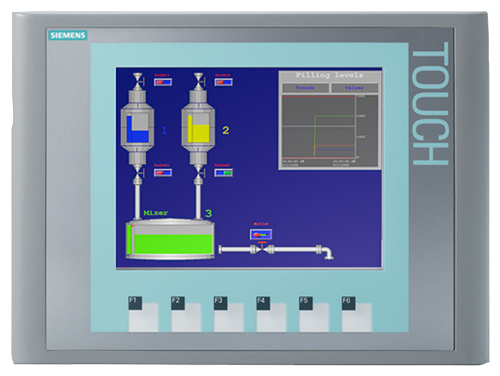
Siemens 6AG1647-0AD11-2AX0 TP177A
€ 817,00
The Siemens 6AG1647-0AD11-2AX0 is a SIPLUS HMI Touch Panel belonging to the TP177A series, part of the SIMATIC HMI product family. This unit is a ruggedized variant of the standard TP177A, designed for use in harsh or demanding environmental conditions. It provides operator interface functionality for industrial automation systems and is manufactured by Siemens under the SIPLUS extended range.
The 6AG1647-0AD11-2AX0 features a 5.7-inch STN color display with a resolution of 320 x 240 pixels (QVGA) and resistive touch technology for operator input. It supports MPI and PROFIBUS DP communication interfaces, enabling direct integration with SIMATIC S7-200, S7-300, and S7-400 PLCs. The panel operates on a 24 V DC supply and includes onboard flash memory for project storage. The SIPLUS variant is conformal-coated and rated for extended temperature and humidity ranges compared to the standard TP177A, making it suitable for environments with condensation, dust, or chemical exposure.
The TP177A SIPLUS panel is commonly deployed in machine-level operator control stations across industries such as automotive manufacturing, food and beverage processing, chemical plants, and water treatment facilities. Its compact form factor and robust construction make it well suited for cabinet-mounted installations where space is limited and environmental conditions are challenging. The panel is typically used to display process data, trigger control actions, and provide alarm management at the machine level.
Technical Specifications
| Display Size | 5.7 inch |
|---|---|
| Display Resolution | 320 x 240 pixels (QVGA) |
| Display Type | STN color |
| Display Colors | 256 colors |
| Touch Technology | Resistive |
| Input Voltage | 24 V DC |
| Power Consumption | Max. 6 W |
| Communication Interface | MPI, PROFIBUS DP |
| Memory | Flash memory (onboard project storage) |
| Operating Temperature | -20 °C to +60 °C (SIPLUS extended range) |
| Storage Temperature | -40 °C to +70 °C |
| Relative Humidity | 5 % to 95 % (with condensation, SIPLUS) |
| IP Rating | IP65 (front), IP20 (rear) |
| Mounting | Panel mounting |
| Certifications | CE, UL, cULus |
| Series | SIPLUS HMI TP177A |
Common Error Codes & System Events
- Event ID: 10000
- Configuration error: The project loaded on the panel is incompatible with the panel type or firmware version.
Reload the correct project using WinCC flexible. Verify that the project is compiled for the TP177A panel type and that firmware versions match. - Event ID: 10001
- Communication error: Connection to the PLC cannot be established or has been lost.
Check MPI or PROFIBUS DP cable connections and termination resistors. Verify PLC address settings and baud rate configuration in the project. - Event ID: 10002
- Tag read error: A configured tag cannot be read from the connected controller.
Verify the tag address in the WinCC flexible project matches the actual PLC data block or memory address. Check PLC program for correct data availability. - Event ID: 10003
- Tag write error: A write operation to a PLC tag has failed.
Check that the target PLC address is not write-protected. Verify communication link integrity and confirm the tag address configuration in the project. - Event ID: 20000
- System memory low: Available memory for runtime operation is critically low.
Reduce the number of active screens, limit logged data, or simplify the project. Transfer a revised, optimized project to the panel. - Event ID: 40000
- Project transfer error: A project download from the engineering PC to the panel has failed.
Check the transfer cable or network connection. Ensure the panel is in transfer mode and that WinCC flexible is configured with the correct interface and panel address. - Event ID: 70000
- Backup/restore error: A panel backup or restore operation could not be completed successfully.
Verify the storage medium (memory card) is correctly inserted and not write-protected. Retry the operation; if it persists, replace the memory card.
Frequently Asked Questions
Which PLCs are compatible with the Siemens 6AG1647-0AD11-2AX0?
The TP177A supports communication with SIMATIC S7-200, S7-300, and S7-400 PLCs via MPI or PROFIBUS DP interfaces. It can also communicate with S7-200 via a direct RS-485 PPI connection.
What engineering software is required to program this panel?
The panel is configured using Siemens WinCC flexible 2008 or later. Projects are created on a PC and transferred to the panel via MPI, PROFIBUS DP, or a USB-to-MPI adapter.
What makes the SIPLUS variant different from the standard TP177A?
The SIPLUS variant (6AG1647-0AD11-2AX0) features conformal coating on the PCBs and is rated for extended environmental conditions, including operation with condensation and a wider temperature range of -20 °C to +60 °C, compared to 0 °C to +50 °C for the standard version.
What is the supply voltage for this panel?
The panel requires a 24 V DC power supply. The permissible voltage range is typically 19.2 V DC to 28.8 V DC (24 V DC -20% / +20%).
Does this panel support recipe management and alarm logging?
Yes, the TP177A supports recipe management and alarm logging functions within WinCC flexible. The number of recipes and alarms is limited by the available onboard flash memory.
Troubleshooting
Display remains blank after power on
Measure the 24 V DC supply voltage at the panel's power connector. Check that the voltage is within the 19.2–28.8 V DC range. Inspect the internal fuse if accessible.
Correct the supply voltage if out of range. If voltage is correct and display remains blank, the backlight or internal power supply board may be faulty and the panel should be sent for repair or replacement.
Touch input is inaccurate or unresponsive
Check whether the touch screen surface is dirty, scratched, or damaged. Attempt to recalibrate the touch screen via the panel's Start Center or control panel settings.
Clean the touch surface with a soft, dry cloth. Perform a touch screen recalibration through the operating system settings. If recalibration fails repeatedly, the resistive touch overlay may need replacement.
Panel cannot establish communication with the PLC
Verify MPI or PROFIBUS DP cable connections at both the panel and PLC ends. Check bus termination at both ends of the cable. Confirm that the panel's configured PLC address and baud rate match the PLC settings.
Replace or reseat the communication cable. Ensure bus terminators are correctly installed. Correct address and baud rate settings in the WinCC flexible project and retransfer the project to the panel.
Project transfer from PC to panel fails
Confirm the panel is set to transfer mode via the Start Center. Check the MPI adapter or PROFIBUS connection between the PC and panel. Verify that WinCC flexible is configured with the correct interface type and panel address.
Restart the panel in transfer mode and retry the download. Try a different MPI/USB adapter or cable. Ensure no firewall or driver issue is blocking the PC-side communication interface.
Panel displays 'Configuration error' or loads an incorrect project
The project stored on the panel may be corrupted or incompatible with the current firmware version. Check the firmware version in the panel's Start Center and compare with the WinCC flexible project settings.
Recompile the project in WinCC flexible ensuring the correct panel type and firmware version are selected. Perform a full project transfer to overwrite the existing project on the panel.
| Condition | Repair, Used, Refurbished, New in box (sealed) |
|---|
Related products
-
Siemens 6AV6640-0CA01-0AX0 OP 73micro
Price range: € 279,00 through € 444,13 -
Siemens 6AV3627-1NK00-2AX0 SIMATIC OP 27
Price range: € 749,00 through € 964,00 -
Siemens 6AG1642-0BA01-4AX0 TP177B
€ 675,00


