


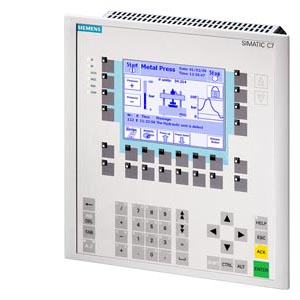
Siemens 6ES7635-2EC01-0AE3 SIMATIC C7-635
€ 2.320,00
The Siemens SIMATIC C7-635, part number 6ES7635-2EC01-0AE3, is a compact combined controller and operator panel from the SIMATIC C7 series. It integrates a SIMATIC S7-300 PLC with an operator panel into a single unit, eliminating the need for separate controller and HMI hardware. This all-in-one design is part of Siemens' strategy to reduce panel space and simplify system architecture in machine-level automation.
The C7-635 features a built-in MPI (Multi-Point Interface) port for communication with other SIMATIC devices and programming via STEP 7. It supports PROFIBUS-DP as an additional communication interface, enabling integration into distributed automation networks. The unit includes onboard CPU functionality equivalent to the S7-300 family, with integrated digital and analog I/O, and supports expansion via standard S7-300 signal modules. The operator panel section provides a touch-sensitive or key-operated interface with a monochrome or color display depending on variant, and is configurable using ProTool or WinCC flexible software.
The SIMATIC C7-635 is widely used in machine building, packaging machinery, printing equipment, and small to mid-scale manufacturing automation where a compact footprint is essential. Its integrated design makes it particularly suitable for OEM machine builders who require a standardized, space-saving control solution. The combination of PLC and HMI in one enclosure reduces wiring complexity and lowers overall system cost in standalone machine applications.
Technical Specifications
| Series | SIMATIC C7 |
|---|---|
| Integrated CPU | S7-300 compatible CPU |
| Display Type | STN color display |
| Display Size | 5.7 inch |
| Communication Interface | MPI, PROFIBUS-DP |
| Input Voltage | 24 V DC |
| Digital Inputs | 16 onboard |
| Digital Outputs | 16 onboard |
| Analog Inputs | 4 onboard |
| Analog Outputs | 2 onboard |
| Operating Temperature | 0 °C to +55 °C |
| Storage Temperature | -20 °C to +70 °C |
| Protection Rating | IP 65 (front panel) |
| Mounting | Panel mounting |
| Certifications | CE, UL |
Common Error Codes & System Events
- Event ID: 10000
- Loss of communication between the C7 operator panel and the integrated CPU
Check MPI configuration and internal bus connections. Restart the unit and verify project download is complete and consistent. - Event ID: 10001
- Project data on the C7 panel is missing or corrupted
Re-download the ProTool or WinCC flexible project to the device using a valid programming cable and STEP 7 / WinCC flexible software. - Event ID: 40000
- PLC CPU has entered STOP mode
Check the CPU diagnostic buffer via STEP 7 online diagnostics. Identify the cause of the STOP (e.g., programming error, I/O fault) and restart the CPU after resolving the issue. - Event ID: 40010
- I/O access error — the CPU cannot access a configured I/O module
Verify that all configured signal modules are physically present and correctly seated. Check module addressing in the hardware configuration in STEP 7. - BATTF
- Battery voltage low or battery missing in the CPU module
Replace the backup battery in the CPU section of the C7-635. Ensure the replacement battery is the correct Siemens-approved type (e.g., AA lithium 3.6 V). - Event ID: 20000
- Operator panel configuration does not match the loaded project
Perform a complete project download to the C7 panel. Ensure the ProTool or WinCC flexible project version matches the firmware version of the device. - Event ID: 50000
- Watchdog timeout — the panel application has stopped responding
Restart the C7 unit. If the fault recurs, check for excessive CPU load in the PLC program and verify the project configuration for any infinite loops or blocking operations.
Frequently Asked Questions
What software is used to configure the operator panel on the C7-635?
The operator panel section of the C7-635 is configured using Siemens ProTool or WinCC flexible software. The PLC program is developed and downloaded using STEP 7.
Can the C7-635 be expanded with additional I/O modules?
Yes, the C7-635 supports expansion with standard SIMATIC S7-300 signal modules connected via the integrated backplane bus, allowing additional digital and analog I/O to be added as required.
What communication interfaces are available on the 6ES7635-2EC01-0AE3?
The unit provides an MPI interface for programming and HMI communication, and a PROFIBUS-DP interface for integration into distributed I/O networks.
What is the supply voltage for the C7-635?
The C7-635 operates on a 24 V DC supply voltage, which powers both the integrated CPU and the operator panel section.
Is the front panel of the C7-635 rated for wash-down or dusty environments?
The front panel of the C7-635 carries an IP 65 protection rating, making it suitable for environments where dust and water jets may be present, such as food processing or light industrial applications.
Troubleshooting
Display remains blank after power is applied
Measure 24 V DC at the power supply terminals of the C7 unit. Check internal fuses if accessible. Verify the power supply unit can deliver sufficient current.
Replace the 24 V DC power supply if voltage is absent or out of tolerance. If voltage is correct but display remains off, the internal display backlight or power board may require replacement or professional repair.
CPU is in STOP mode and cannot be set to RUN
Connect a programming device via MPI and open the CPU diagnostic buffer in STEP 7 online diagnostics to identify the specific fault causing the STOP condition.
Resolve the identified fault — common causes include missing I/O modules, program errors, or incorrect hardware configuration. After correction, perform a memory reset (MRES) if necessary and reload the project.
Communication between the C7 panel and an external PROFIBUS device fails
Check PROFIBUS cable termination at both ends of the network segment. Verify the bus address of the C7 unit and the remote device do not conflict. Use STEP 7 diagnostics to check bus status.
Correct any address conflicts, ensure proper 220-ohm termination resistors are active only at the physical ends of the PROFIBUS segment, and replace damaged PROFIBUS cables or connectors.
Operator panel displays 'No project' or configuration error after startup
The project data may have been lost due to a battery failure or a failed download. Check the battery status and verify the project was successfully transferred to the device.
Replace the backup battery if depleted, then re-download the complete ProTool or WinCC flexible project to the C7-635. Perform a full consistency check before downloading.
Touchscreen or operator keys are unresponsive
Check whether the display is active and showing the correct screen. Attempt to navigate using alternative input methods if available. Check for physical damage to the front panel membrane or touch layer.
Recalibrate the touch interface if the option is available in the system settings. If keys or touch remain unresponsive after recalibration, the front panel membrane keypad or touch screen assembly requires replacement.
| Condition | Repair, Used, Refurbished, New in box (sealed) |
|---|
Related products
-
Siemens 6AV3607-1NH00-0AX0 OP7
€ 615,00 -
Siemens 6AV3627-1QK00-0AX0 OP27
Price range: € 649,00 through € 869,00

