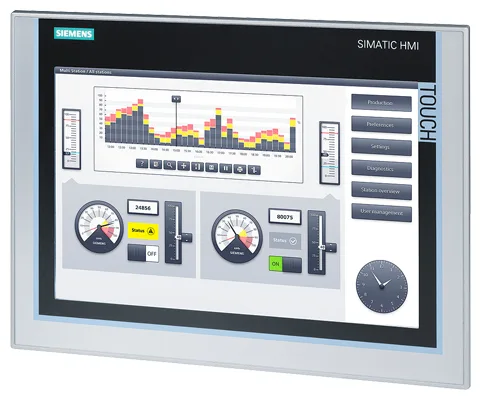


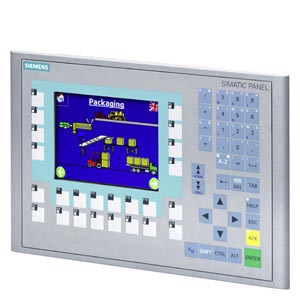
Siemens 6AV6643-0BA01-1AX0 TP277
Price range: € 1.088,00 through € 2.149,00
The Siemens TP277 (part number 6AV6643-0BA01-1AX0) is a touch-panel Human Machine Interface belonging to the SIMATIC HMI 277 series. It features a 5.7-inch TFT color display and is designed for machine-level visualization and operator control tasks. As part of Siemens' SIMATIC HMI portfolio, it bridges the gap between entry-level panels and high-performance multi-panel systems.
The TP277 operates on a 24 V DC supply and runs the Windows CE 5.0 operating system, providing a stable and deterministic runtime environment for WinCC flexible applications. It supports MPI, PROFIBUS DP, and Ethernet (TCP/IP) communication interfaces, enabling integration into a wide range of Siemens and third-party control architectures. The panel offers 6 MB of user memory for project data and supports USB host and device ports for peripheral connectivity and project transfer. The resistive touch screen supports single-touch input and the display provides a resolution of 320 x 240 pixels (QVGA) with 256 colors.
The TP277 is widely deployed in manufacturing, packaging, food and beverage, and process industries where a compact, reliable operator panel is required at the machine level. Its PROFIBUS DP connectivity makes it particularly suitable for integration with SIMATIC S7-300 and S7-400 PLCs in distributed automation architectures. The panel's compact form factor and portrait or landscape mounting flexibility allow installation in space-constrained control cabinet doors and operator stations.
Technical Specifications
| Display Size | 5.7 inch |
|---|---|
| Display Resolution | 320 x 240 pixels (QVGA) |
| Display Colors | 256 colors |
| Display Type | TFT LCD |
| Touch Technology | Resistive single-touch |
| Input/Operating Voltage | 24 V DC (19.2 V – 28.8 V) |
| Power Consumption | Max. 9 W |
| Operating System | Windows CE 5.0 |
| User Memory | 6 MB |
| Communication Interface | MPI, PROFIBUS DP, Ethernet (TCP/IP), USB |
| Operating Temperature | 0 °C to +50 °C |
| Storage Temperature | -20 °C to +60 °C |
| Relative Humidity | 10% to 90% (non-condensing) |
| IP Rating (Front) | IP65 |
| IP Rating (Rear) | IP20 |
| Mounting | Panel mounting (portrait or landscape) |
| Certifications | CE, UL, cULus |
Common Error Codes and System Events
- Event ID: 10000
- Communication error between the HMI panel and the connected PLC. The configured connection cannot be established or has been interrupted.
Check the MPI or PROFIBUS DP cable connections and terminating resistors. Verify the PLC is powered and in RUN mode. Confirm the communication parameters (station address, baud rate) match on both devices. - Event ID: 10001
- Tag read error. The HMI is unable to read a configured tag from the PLC.
Verify the tag address exists in the PLC program and the data block is not write-protected. Check that the PLC is in RUN mode and the communication link is active. - Event ID: 10002
- Tag write error. The HMI is unable to write a value to the configured PLC tag.
Confirm the target address is writable and not protected in the PLC. Check communication link integrity and PLC operating mode. - Event ID: 40000
- Project download error. A project transfer from WinCC flexible to the panel has failed.
Ensure the transfer cable or Ethernet connection is properly seated. Verify the panel is in Transfer mode and the correct communication interface is selected in WinCC flexible project settings. - Event ID: 20000
- System memory low. Available runtime memory on the panel is insufficient for the loaded project.
Reduce the project size by optimizing graphics, removing unused screens, or compressing images. Restart the panel after transferring an optimized project. - Event ID: 50000
- Illegal system state detected. The panel runtime has encountered an unrecoverable internal error.
Perform a controlled restart of the panel. If the error persists, reload the project via WinCC flexible and consider restoring factory settings using the Control Panel boot menu. - Event ID: 70010
- Recipe data error. A recipe record could not be read from or written to the configured storage location.
Check that the target storage medium (internal flash or USB) is present and not full. Verify recipe configuration in WinCC flexible for correct tag assignments.
Frequently Asked Questions
Which engineering software is required to configure the TP277 (6AV6643-0BA01-1AX0)?
The TP277 is configured using Siemens WinCC flexible 2008 or later. It is not compatible with TIA Portal WinCC; projects must be created in the WinCC flexible engineering environment.
Which PLCs are compatible with the TP277 panel?
The TP277 supports communication with SIMATIC S7-200, S7-300, and S7-400 PLCs via MPI or PROFIBUS DP, as well as third-party controllers accessible via Ethernet TCP/IP using supported drivers.
How is a project transferred to the TP277?
Projects can be transferred via MPI, PROFIBUS DP, Ethernet (TCP/IP), or USB. The panel must be set to Transfer mode through its Start Center or Control Panel before initiating the download from WinCC flexible.
What is the front panel protection rating of the TP277?
The front panel of the TP277 achieves IP65 protection, making it suitable for installation in environments where dust and water jets may be present.
Can the TP277 operate in both portrait and landscape orientation?
Yes, the TP277 supports both portrait and landscape mounting orientations, providing flexibility for installation in various control cabinet configurations.
Troubleshooting
Display remains blank after power is applied
Measure the 24 V DC supply voltage at the panel's power connector. Verify the supply is within the 19.2 V to 28.8 V range. Check for blown internal fuse or faulty power supply unit.
Correct the supply voltage if out of range. If voltage is correct and display remains blank, the internal backlight or power supply board may require replacement. Return the unit for repair or replace the backlight inverter board.
HMI shows 'No connection to PLC' or communication alarm at startup
Check the MPI or PROFIBUS DP cable for physical damage and verify correct termination resistors are active at both ends of the bus. Confirm the station address and baud rate settings on the HMI match those configured in the PLC hardware configuration.
Correct any wiring faults or termination issues. Adjust the HMI communication parameters in WinCC flexible to match the PLC settings, retransfer the project, and restart both devices.
Touch screen does not respond or registers incorrect touch positions
Access the Control Panel via the Start Center and run the touch screen calibration utility. Check for physical damage or contamination on the touch surface.
Perform a touch screen recalibration through the Control Panel. Clean the screen surface with a soft, dry cloth. If calibration does not resolve the issue, the resistive touch overlay may need replacement.
Panel repeatedly restarts or enters an error loop after project download
The project may exceed available memory or contain configuration errors incompatible with the panel firmware version. Check the WinCC flexible output window for compilation warnings.
Verify the project is compiled without errors in WinCC flexible and that the panel firmware version is compatible. Update the panel firmware if necessary via the Siemens ProSave tool, then retransfer the project.
USB device not recognized when connected to the TP277
Check that the USB device is formatted as FAT32 and does not exceed the supported storage capacity. Verify the USB port is not disabled in the panel's Control Panel settings.
Reformat the USB device to FAT32 and reconnect. If the port remains unresponsive, test with a known-good USB device. A faulty USB host port may require hardware-level repair of the panel.
| Condition | Repair, Used, Refurbished, New in box (sealed) |
|---|
Related products
-
Siemens 6AV6545-0AA15-2AX0 TP 270
Price range: € 399,00 through € 1.149,00 -
Siemens 6AV6642-5AA00-0QE0 TP177B
€ 394,00 -
Siemens 6AG1545-0CC10-4AX0 SIPLUS HMI TP900
€ 1.340,00