


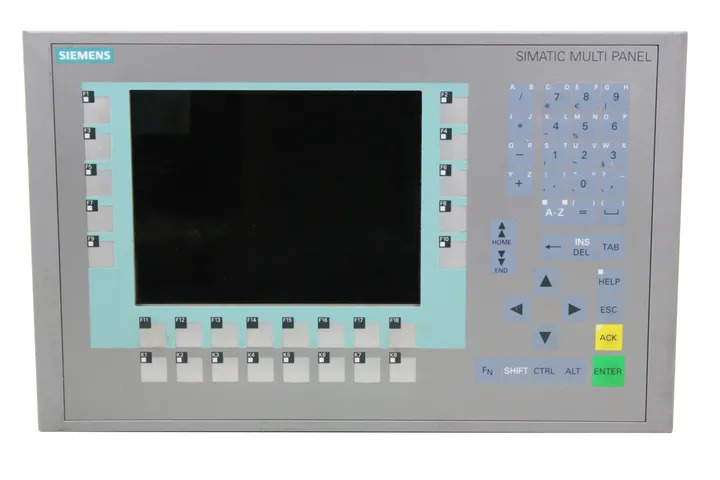
Siemens 6AV6643-0DB01-1AX1 MP277
Price range: € 1.071,00 through € 1.543,50
The Siemens MP277 (part number 6AV6643-0DB01-1AX1) is a Multi Panel HMI device belonging to the SIMATIC HMI family. It features a 10.4-inch TFT display and is designed for machine-level visualization and operator control tasks. This unit is part of the MP277 series, which bridges the gap between compact panels and high-performance PC-based systems.
The 6AV6643-0DB01-1AX1 variant is equipped with a resistive touch screen and supports both MPI/PROFIBUS DP and PROFINET/Ethernet communication interfaces, enabling flexible integration into a wide range of Siemens automation architectures. It runs WinCC flexible runtime software and offers 12 MB of user memory for project data. The panel operates on 24 V DC and provides a display resolution of 640 x 480 pixels (VGA) with 256 colors. It includes USB host and device ports, a CF card slot for data storage and project transfer, and supports multiple languages for international deployments.
The MP277 is widely used in manufacturing, automotive, food and beverage, and process industries where reliable operator interface terminals are required at the machine level. Its compatibility with S7-200, S7-300, S7-400, and S7-1200 PLCs makes it a versatile choice for both new installations and system upgrades. The robust construction and wide operating temperature range make it suitable for demanding industrial environments.
Technical Specifications
| Display Size | 10.4 inch |
|---|---|
| Display Resolution | 640 x 480 pixels (VGA) |
| Display Colors | 256 |
| Display Type | TFT LCD |
| Touch Technology | Resistive touch screen |
| Input/Operating Voltage | 24 V DC |
| Power Consumption | Max. 18 W |
| User Memory | 12 MB |
| Communication Interface | MPI/PROFIBUS DP, PROFINET/Ethernet (RJ45), USB |
| Expansion Slots | 1 x CompactFlash (CF) card slot |
| Operating Temperature | 0 °C to +50 °C |
| Storage Temperature | -20 °C to +60 °C |
| Relative Humidity | 10% to 90% (non-condensing) |
| IP/Protection Rating | IP65 (front), IP20 (rear) |
| Dimensions (W x H x D) | 310 x 245 x 60 mm |
| Certifications | CE, UL, cULus |
| Series/Product Family | SIMATIC HMI MP277 |
Common Error Codes & System Events
- Event ID: 10000
- Configuration error: The project loaded on the panel contains configuration errors or is incompatible with the runtime version.
Recompile and re-transfer the WinCC flexible project from the engineering station. Ensure the runtime version on the panel matches the project version. - Event ID: 10001
- Connection to PLC lost: Communication between the HMI panel and the configured PLC has been interrupted.
Check MPI/PROFIBUS or Ethernet cable connections. Verify PLC address settings and baud rate configuration in the HMI project. Confirm PLC is powered and running. - Event ID: 10002
- Tag read error: The panel is unable to read a configured tag from the PLC.
Verify the tag address exists in the PLC program. Check communication connection status and ensure the PLC data block or memory area is accessible. - Event ID: 10003
- Tag write error: A write operation to a PLC tag has failed.
Check that the target PLC address is not write-protected. Verify communication link integrity and confirm the tag address is correctly configured in the HMI project. - Event ID: 10004
- Recipe data error: An error occurred during recipe read or write operations.
Check available storage memory on the panel or CF card. Verify recipe configuration in the WinCC flexible project and ensure the CF card is properly inserted and not write-protected. - Event ID: 10005
- Illegal system state: The panel has detected an internal system fault or illegal operating state.
Perform a controlled restart of the HMI panel. If the fault persists, reload the operating system using the ProSave tool and re-transfer the project. - Event ID: 10006
- Data loss warning: Retain data or recipe data may have been lost due to power failure or memory fault.
Check the panel's internal backup battery if applicable. Verify CF card integrity and re-initialize retain data areas. Re-transfer the project if necessary. - Event ID: 10007
- Printer error: A configured print job could not be completed.
Check printer connection and driver configuration. Verify the printer is online and the correct printer driver is configured in the WinCC flexible project settings.
Frequently Asked Questions
What communication interfaces does the 6AV6643-0DB01-1AX1 support?
The MP277 10-inch touch panel supports MPI/PROFIBUS DP and PROFINET/Ethernet (RJ45) interfaces, as well as USB host and device ports. This allows integration with a wide range of Siemens S7 PLCs and third-party controllers.
Which PLCs are compatible with the Siemens MP277?
The MP277 is compatible with Siemens S7-200, S7-300, S7-400, and S7-1200 PLCs via MPI, PROFIBUS DP, or PROFINET. It can also communicate with third-party controllers using supported drivers in WinCC flexible.
What software is required to program the MP277 panel?
The MP277 is programmed using Siemens WinCC flexible software on an engineering PC. Projects are transferred to the panel via Ethernet, USB, or a CF card.
Can the CF card slot be used for project transfer and data logging?
Yes, the CompactFlash card slot supports both project transfer and runtime data storage, including recipe data, alarm logs, and data records. A standard CF card formatted appropriately can be used.
What is the operating voltage of the MP277 6AV6643-0DB01-1AX1?
The panel operates on 24 V DC. It is important to ensure a stable, regulated 24 V DC power supply to prevent unexpected restarts or data loss.
Troubleshooting
Display remains blank after power on
Check that 24 V DC is present at the power supply terminals. Measure voltage at the panel connector and inspect the internal fuse if accessible.
Ensure the power supply is providing a stable 24 V DC within the specified tolerance. Replace any blown fuse. If the backlight has failed, the display unit or backlight inverter may require replacement.
Touch screen does not respond or responds inaccurately
Determine whether the issue is a complete lack of response or positional inaccuracy. Check for physical damage or contamination on the touch surface.
Perform a touch screen recalibration via the panel's Start Center or Control Panel settings. Clean the touch surface with a soft, dry cloth. If recalibration does not resolve the issue, the touch screen overlay may need replacement.
HMI panel fails to establish communication with the PLC
Verify the communication cable connections on both the panel and PLC sides. Check the configured communication parameters (address, baud rate, subnet) in the WinCC flexible project and on the PLC.
Correct any mismatched communication parameters. Replace the communication cable if damaged. Confirm the PLC is in RUN mode and that the correct communication driver is configured in the HMI project.
Panel repeatedly restarts or enters an error loop after project transfer
The transferred project may be incompatible with the installed runtime version, or the project file may be corrupted.
Use the ProSave tool to update or restore the panel's operating system to the correct version. Recompile the WinCC flexible project and re-transfer. Ensure the WinCC flexible version used for engineering matches the runtime version on the panel.
CF card not recognized by the panel
Check whether the CF card is properly seated in the slot. Test the CF card in a card reader to verify it is not corrupted or damaged.
Reformat the CF card using the panel's built-in format function or a PC. Ensure the card is a compatible type and capacity. Re-insert the card firmly and restart the panel. Replace the CF card if it remains undetected.
| Condition | Repair, Used, Refurbished, New in box (sealed) |
|---|
Related products
-
Siemens 6AG1643-0AA01-4AX0 MP 277
€ 1.278,00 -
Siemens 6AV6642-0BA01-1AX1 TP177B
Price range: € 723,00 through € 2.499,00 -
Siemens 6AG1642-0BA01-4AX0 TP177B
€ 675,00


