


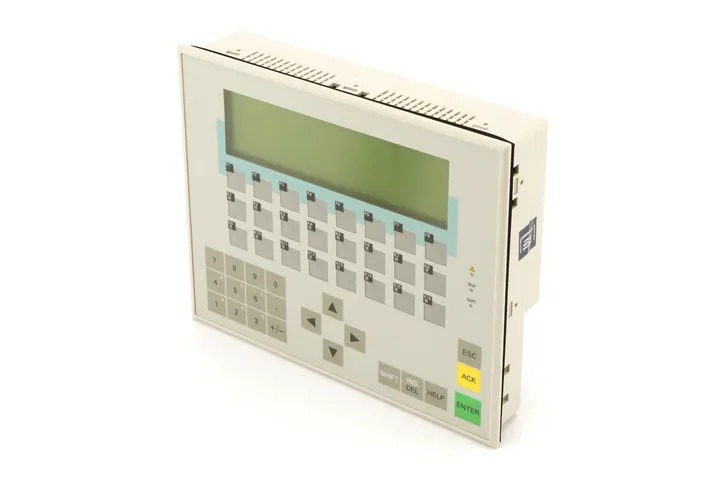
Siemens 6AV3617-1JC20-0AX2 OP17
Price range: € 662,00 through € 1.899,00
The Siemens OP17 (part number 6AV3617-1JC20-0AX2) is a compact operator panel belonging to the SIMATIC HMI family. It is designed for machine-level human-machine interface applications, providing text-based visualization and operator control without the need for a full graphical display. The OP17 communicates directly with Siemens SIMATIC PLCs and is configured using the ProTool software package.
The 6AV3617-1JC20-0AX2 features a 4-line LCD text display capable of showing alphanumeric characters, along with a membrane keypad for operator input including function keys, system keys, and numeric entry. It supports MPI (Multi-Point Interface) and PROFIBUS-DP communication protocols for direct connection to S7-200, S7-300, and S7-400 PLCs. The unit operates on 24 V DC supply voltage and is rated IP65 at the front panel, making it suitable for panel-mount installation in industrial enclosures. Internal memory allows storage of alarm messages, recipes, and screen configurations.
The OP17 is widely used in manufacturing, packaging, and process automation environments where a cost-effective, robust text-based operator interface is required. It is particularly suited for machine control panels where operators need to monitor process values, acknowledge alarms, and adjust setpoints without requiring a full graphical HMI. Its compact form factor and panel-mount design make it a practical choice for retrofitting existing control cabinets or integrating into new machine builds.
Technical Specifications
| Display Type | LCD text display |
|---|---|
| Display Lines | 4 lines |
| Characters per Line | 20 characters |
| Input/Operating Voltage | 24 V DC |
| Communication Interface | MPI, PROFIBUS-DP |
| IP Rating (Front) | IP65 |
| IP Rating (Rear) | IP20 |
| Operating Temperature | 0 °C to +50 °C |
| Storage Temperature | -20 °C to +70 °C |
| Relative Humidity | 10% to 90% (non-condensing) |
| Mounting | Panel mount |
| Configuration Software | ProTool |
| PLC Compatibility | SIMATIC S7-200, S7-300, S7-400 |
| Certifications | CE, UL |
Common Error Codes & System Events
- System Error 1
- Configuration data error or missing configuration in the operator panel memory
Reload the project configuration using ProTool software and transfer it to the OP17 via MPI or serial connection - System Error 4
- Communication connection to the PLC has been lost or cannot be established
Check MPI/PROFIBUS cable connections, verify PLC address settings, and confirm baud rate matches the PLC configuration - System Error 6
- Overflow of the alarm buffer; too many alarms have been generated without acknowledgment
Acknowledge pending alarms on the operator panel and review the PLC program to reduce alarm frequency - System Error 10
- Recipe data error; inconsistency detected in recipe records stored in the panel
Delete and re-transfer recipe data from the configuration PC using ProTool - System Error 16
- Watchdog timeout; the panel firmware detected an internal processing timeout
Cycle power to the OP17. If the fault persists, perform a factory reset and reload the configuration - System Error 20
- Transfer mode active; the panel is waiting for a project download from the configuration PC
Connect the configuration PC and transfer the project using ProTool, or press ESC to exit transfer mode if unintended - System Error 25
- Internal memory error detected during self-test at startup
Perform a factory reset of the panel. If the error persists, the unit may require repair or replacement of the internal memory module
Frequently Asked Questions
Which PLCs are compatible with the Siemens OP17 6AV3617-1JC20-0AX2?
The OP17 is compatible with Siemens SIMATIC S7-200, S7-300, and S7-400 PLCs via MPI or PROFIBUS-DP interfaces. It also supports connection to S5 PLCs via a serial interface with appropriate configuration.
What software is used to configure the OP17?
The OP17 is configured using Siemens ProTool software. Projects are created on a PC and then downloaded to the panel via the MPI interface or a serial programming cable.
What is the supply voltage for the OP17?
The OP17 operates on a 24 V DC supply voltage. Ensure the power supply is within the specified tolerance range to avoid operational issues.
Is the OP17 front panel rated for wash-down or dusty environments?
Yes, the front panel of the OP17 carries an IP65 protection rating, making it resistant to dust ingress and low-pressure water jets. The rear of the unit is rated IP20.
Can the OP17 display graphical content or only text?
The OP17 is a text-based operator panel and can only display alphanumeric characters across its 4-line LCD display. It does not support bitmap graphics or touch input.
Troubleshooting
Display remains blank after power is applied
Check the 24 V DC supply voltage at the power connector using a multimeter. Verify the supply is within the acceptable voltage range and that the connector is fully seated.
Restore correct 24 V DC supply voltage. If voltage is correct and the display remains blank, inspect the internal fuse and replace if blown. If the fault persists, the display or internal power circuitry may require repair.
OP17 shows 'No Connection' or communication error to PLC
Verify the MPI or PROFIBUS-DP cable is correctly connected and undamaged. Check that the PLC address configured in ProTool matches the actual PLC station address and that baud rates are consistent.
Replace or reseat the communication cable. Correct any address or baud rate mismatches in the ProTool project and re-download the configuration to the panel. Confirm the PLC is powered and in RUN mode.
Panel is stuck in transfer mode and will not display the project
The panel is waiting for a project download, either because no valid project is stored or transfer mode was triggered unintentionally at startup.
Connect the configuration PC with ProTool and transfer a valid project to the panel. If a project already exists and transfer mode was entered accidentally, power cycle the panel and avoid pressing the transfer key combination during boot.
Alarm messages are not displaying correctly or are truncated
Review the alarm text configuration in ProTool. Check that alarm text lengths do not exceed the 20-character per line limit of the OP17 display.
Edit alarm texts in ProTool to fit within the 20-character display width. Re-download the updated project to the panel and verify alarm display in operation.
Function keys do not respond or produce incorrect actions
Inspect the membrane keypad for physical damage or contamination beneath the keys. Verify the function key assignments in the ProTool project configuration.
Clean the keypad surface and check for any mechanical damage. If key assignments are incorrect, update the ProTool project and re-download. If individual keys are unresponsive due to membrane damage, the keypad assembly may need replacement.
| Condition | Repair, Used, Refurbished, New in box (sealed) |
|---|
Related products
-
Siemens 6AV6642-5AA00-0QE0 TP177B
€ 394,00 -
Siemens 6AG1545-0CC10-4AX0 SIPLUS HMI TP900
€ 1.340,00 -
Siemens 6AV3627-1NK00-2AX0 SIMATIC OP 27
Price range: € 749,00 through € 964,00


