


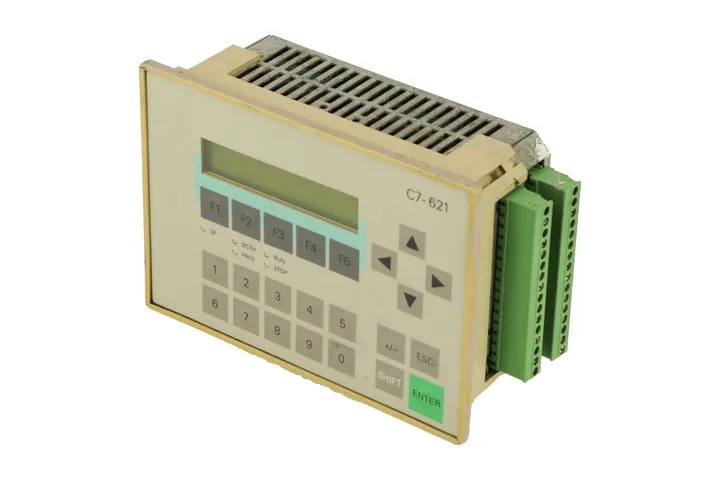
Siemens 6ES7621-1AD02-0AE3 SIMATIC C7-621
Price range: € 799,00 through € 1.043,00
The Siemens SIMATIC C7-621, identified by part number 6ES7621-1AD02-0AE3, is a compact combined controller and operator panel belonging to the SIMATIC C7 product family. It integrates a SIMATIC S7-300 PLC with an HMI operator panel into a single unit, eliminating the need for separate control and display hardware. This all-in-one design is part of Siemens' strategy to reduce panel space and simplify system architecture in machine-level automation.
The C7-621 features an integrated operator panel with a monochrome display and touch or membrane keypad interface for local operation and monitoring. It supports MPI (Multi-Point Interface) communication for integration with SIMATIC S7 networks and can be programmed using STEP 7 for the PLC logic and ProTool or WinCC flexible for the HMI configuration. The unit operates on 24 V DC supply voltage and is designed for panel mounting, with a protection rating suitable for front-panel installation in industrial enclosures. Onboard memory supports user programs and HMI project data within the constraints of the S7-300 CPU integrated into the device.
The SIMATIC C7-621 is well suited for machine-level control applications where panel space is limited and a combined control and visualization solution is required. Typical industries include packaging machinery, conveyor systems, printing machines, and general-purpose manufacturing equipment. Its integrated design reduces wiring complexity and commissioning time, making it a practical choice for OEMs building compact machine control panels.
Technical Specifications
| Series/Product Family | SIMATIC C7 |
|---|---|
| Input/Operating Voltage | 24 V DC |
| Communication Interface | MPI (Multi-Point Interface) |
| Integrated PLC | SIMATIC S7-300 CPU |
| Mounting | Panel mounting |
| IP/Protection Rating | IP65 (front panel) |
| Operating Temperature | 0 °C to +55 °C |
| Storage Temperature | -20 °C to +70 °C |
| Relative Humidity | 10% to 90%, non-condensing |
| Certifications | CE, UL |
| Programming Software | STEP 7 / ProTool / WinCC flexible |
Common Error Codes & System Events
- Event ID: 10000
- Loss of communication on MPI interface
Check MPI cable connections and termination resistors. Verify MPI address settings and network configuration in STEP 7. - Event ID: 10001
- PLC CPU in STOP mode
Check the diagnostic buffer in STEP 7 for the cause of the STOP. Correct the program error or hardware fault and perform a CPU restart. - Event ID: 10002
- HMI project download error
Verify the ProTool or WinCC flexible project is compatible with the C7-621 firmware version. Re-download the project via MPI. - Event ID: 10003
- Battery low or battery failure
Replace the backup battery to retain retentive data and the real-time clock. Use only the Siemens-approved battery type for the C7 series. - Event ID: 10004
- Configuration mismatch between HMI project and PLC program
Ensure the HMI tag addresses in the project match the actual PLC data block and variable addresses. Re-download both PLC program and HMI project. - Event ID: 10005
- Internal hardware fault detected
Perform a power cycle. If the fault persists, check for overheating or physical damage. The unit may require repair or replacement. - Event ID: 10006
- Watchdog timeout in CPU
Check the user program for excessively long scan cycles or infinite loops. Increase the watchdog time in the CPU properties if justified, or optimize the program.
Frequently Asked Questions
What PLC platform is integrated into the C7-621?
The C7-621 integrates a SIMATIC S7-300 CPU, allowing it to be programmed using Siemens STEP 7 software. It functions as a standard S7-300 controller combined with an HMI operator panel in a single housing.
What software is required to program and configure the C7-621?
The PLC portion is programmed using Siemens STEP 7, while the HMI portion is configured using ProTool or WinCC flexible. Both project types are downloaded to the unit via the MPI interface.
What communication interface does the C7-621 support?
The C7-621 supports MPI (Multi-Point Interface), which is used for programming, HMI communication, and integration into SIMATIC S7 networks.
Is the C7-621 compatible with PROFIBUS?
The base C7-621 unit uses MPI as its primary communication interface. PROFIBUS-DP connectivity would require an additional communications module depending on the specific hardware configuration.
What is the supply voltage for the C7-621?
The C7-621 operates on a 24 V DC supply voltage, which is standard for SIMATIC C7 series combined controller/HMI units.
Troubleshooting
Display remains blank after power on
Check that 24 V DC is present at the power supply terminals. Measure voltage at the input connector and verify the power source is within specification.
Restore correct 24 V DC supply. If voltage is correct and display remains blank, inspect internal fuse and power supply board. The unit may require internal repair or replacement of the power supply section.
PLC CPU remains in STOP mode after power on
Connect STEP 7 via MPI and read the CPU diagnostic buffer to identify the cause of the STOP state. Check for program errors, memory faults, or hardware issues.
Correct any identified program errors and perform a CPU memory reset (MRES) if necessary. Re-download the user program and perform a warm restart.
MPI communication cannot be established with programming device
Verify MPI cable integrity and that the correct MPI address is set for the C7-621. Check that bus termination is correctly applied at both ends of the MPI segment.
Replace faulty MPI cable if damaged. Correct MPI address settings in STEP 7 hardware configuration. Ensure only the two physical ends of the MPI bus have termination resistors enabled.
HMI tags show no values or display question marks
Check that the HMI project tag addresses correspond to valid PLC memory areas. Verify MPI communication is active between the HMI and PLC portions of the C7 unit.
Re-check and correct tag address assignments in the ProTool or WinCC flexible project. Re-download the HMI project to the C7-621 and perform a restart.
Retentive data lost after power cycle
Check the status of the backup battery. A depleted or missing battery will cause loss of retentive memory contents and real-time clock data on power loss.
Replace the backup battery with the correct Siemens-approved type. After replacement, re-initialize retentive data areas as required by the application program.
| Condition | Repair, Used, Refurbished, New in box (sealed) |
|---|
Related products
-
Siemens 6AG1642-0BA01-4AX0 TP177B
€ 675,00 -
Siemens 6AV6640-0CA01-0AX0 OP 73micro
Price range: € 279,00 through € 444,13


