


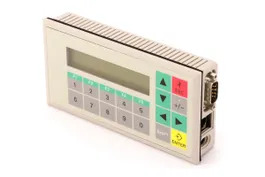
Siemens 6AV3503-1DB10 SIMATIC OP3
Price range: € 352,00 through € 363,00
The Siemens 6AV3503-1DB10 is an Operator Panel (OP3) belonging to the SIMATIC HMI product family. It is a compact, text-based operator panel designed for straightforward machine-level operator control and monitoring tasks. This unit is part of Siemens' established range of operator panels intended for integration with SIMATIC S5 and S7 programmable logic controllers.
The OP3 features a two-line LCD text display capable of showing alphanumeric characters, providing clear readout of process values, messages, and status information. It communicates via an MPI (Multi-Point Interface) or Point-to-Point (PtP) serial interface, enabling direct connection to SIMATIC S7-200, S7-300, and compatible S5 controllers. The panel includes a membrane keypad with function keys for operator input, and is configured using Siemens ProTool software. The unit operates on a 24 V DC supply and is built for panel-mount installation in industrial enclosures.
The SIMATIC OP3 is widely used in manufacturing, process automation, and machine building applications where a cost-effective, reliable text-based HMI solution is required. It is suitable for conveyor systems, packaging machinery, pump control stations, and general-purpose machine panels where basic operator interaction such as setpoint entry, alarm acknowledgment, and status display is needed. Its compact form factor makes it appropriate for space-constrained control panels.
Technical Specifications
| Display Type | LCD, 2-line text |
|---|---|
| Display Characters | 2 lines x 20 characters |
| Input/Operating Voltage | 24 V DC |
| Communication Interface | MPI, Point-to-Point (PtP) serial (RS-422/RS-485) |
| PLC Compatibility | SIMATIC S7-200, S7-300, S5 |
| Configuration Software | ProTool |
| Keypad | Membrane keypad with function keys |
| Mounting | Panel mount (front-panel installation) |
| Operating Temperature | 0 °C to +50 °C |
| Storage Temperature | -20 °C to +70 °C |
| IP Rating (Front) | IP65 |
| Supply Voltage Tolerance | 20.4 V DC to 28.8 V DC |
| Series | SIMATIC OP3 |
Common System Event Codes
- System Error 1
- Configuration data error or missing configuration in the operator panel memory
Re-download the project configuration to the OP3 using ProTool software and verify the transfer was successful - System Error 2
- Communication link to the PLC is not established or has been lost
Check MPI or PtP cable connections, verify PLC address settings, and confirm baud rate matches between OP3 and PLC configuration - System Error 4
- PLC is in STOP mode or not responding to OP3 requests
Switch PLC to RUN mode and verify the PLC program is active; check MPI network address conflicts - System Error 6
- Overflow of the alarm or message buffer
Acknowledge and clear pending alarms on the OP3; review PLC program to reduce simultaneous alarm generation - System Error 8
- Incorrect or incompatible firmware version detected
Update the OP3 firmware using the appropriate ProTool transfer utility to match the project requirements - System Error 10
- Internal memory fault or data corruption in the operator panel
Perform a factory reset of the OP3 and re-download the configuration; if the fault persists, the unit may require repair or replacement - System Error 12
- Watchdog timeout — the panel processor did not respond within the expected time
Power cycle the OP3; if the fault recurs, check for electrical interference on the supply line and verify 24 V DC supply stability
Frequently Asked Questions
What PLC systems is the 6AV3503-1DB10 compatible with?
The OP3 is compatible with SIMATIC S7-200, S7-300, and SIMATIC S5 PLCs via MPI or Point-to-Point serial interfaces. Compatibility depends on the communication protocol configured in ProTool.
What software is used to configure the SIMATIC OP3?
The OP3 is configured using Siemens ProTool software. ProTool allows creation of screens, alarm messages, and variable links, which are then downloaded to the panel via the MPI or serial interface.
What is the supply voltage for the 6AV3503-1DB10?
The unit requires a 24 V DC supply, with an acceptable range of approximately 20.4 V DC to 28.8 V DC.
What is the IP protection rating of the OP3 front panel?
The front panel of the OP3 achieves IP65 protection when correctly installed in a panel cutout with the supplied seal, making it suitable for environments with dust and water spray.
Can the OP3 display graphical content or images?
No, the OP3 is a text-only operator panel with a 2-line alphanumeric LCD display. It does not support graphical or bitmap content.
Troubleshooting
Display remains blank after power on
Measure the 24 V DC supply voltage at the rear connector of the OP3. Check for blown internal fuse or wiring fault on the supply terminals.
Restore correct 24 V DC supply within the specified tolerance range. If supply is confirmed correct and display remains blank, the internal power supply or LCD assembly may be faulty and the unit should be inspected for repair.
'System Error 2' or no communication with PLC
Verify the MPI or PtP cable is correctly connected and undamaged. Check that the MPI address configured in ProTool matches the address set on the OP3 and that the PLC MPI address does not conflict.
Replace or reseat the communication cable. Correct address and baud rate settings in ProTool and re-download the project. Ensure no duplicate MPI addresses exist on the network.
OP3 displays messages in wrong language or garbled characters
The character set or language setting in the downloaded project may not match the panel firmware, or the project download may have been incomplete.
Re-download the complete project configuration using ProTool, ensuring the correct language and character set are selected for the target panel firmware version.
Function keys do not respond to presses
Inspect the membrane keypad for physical damage, contamination, or deformation. Verify the key assignments are correctly configured in the ProTool project.
Clean the keypad surface with a dry cloth. If keys remain unresponsive, the membrane keypad assembly may be worn or damaged and requires replacement. Verify key function assignments in the project configuration.
OP3 repeatedly resets or reboots during operation
Check the 24 V DC supply for voltage dips or ripple using a multimeter or oscilloscope. Electrical interference or an unstable supply can cause watchdog resets.
Stabilize the 24 V DC supply using an appropriate power supply with sufficient current capacity. Add filtering if electrical noise is present. Ensure proper grounding of the control panel and OP3 unit.
| Condition | Repair, Used, Refurbished, New in box (sealed) |
|---|
Related products
-
Siemens 6AV6642-8BA10-0AA0 TP177B
Price range: € 964,00 through € 1.611,00 -
Siemens 6AG1642-0BA01-4AX1 TP177B
€ 1.040,00 -
Siemens 6AG1642-0BD01-4AX0 TP177B
€ 555,00


